Somewhere around your twelfth application, the details blur. Did you send the cover letter to the Denver company or the Austin one? Who said they would call on Thursday? Which version of your resume went where? A job application tracker fixes that mess, and it takes about ten minutes to set up.
Below is what to track, how to keep it tidy, and how to use it so your search stays calm even when it gets busy.
Quick picks
| Product | Best for | Price | Link |
|---|---|---|---|
| Northfield ATS Resume Kit | A full ATS kit with a thank-you letter and job tracker | $7.97 | View |
| Shortlist ATS Resume Template Kit | A 1 and 2 page resume set with a job search tracker | $7.49 | View |
| Alder Resume Template with Photo | A minimalist photo resume with a job tracker | $4.79 | View |
Why you need a job application tracker
A job search is a numbers game with a memory problem. You send many applications, you hear back from a few, and weeks go by between steps. Without a record, you lose track. You miss a follow-up window. You answer a recruiter’s call and have no idea which job they mean.
That last one hurts. Picture picking up an unknown number and saying “Hi, who is this?” because you cannot remember applying to the company. Recruiters notice. A job application tracker keeps every role, date and contact in one place so you can answer with confidence.
There is also a quieter benefit. Seeing your progress written down is good for morale. Thirty applications in a column looks like work done, not wasted effort.
What to put in your job application tracker
Keep it simple. A tracker you hate filling in is a tracker you will stop using. These columns cover almost everything.
- Company name and job title
- Date applied
- Link to the posting
- Where you found it (job board, referral, company site)
- Status: applied, phone screen, interview, offer, closed
- Contact name and email
- Next step and the date it is due
- Notes
The “next step” column is the one that does the work. Every row should tell you what to do next and by when. “Follow up Friday.” “Send thank you letter.” “Wait, they said two weeks.” If a row has no next step, either it is finished or you forgot something.
Save a copy of the job posting too. Postings disappear after the role is filled, and you will want the description when the interview comes. A quick screenshot or a PDF in a folder with the company name is enough.
Which resume did you send?
Add one more column: the resume version. If you tweak your resume for different roles, and you should, you need to know which one each company has. Name your files clearly, like “Resume-Marketing” and “Resume-Operations,” then write that name in the tracker.
It sounds fussy until the day a hiring manager mentions something from your resume and you have no idea which one they are reading. With the name in your tracker, you open that exact file in ten seconds and walk into the call prepared.
Tailoring matters here too. A resume that mirrors the words in the posting gets past more filters and reads better to a person. Your tracker keeps that honest. When a role asks for “customer onboarding” and your general resume says “client setup,” you change it, and you note that you changed it. Small edits, written down, keep your search from turning into a pile of near-identical files.
Set a weekly rhythm
A job application tracker only works if you touch it. Pick a time each week, say Friday morning, and spend fifteen minutes on it.
- Add every new application from the week.
- Update statuses based on any replies.
- Check the next-step dates and do whatever is due.
- Mark old, silent applications as closed.
Fifteen minutes. That is all. And it turns a vague feeling of “I should be doing more” into a clear list of what to do.
A good rule for follow-ups: if an employer gave you a timeline, wait until it passes, then write a short, polite note. If they gave none, a week to ten days after applying is reasonable. After one follow-up and no answer, move on. Your tracker will tell you when you have already done that.
Some people prefer pen and paper, and that works. A notebook on the desk, one line per application, a star next to anything that needs action. Others like a file on the laptop that they can search. The medium matters much less than the habit. If you can find a company in ten seconds, you picked the right one.
Free tracker or built-in tracker?
You can start with a blank page in any program. Plenty of people do. The trouble is that a blank page asks you to make every decision: which columns, what order, how it looks. That is where the project stalls.
A kit that already includes a tracker solves that. You get the layout done, and it sits next to your resume, cover letter and references in a matching style. That is the logic behind the Taskdale resume kits below. Each one lists a job tracker in its title, along with the documents you send to employers.
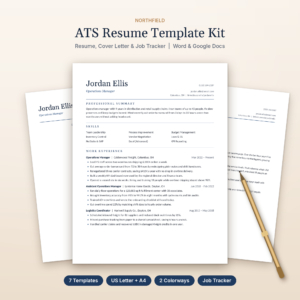
Northfield ATS Resume Kit
Price: $7.97 | Best for: A full ATS kit with a thank-you letter and job tracker
Northfield is an ATS resume kit for Word and Google Docs. The title lists a resume template, cover letter, references, a thank-you letter and a job tracker, in US Letter and A4. It suits job seekers who want the whole set, from application to follow-up, in one matching design.
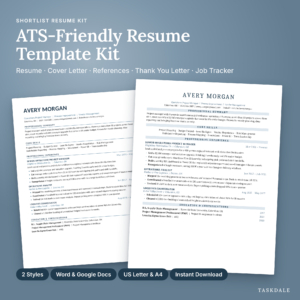
Shortlist ATS Resume Template Kit
Price: $7.49 | Best for: A 1 and 2 page resume set with a job search tracker
Shortlist is an ATS resume template kit for Word and Google Docs. The title lists a 1 and 2 page resume, cover letter, references, a thank you letter and a job search tracker, in US Letter and A4. It suits people who want a tidy, ATS-minded set with a tracker included.
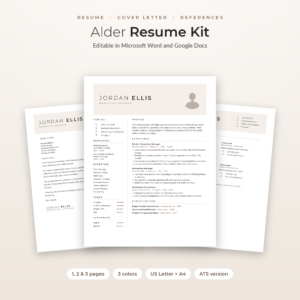
Alder Resume Template with Photo
Price: $4.79 | Best for: A minimalist photo resume with a job tracker
Alder is a resume template with photo for Word and Google Docs. The title describes a minimalist resume, cover letter and references, 1, 2 and 3 page CV versions, an ATS resume and a job tracker. It suits applicants who want a clean look with a photo and a tracker alongside.
How to read your job application tracker
Once you have a few weeks of data, patterns appear. This is the part most people skip, and it is where a tracker turns from a diary into a tool.
Look at where your replies come from
If most interviews come from referrals and almost none from job boards, spend more time talking to people. If one board keeps producing, use it more. Your “where I found it” column answers this in a minute.
Look at where you stall
Plenty of applications and no phone screens? The problem is probably your resume or how you match the postings. Phone screens but no interviews? Work on how you talk about your experience. Interviews but no offers? Practice answers and follow up better. Each stage points to a different fix.
Look at timing
Notice how long employers take to answer. Some reply in two days, some in six weeks. Knowing that keeps you from panicking over silence that is normal for that company.
Common mistakes with a job application tracker
Most of these come down to one thing: making it too complicated.
Too many columns is the first. If you need twenty fields, you will not fill them in. Keep to what you will actually use.
Updating it in batches is the second. Waiting a month means you forget details. Add a row the moment you apply, even if it only has the company and date. You can fill in the rest later.
Third, ignoring the rejections. Keep them in the tracker, marked closed. They are data, and deleting them hides the real picture of your search.
And fourth, tracking without acting. A neat sheet that never leads to a follow-up is just a nicer way of waiting. Let the next-step column drive your week.
Keep notes on every contact
When someone at a company writes to you, put their name and role in the tracker, plus one detail from the exchange. “Asked about Excel skills.” “Mentioned a team of six.” Those details make your follow-up letters sound human, and they help you walk into the next call with something real to say.
A small example of one week
Say it is Monday and you have three open applications. One company said they would answer by the end of last week, so the next step reads “Send follow-up.” You send it in five minutes. Another is a phone screen on Wednesday, so the notes column holds three points you want to make. The third is a fresh application you sent on Sunday night, so it gets a row and a date.
By Friday you add two more applications, record the outcome of the phone screen, and write a thank you letter for the next interview. Your search feels organized instead of scattered. That feeling is half the value.
How the three kits compare
| Product | Format | Price | Best for | Link |
|---|---|---|---|---|
| Northfield ATS Resume Kit | Word and Google Docs, US Letter and A4 | $7.97 | Full set with thank-you letter | View |
| Shortlist ATS Resume Template Kit | Word and Google Docs, US Letter and A4 | $7.49 | ATS set with search tracker | View |
| Alder Resume Template with Photo | Word and Google Docs, 1, 2 and 3 page CV | $4.79 | Minimalist look with photo | View |
Pick based on the look and the documents you need. All three put a tracker in the same kit as your resume, which is the point: one download, one style, one place to keep your search.
Frequently asked questions
What is a job application tracker?
It is a simple record of every job you apply for. It lists the company, role, date, status and next step. Some people use a paper sheet, some use a computer file. The aim is to know where each application stands without digging through emails.
What should I track for each application?
At minimum: company, job title, date applied, link, status and next step. Add the contact name, where you found the job and which resume you sent. Keep notes short. If a field feels like a chore, drop it.
How often should I update it?
Add a row the same day you apply, and do a fifteen minute review once a week. That rhythm catches follow-ups on time and keeps the sheet honest. Daily updates are fine if you like them, but they are not needed.
How many applications should I send each week?
It depends on your field and your time. Quality beats volume, so tailor each one. Your tracker will show you what works. If a pace of ten a week gives you interviews, keep it. If it gives you nothing, change the approach before adding more.
Should I keep rejected applications in the tracker?
Yes. Mark them closed and leave them. They show you what has been tried, stop you from applying twice, and give you a real picture of your results. Deleting them only hides useful information.
Your next step
So, the short version: start the sheet today, add every application you can remember, and give each row a next step. Set a weekly slot on your calendar and keep it.
If you would rather have the layout done for you, the Northfield ATS Resume Kit and the Shortlist ATS Resume Template Kit both come with a tracker next to your resume and letters. Whichever you choose, a job application tracker you actually use beats a perfect one you never open.