Best Annual Budget Spreadsheet: Plan All 12 Months
The best annual budget spreadsheet is one that fills all 12 months from a single list of paychecks and bills, so large yearly costs show up months before they are due. For most people on this page, that means a file that matches your spreadsheet program and your pay pattern. Extra tabs matter less.
Key facts at a glance
- An annual budget spreadsheet is a file that plans income and bills across all 12 months at once, rather than one month at a time.
- Most options here work in both Excel and Google Sheets, while Lantern Budget System and Seaglass are Excel-only and Emberlune is Google Sheets-only.
- Tab counts range from 11 (Rosewater) to 30 (Seaglass), and a bigger file is not always easier to use.
- Every option includes some form of debt payoff planning, and most offer snowball and avalanche methods.
- Couples have a dedicated choice in Hearth & Ledger, which splits bills 50/50, by income or by a custom percentage.
Table of Contents Toggle
- What makes an annual budget better than a monthly one
- What to look for
- How the options compare
- Who each one suits
- How to set one up
- Mistakes to avoid
- What affects price
- Which to pick
- Common questions
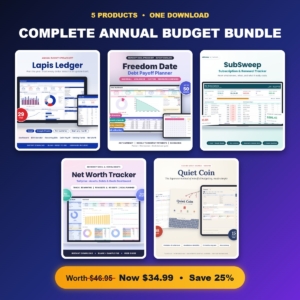 Complete Annual Budget Bundle | Annual Budget Spreadsheet, Debt Payoff Tracker, Subscription Tracker, Net Worth Tracker & Kakeibo Money Journal
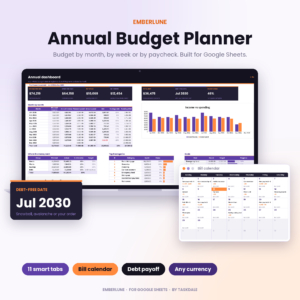 Annual Budget Spreadsheet for Google Sheets | Emberlune Paycheck Budget Planner with Bill Calendar, Debt Payoff Tracker, Net Worth & Savings Goals
 Annual Budget Spreadsheet for Excel & Google Sheets | Lapis Ledger Monthly Budget Planner with Dashboard, Bill Calendar, Recurring Bills, Debt Payoff, Sinking Funds & Paycheck Planner
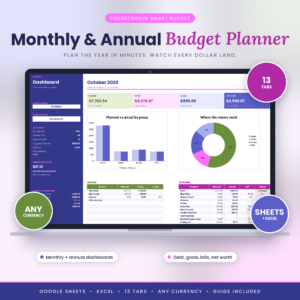 Budget Planner Spreadsheet | Pocketgrove Monthly & Annual Budget Template for Google Sheets & Excel with Dashboard, Transaction Tracker, Sinking Funds, Debt Payoff, Bill Tracker & Net Worth
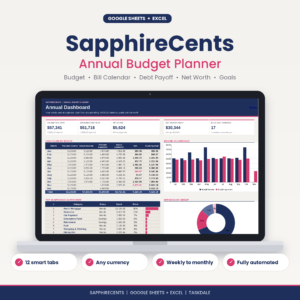 SapphireCents Annual Budget Spreadsheet for Google Sheets & Excel | Monthly, Biweekly & Paycheck Budget Planner, Bill Calendar, Debt Payoff & Net Worth Tracker
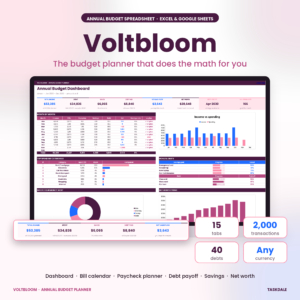 Annual Budget Spreadsheet | Voltbloom Budget Planner with Dashboard, Bill Calendar, Paycheck Planner, Debt Snowball, Savings & Net Worth Tracker | Excel & Google Sheets
 Couples Budget Spreadsheet | Hearth & Ledger Family Budget Planner with Bill Splitting, Partner Dashboards, Recurring Bills, Debt Payoff & Savings Goals | Excel & Google Sheets
 Paycheck Budget Spreadsheet for Excel & Google Sheets | Ledgerlark Biweekly & Monthly Budget Planner with Bill Tracker, Debt Payoff, Savings Goals & Calendar
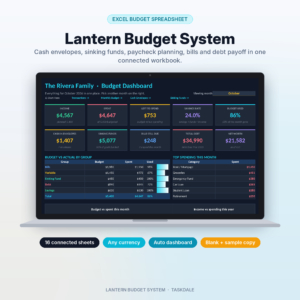 Lantern Budget System | Cash Envelope Budget Spreadsheet for Excel with Sinking Funds Tracker, Paycheck Budget, Bill Calendar & Debt Snowball
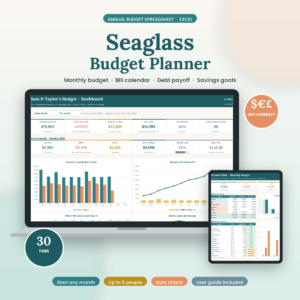 Annual Budget Spreadsheet for Excel | Seaglass Budget Planner | Monthly Budget, Bill Calendar, Debt Snowball, Sinking Funds & Paycheck Budget Template
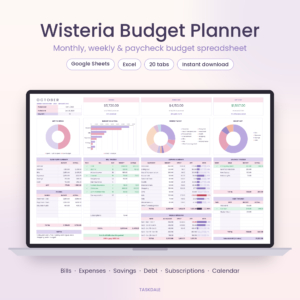 Wisteria Budget Planner | Budget Spreadsheet for Google Sheets & Excel | Monthly, Biweekly & Paycheck Budget with Bill Calendar, Debt Payoff, Savings & Subscription Tracker
What makes an annual budget spreadsheet better than a monthly one?
An annual budget spreadsheet shows your whole year in one place, which is why it catches costs a monthly budget misses. A monthly budget only looks about four weeks ahead. The car registration, the insurance renewal and the December spending spree all arrive without warning.
If money planning feels like a lot to keep on top of, this is the simplest fix. You enter each paycheck and bill once, the file repeats them on the right dates, and you can see a tight month in March before it happens. You then have time to set money aside in advance rather than scrambling.
What should you look for in an annual budget spreadsheet?
Look for six things: the right programme, a fit with how you are paid, a bill calendar, sinking funds, debt planning and clear instructions. The sections below explain each one, so you can ignore features you will never use.
Does it work in Excel, Google Sheets or both?
The programme you already use should decide this first. Most files here, including Lapis Ledger, Pocketgrove, SapphireCents, Voltbloom, Wisteria and Rosewater, work in both Excel and Google Sheets. Emberlune is listed for Google Sheets only. Lantern Budget System and Seaglass are built for Excel.
Google Sheets suits anyone who wants to check the budget from a phone or share it with a partner. Excel suits people who prefer working offline on a computer.
Does it match how you are paid?
A paycheck budget assigns each pay date its own set of bills, which matters if your income does not arrive on the first of the month. Ledgerlark covers weekly, biweekly, twice-monthly and monthly pay. SapphireCents budgets monthly, weekly, biweekly or by paycheck. Emberlune lets you budget by month, by week or by exact paycheck dates.
If you are paid once a month, any of them will do. If your pay dates move around, choose one of these three first.
Is there a bill calendar with status markers?
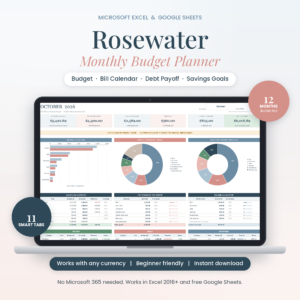
A bill calendar is a month-by-month view of what is due and when. The useful versions mark bills as paid, due soon or overdue, as Emberlune and SapphireCents do. Rosewater ticks paid bills off for you and shows paydays on the same calendar.
For anyone who has missed a payment because it slipped their mind, this feature is worth more than any chart.
Does it have sinking funds?
A sinking fund is money set aside in small amounts for a known future cost, such as a holiday, a service or a renewal. This is where an annual budget earns its keep. Lapis Ledger, Pocketgrove, Lantern Budget System and Seaglass all include them, and Seaglass offers 15.
How does the debt payoff planner work?
A debt payoff planner shows the order and dates for clearing your balances. Snowball pays the smallest balance first, while avalanche pays the highest interest rate first. Several files also allow a custom order. Voltbloom shows real rollover dates, and Rosewater and Emberlune show a debt-free date.
If you have no debts, this is a feature you can ignore.
Does it come with a guide and an example?
A filled-in example file lets you see what a finished budget looks like before you enter your own figures. Voltbloom includes one with a 16-page guide, Rosewater has a 22-page guide, and Hearth & Ledger, Ledgerlark and Lantern Budget System also include sample copies. Pocketgrove and SapphireCents include step-by-step or illustrated guides.
If spreadsheets are new to you, treat a guide as a requirement rather than a bonus.
How do the annual budget spreadsheets on this page compare?
The table below compares the options on what actually differs: programme, size and main strength. 13 options are listed on this page, and the table covers all of them.
| Product | Brand | Works in | Size | Main strength |
|---|---|---|---|---|
| Complete Annual Budget Bundle | Lapis Ledger and others | Spreadsheet templates | Five tools in one download | Budget plus debt, subscription, net worth and journal tools |
| Annual Budget Spreadsheet for Google Sheets | Emberlune | Google Sheets | Net worth for up to 80 accounts | Budgeting by exact paycheck dates |
| Annual Budget Spreadsheet for Excel & Google Sheets | Lapis Ledger | Excel and Google Sheets | 29 tabs | Includes a 40-year investment forecast |
| Budget Planner Spreadsheet | Pocketgrove | Excel and Google Sheets | 13 tabs | Two live dashboards with account filter |
| SapphireCents Annual Budget Spreadsheet for Google Sheets & Excel | SapphireCents | Excel and Google Sheets | 12 tabs, 13 recurring items | Four budgeting rhythms |
| Annual Budget Spreadsheet | Voltbloom | Excel and Google Sheets | 15 tabs | Real debt rollover dates |
| Couples Budget Spreadsheet | Hearth & Ledger | Excel and Google Sheets | 17 tabs | Bill splitting and partner dashboards |
| Paycheck Budget Spreadsheet for Excel & Google Sheets | Ledgerlark | Excel and Google Sheets | 15 tabs | Safe-to-spend per day |
| Lantern Budget System | Lantern | Excel | 16 sheets | Cash envelope budgeting |
| Annual Budget Spreadsheet for Excel | Seaglass | Excel | 30 tabs | 15 sinking funds, up to 6 people |
| Wisteria Budget Planner | Wisteria | Excel and Google Sheets | 12 monthly dashboards | Subscription tracker |
| Monthly Budget Spreadsheet for Excel & Google Sheets | Rosewater | Excel and Google Sheets | 12 months, 11 tabs | No copying tabs each month |
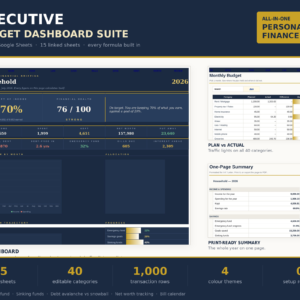
| Executive Budget Dashboard Spreadsheet Suite | Executive | Excel and Google Sheets | 15 sheets | One dashboard, no macros |
Which annual budget spreadsheet suits which person?
The right choice depends on your household and how you are paid. Here is how the main options line up.
- If you want everything in one purchase: the Complete Annual Budget Bundle adds a Debt Payoff Tracker, Subscription Tracker, Net Worth Tracker and Kakeibo Money Journal to the Lapis Ledger budget.
- If you share finances with a partner: Hearth & Ledger shows who owes whom and splits costs by the method you choose. Seaglass supports up to 6 people, which suits a larger household.
- If your pay dates are irregular: Ledgerlark, SapphireCents and Emberlune are built around paycheck timing.
- If you prefer cash envelopes: Lantern Budget System is the only one built around them, with a cash withdrawal breakdown.
- If you want a lighter file: Rosewater (11 tabs) and Pocketgrove (13 tabs) have fewer moving parts than Seaglass or Lapis Ledger.
- If you want one summary screen: Executive Budget Dashboard Spreadsheet Suite feeds fifteen sheets into a single dashboard, and needs no macros.
- If you want to track subscriptions: Wisteria and Rosewater both include a subscription tracker.
How do you set up and use an annual budget spreadsheet?
Setting one up takes about one sitting, and after that the upkeep is small. The steps below work for almost every file on this page.
- Open the filled-in example first, if one is included, to see how the tabs connect.
- Choose your start month and currency, which most files let you set.
- Enter each paycheck once, with its date and how often it arrives.
- Enter each recurring bill once, including annual ones such as insurance and registration.
- Add sinking funds for known future costs, then divide the yearly amount by the number of months or paychecks.
- Add your debts and choose snowball or avalanche.
- Log spending weekly, and tick bills off as you pay them.
A short weekly check keeps the numbers honest.
What mistakes should you avoid with an annual budget spreadsheet?
The most common mistake is leaving out the irregular bills, because they are the whole reason to budget annually. Others follow a similar pattern.
- Skipping annual and quarterly costs. Check last year's bank statements for renewals, gifts and repairs.
- Choosing the biggest file. A 30-tab workbook you never open is worse than an 11-tab one you use weekly.
- Ignoring the programme. An Excel-only file is awkward if you mostly use a phone.
- Not logging spending. Planned figures only help when you compare them with what really happened.
- Overwriting formulas. Type only in the input cells. If something looks wrong, go back to the guide.
What affects the price of a budget spreadsheet?
The price of a budget spreadsheet mostly reflects how much is bundled and how much support is included. Live prices appear on the product cards, so this section covers only the factors.
A bundle such as the Complete Annual Budget Bundle costs more up front than a single file, because you receive five tools. Larger workbooks with more tabs, forecasting and multi-person features generally cost more than simpler ones. Included extras, such as a filled-in example and a long user guide, also add value. Compare what you will use rather than what is listed.
Which annual budget spreadsheet should you pick?
Pick by working through three questions in order. First, check which programme you use, and rule out anything that does not fit. Second, check how you are paid, and favour Ledgerlark, SapphireCents or Emberlune if your pay dates vary. Third, check who shares the budget, and choose Hearth & Ledger or Seaglass if it is more than just you.
If none of those narrow it down, choose the file with the fewest tabs that still has a bill calendar and sinking funds. You can always move to a larger one later.
Common questions
Can I use an annual budget spreadsheet on my phone?
Files built for Google Sheets work well in the Google Sheets app, which suits quick spending entries. Excel files can be opened in the Excel mobile app, though large workbooks are easier to manage on a computer. Check which program each product supports before buying.
Do I need spreadsheet skills to use these files?
No. The files here are designed so you enter paychecks and bills once and the formulas do the rest. Hearth & Ledger says you need no formulas to write, and the Executive suite needs no macros or setup. Most also include a user guide.
What is the difference between snowball and avalanche debt payoff?
Snowball pays off your smallest balance first, which gives quick wins. Avalanche pays the highest interest rate first, which usually costs less interest overall. Several files let you choose either, or set a custom order if neither suits.
Can I start my budget in a month other than January?
Yes. Lapis Ledger, Seaglass, Voltbloom, Ledgerlark and SapphireCents let you set any start month or date. That suits you if your financial year follows your pay, a tax date or a personal milestone.
Can I track more than one currency or person?
Each file lets you set any currency, though they do not all handle two at once. For people, Seaglass supports up to 6 and Hearth & Ledger is designed for two partners, with separate dashboards for each.