Big bills rarely wreck a budget. Rent is the same every month and you plan for it. What drains the account is the daily stuff: a $6.40 lunch, a $14 pharmacy run, a $9 parking fee, a $23 “quick” grocery top-up. None of it feels like much on the day. Added up over thirty days, it can easily be the difference between saving $300 and wondering where it all went.
An expense tracker for daily and monthly spending catches both levels. Daily tracking shows you the small leaks while you can still do something about them. Monthly totals show whether the plan worked. This guide is for anyone who wants that two-level view without turning it into a second job. You will learn how to set a daily spending number, log purchases in seconds, read a week of entries, roll days into a monthly picture, and pick a tracker that suits how you like to work.
Quick picks: trackers for daily and monthly spending
| Product | Best for | Price | Link |
|---|---|---|---|
| Pennygrove Budget Planner Spreadsheet | Logging on your phone in Google Sheets | $7.99 | View |
| Soft Ledger Budget Planner | A paper daily log with a weekly and daily number | Original price was: $12.99.$8.99Current price is: $8.99. | View |
| Blush & Balance Income and Expense Tracker | Households and side hustlers who want any date range | $7.99 | View |
Why track at two levels
Monthly tracking alone has a timing problem. By the time you see that eating out hit $310 instead of $150, the month is over and the money is gone. Daily tracking alone has the opposite problem. You can see that today you spent $37, but you have no sense of whether that is fine or a disaster.
Put the two together and each fixes the other. The monthly plan says you have $900 for everyday spending. Divided by 30, that is $30 a day. Now today’s $37 has meaning: you are $7 over, and tomorrow can be a $23 day. A small correction, made while it is still easy.
That is the whole idea. Monthly sets the frame. Daily keeps you inside it.
Work out your daily spending number
Your daily number is the amount you can spend on everyday things each day and still finish the month on plan. It does not include rent or bills that leave automatically. It covers groceries, fuel, lunches, coffee, small household items and fun.
- Start with monthly take-home pay. Say $3,900.
- Subtract fixed bills. Rent, utilities, phone, insurance, subscriptions, loan payments. Say $2,180.
- Subtract savings. Whatever you move on payday. Say $400.
- Subtract set-asides. Monthly slices for yearly costs like gifts or car registration. Say $120.
- What is left is your flexible money. $3,900 minus $2,700 equals $1,200.
- Divide by the days in the month. $1,200 divided by 30 is $40 a day.
Forty dollars a day. That is a number you can carry around in your head. Some days you will spend $110 on a big grocery shop and some days nothing at all. What counts is the running total against $40 times the days so far.
Logging a purchase in under 30 seconds
The best expense tracker is the one you can update faster than you can talk yourself out of it. If logging a coffee takes two minutes and four taps through menus, you will stop by the second week. Aim for three pieces of information per entry:
- Amount. $6.40.
- Category. From a short dropdown list. Food out.
- Date. Today, often filled in for you.
A note is optional. The account (card or cash) helps if you reconcile later. Anything beyond that is a nice-to-have, not a must.
Speed tricks that help: keep the tracker bookmarked on your phone’s home screen, log while you are still at the till or in the car, and use the same handful of categories every time. After a week, your thumbs will know where everything is.
A week of daily entries, read properly
Here is a week for someone with a $40 daily number, so $280 for the week.
| Day | Entries | Day total | Running total | Target so far |
|---|---|---|---|---|
| Mon | Groceries $86.20, coffee $4.50 | $90.70 | $90.70 | $40 |
| Tue | Nothing | $0 | $90.70 | $80 |
| Wed | Lunch $11.80, fuel $45 | $56.80 | $147.50 | $120 |
| Thu | Pharmacy $14.20 | $14.20 | $161.70 | $160 |
| Fri | Takeaway $32, parking $9 | $41 | $202.70 | $200 |
| Sat | Farmers market $18.60, kid’s party gift $20 | $38.60 | $241.30 | $240 |
| Sun | Nothing | $0 | $241.30 | $280 |
Monday looks terrible on its own: $90 against a $40 target. But it was the weekly shop, and the running total caught up by Thursday. By Sunday, the week finished $38.70 under. That is the value of a running total. It stops one big day from making you feel like you have failed, and it shows you clearly when a pattern really is going wrong.
Two “nothing” days helped a lot here. People who track daily often find themselves going for no-spend days on purpose, just for the small satisfaction of writing $0.
Daily logging on paper
Writing each purchase by hand has a real effect. It slows you down. A $32 takeaway written in ink feels bigger than one tapped on a card. Some people stop buying small things simply because they do not want to write them down. That sounds silly. It works.
The trouble with paper is the adding up. A good paper system gives you a daily log page, a place for the weekly total, and a month-end review, so the arithmetic is just a few lines once a week.
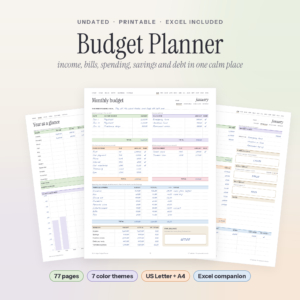
Soft Ledger Budget Planner
Price: Original price was: $12.99.$8.99Current price is: $8.99. | Best for: people who log better with a pen
Soft Ledger is an undated budget planner printable with 77 pages and a matching Excel budget spreadsheet. Each month has a budget page, an overview that turns what is left into one weekly and one daily spending number, a daily log for purchases and a review page, with totals carried to a year-at-a-glance sheet. Print this month’s four pages, write your daily number at the top of the log, and enter weekly totals in the spreadsheet if you want the sums done.
Keep the log where you empty your pockets at night: the kitchen counter, the hall table. Thirty seconds with the day’s receipts is enough.
Daily logging on your phone
If you always have your phone and rarely a pen, a spreadsheet in Google Sheets is the next best thing. The free Sheets app lets you add a row in seconds, and the monthly dashboard updates the moment you do.
The real advantage is that daily and monthly views live in the same file. Log a $6.40 lunch on Tuesday, and the month’s eating out total, the category chart and the warning colors all update. No copying, no weekly math session. If you have never set one up, our guide to setting up a Google Sheets budget template in one evening walks through it.
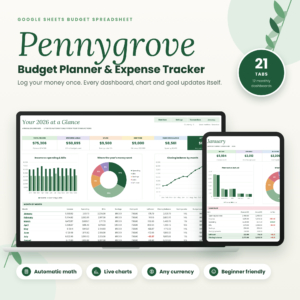
Pennygrove Budget Planner Spreadsheet
Price: $7.99 | Best for: phone loggers using Google Sheets
Pennygrove is a budget planner spreadsheet for Google Sheets with 21 tabs, including 12 monthly dashboards and an annual dashboard. You type in the cream-colored cells and it handles spending by category, charts, bill status, savings goals and debt estimates, with categories turning amber at your warning level and red when you go over. It works in any currency. Set up your categories and monthly targets on a laptop, then log daily spending from the Sheets app.
A two-minute end-of-day ritual
Even with the best intentions, some purchases slip through during the day. A short ritual before bed catches them. It takes about two minutes and works with paper or a phone.
- Empty your pockets and bag of receipts.
- Open your banking app and scroll today’s card payments.
- Log anything missing.
- Glance at the running total against your daily number times today’s date.
If you are over, decide right then what tomorrow looks like: packed lunch, no coffee stop, or a quiet evening in. If you are under, enjoy it. Some people like to move any leftover from a good week straight into savings on Sunday night, so the win is locked in before the weekend shop. Watching that small transfer land feels better than any purchase it replaced.
Rolling the days into a monthly picture
At the end of the month, step back from the daily entries and look at the month as a whole. A few numbers are worth writing down:
- Total everyday spending against your flexible money. $1,140 against $1,200 is a good month.
- Top three categories. Usually groceries, fuel and eating out. Are they where you expected?
- Number of no-spend days. Six is a lot more than you might think.
- Biggest single surprise. The $140 car part, the forgotten school fee. Does it need its own monthly set-aside next time?
That last point is where daily tracking really pays off. Surprises that keep showing up are not surprises. They are costs you have not planned for yet. Turning them into small monthly set-asides, sometimes called sinking funds, stops them from blowing up your daily number.
When your spending covers more than one household
Some people need a tracker that looks at any date range, not just a calendar month. A freelancer who wants to know what she spent on supplies between two client projects. A household that splits costs with a lodger from the 15th to the 14th. A side hustler who wants weekend market costs kept apart from family spending.
For those cases, a tracker that lets you pick any two dates and splits personal from business spending saves a lot of filtering by hand.
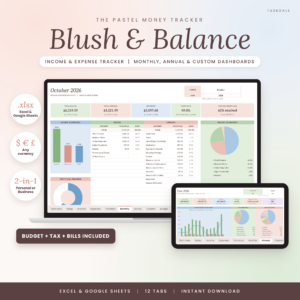
Blush and Balance Income and Expense Tracker
Price: $7.99 | Best for: households with side income
Blush and Balance is an income and expense tracker for Excel and Google Sheets with twelve tabs that turn a simple log into dashboards, budgets, account balances and tax estimates. Pick a month, a year or any two dates and every total and chart updates. It suits households who want to see where the paycheck goes as well as freelancers and side hustlers who need profit and a quarterly tax set-aside. Choose your currency first, then add your accounts.
Tracking daily spending as a family
In a household of three or four, nobody sees every purchase. One parent buys groceries, the other fills the car, a teenager taps a card for lunch. A daily tracker only works if every spender logs, so make it easy for each of them.
A shared Google Sheet is the simplest route. Everyone adds their own entries from their phone, and a Who column shows who bought what without any blame attached. For younger kids with pocket money, a small paper log on the fridge does the same job. Once a week, look at the family total together for five minutes. A ten-year-old who sees that the family spent $64 on snacks in a week often comes up with cost-cutting ideas faster than the adults do.
Categories that work for daily spending
Daily tracking needs fewer, broader categories than a full budget. You want to pick one in a second, standing in a parking lot. Eight to ten is plenty:
- Groceries
- Eating out and coffee
- Fuel and transport
- Household and personal care
- Kids
- Health and pharmacy
- Fun and hobbies
- Gifts
- Clothes
- Other
If “Other” goes past 10% of your spending in a month, look at what is in it and give the biggest item its own category. Otherwise, leave the list alone. Changing categories mid-month makes the totals hard to compare.
Mistakes that make daily tracking feel pointless
- Tracking without a daily number. Without a target, $37 is just a number. With a $40 target, it is information.
- Judging single days. Big shopping days are normal. Watch the running total.
- Forgetting cash and small card taps. A $3 snack every day is $90 a month.
- Letting a missed day become a missed week. Catch up from your bank app. It takes five minutes.
- Never looking at the month. Daily entries without a monthly review are just a diary.
The first month you finish under your flexible total, with three or four no-spend days behind you, you will feel it. That small pride is often what turns tracking from a chore into a habit.
Who daily tracking is not for
Not everyone needs daily detail. If your spending is steady and you already save what you planned every month, a weekly check of the bank app might be all you need. Daily tracking shines when money feels tight, when you are trying to cut spending for a goal, or when you honestly do not know where the money goes. It is a tool for a season, not a life sentence. Many people track daily for three months, learn their patterns, then relax into a weekly rhythm.
Frequently asked questions
How do I track my daily expenses?
Log every purchase with its amount, category and date, either on paper or in a spreadsheet. Compare the running total with a daily spending number worked out from your monthly plan.
What is a good daily spending limit?
Take monthly take-home pay, subtract bills, savings and set-asides, then divide what is left by the number of days in the month. That figure is your limit.
Should I track expenses daily or weekly?
Daily tracking catches leaks fastest and suits tight months or savings goals. Weekly tracking is easier to keep up once your spending is under control.
What is the best way to track spending without an app?
A printed daily log or a spreadsheet in Google Sheets on your phone. Both work without bank logins or subscriptions.
How do I see my monthly spending from daily entries?
Total each category at the end of the month and compare with your plan. Most budget spreadsheets roll daily entries into monthly totals automatically.
Your next step
Work out your daily number tonight: take-home pay, minus bills, savings and set-asides, divided by the days in the month. Write it on a sticky note on your phone case. Then set up the Pennygrove Budget Planner Spreadsheet and log tomorrow’s spending as it happens.