Most vision boards end up the same way. You spend a Sunday gluing magazine clippings to a poster, pin it up, and by March it’s wallpaper. Nobody looks at it. So here’s how to make a vision board that you will actually see, use and update, with scissors and glue or with a tablet and a stylus. We’ll cover the planning step most people skip, a printable route, a digital route, and three Taskdale products that do the layout work for you.
Quick picks
| Product | Best for | Price | Link |
|---|---|---|---|
| Golden Hour Vision Journal | Printing a vision board and keeping it with goals and gratitude pages | $3.99 | View product |
| Sunlit Path Vision Journal | Making a digital vision board in GoodNotes | $3.79 | View product |
| VisionKeeper Vision Board and Goal Tracker Spreadsheet | A vision board that lives in Google Sheets or Excel | $4.39 | View product |
Why Most Vision Boards Get Ignored
If you have searched for how to make a vision board before and still ended up with a dusty poster, you’re in good company.
Let’s be honest about the problem first. A vision board fails for boring reasons, not mystical ones.
It lives in the wrong place. A poster behind a closet door gets seen twice a year. It has no focus: forty images, from a beach house to a yoga pose to a stack of cash, and your eye slides right off. And it never changes, so the dreams on it stop matching your actual life.
The fix is simple. Make fewer choices, put the board where your eyes already go, and give it a date to be reviewed. That’s most of the secret of how to make a vision board that works. Everything else is decoration.
Think of it as a small experiment. You are not locking in your future. You are testing a picture of it, then checking whether the picture still feels true a month from now.
How to Make a Vision Board in Five Steps
This works for paper boards and digital boards alike. Set aside about an hour.
Step one: write before you cut
Grab a plain sheet of paper and finish this sentence six times: “A year from now I want…” Be specific. “More money” is weak. “A $2,000 emergency fund” is something you can picture. Do this before you touch a single image, because pictures are persuasive and will pull you toward what looks pretty, not what you actually want.
Step two: pick three to five areas
Health, money, work, home, relationships, rest. You can’t give them all equal space. Choose the few that matter this year and let the rest go for now. A board with five areas is readable. A board with twelve is a collage.
Step three: gather images and words
Look for photos that make you feel something small and physical, like a loosened chest or a smile. Skip the images that only look impressive. Add a few words too: a phrase, a number, a date. Words keep a board from turning into pure aesthetics.
Step four: arrange it with a center
Put your single biggest goal in the middle or top left, where your eye starts. Group the rest around it. Leave a little white space. Crowded boards feel stressful, and you’ll stop looking at them.
Step five: set a review date
Put a date on your calendar, say the first Sunday of each month. On that day, look at the board for five minutes and ask two things. What moved? What no longer fits? Swap or remove anything that has gone stale.
How to Make a Vision Board on Paper
If you like to work with your hands, paper is hard to beat. Cutting and pasting slows you down, and slowing down is useful here. You notice what you pick up and what you put back.
The classic approach is a poster board or corkboard with clipped images. It looks lovely. The weakness is that it’s big and it stays in one spot. If that spot is your bedroom, great. If it’s a spare room you rarely enter, it won’t help.
A printable journal solves that. A journal vision board sits on a page, usually next to goal and gratitude pages, so you flip past it every time you write. It travels. You can keep it on a desk, in a bag, or on a nightstand. For many people that daily glance does more than a giant poster ever did.
Printing at home also means you can redo a page when your goals change. No guilt about wasting a big board. Just print a fresh page and start again.
How to Make a Digital Vision Board
A digital board has real advantages. It’s easy to change, it never gets dusty, and your phone or tablet is already in your hand all day.
There are two common styles. The first is a picture board, built in a note-taking app like GoodNotes: you drop in images, stickers and text, and rearrange them with your finger. The second is a spreadsheet board, where your goals sit in cells along with a tracker, so you see the picture and the progress at once.
A tip for either one: use the board as your lock screen or the first page you open. A digital board you have to hunt for is the same as a poster in a closet.
If you are comfortable with apps, digital also lets you link pages together. Tap a goal and jump straight to its tracker. That small convenience keeps you out of menus and in your actual plan.
Three Taskdale Products That Do the Layout for You
Blank space is the hardest part of starting. These three give you pages to fill in. Pick the one that matches how you like to work.
Golden Hour Vision Journal
Price: $3.99 | Best for: Printing a vision board with goal and gratitude pages
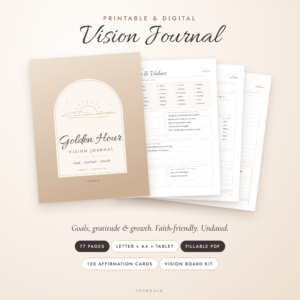
Golden Hour is a printable and digital vision board journal. It combines a vision board, a goal planner and a gratitude journal, and it comes with 120 affirmation cards. It suits anyone who wants the board and the daily writing in one place.

Sunlit Path Vision Journal
Price: $3.79 | Best for: Building a digital vision board in GoodNotes
Sunlit Path is an undated digital goal, gratitude and affirmation journal made for GoodNotes. It includes a vision board, a habit tracker and stickers, and comes with a printable version in US Letter and A4. Undated means you can start whenever the mood hits, not only on January first.
VisionKeeper Vision Board and Goal Tracker Spreadsheet
Price: $4.39 | Best for: People who think in spreadsheets and want progress they can see
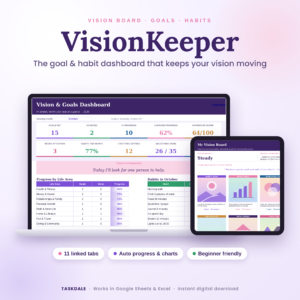
VisionKeeper is a vision board and goal tracker spreadsheet for Google Sheets and Excel. It is a goal planner dashboard with a habit tracker, a gratitude journal and affirmations. If you like numbers and checkmarks, this one turns the vision into something you can measure.
Printable, Digital or Spreadsheet: How to Choose
| Product | Format | Price | Best for | Link |
|---|---|---|---|---|
| Golden Hour Vision Journal | Printable and digital journal with 120 affirmation cards | $3.99 | Paper lovers who want a board plus gratitude pages | View product |
| Sunlit Path Vision Journal | Undated digital journal for GoodNotes, with printable US Letter and A4 | $3.79 | Tablet users who like stickers and habit trackers | View product |
| VisionKeeper Spreadsheet | Google Sheets and Excel dashboard | $4.39 | Tracking goals with a dashboard | View product |
My honest read: if you have never made a board before, start with the paper route. It’s the least fussy. If you live on your iPad, Sunlit Path fits right in. And if you set goals and then forget them, VisionKeeper’s tracker is the one that will nag you in a useful way.
What to Put on Your Vision Board
People get stuck here, so here are real examples. They are meant to show the level of detail, not tell you what to want.
Instead of “travel,” pick a place and a month: “Lisbon, September.” Instead of “healthy,” put a picture of the thing you want to do, like finishing a 5K or climbing stairs without getting winded. Instead of “money,” write a figure and a purpose: “$500 saved for the car repair.”
Add one thing that is only for joy. A hobby, a color, a quiet morning. Boards full of achievements read like a performance review. A little joy keeps it human.
Include a feeling word or two as well. Calm. Steady. Brave. When you look at the board on a hard day, a word like that does more than a photo of a mansion.
Mistakes to Skip When You Make a Vision Board
Learning how to make a vision board is mostly learning what to leave out. A few things trip up nearly everyone.
Too many goals is the big one. Five areas, tops. After that you are collecting, not choosing.
Another is using only outcomes. A picture of a finished marathon is nice, but add a picture of the first step too, like running shoes by the door. Boards that show only the finish line can feel far away. Adding the first action makes it feel doable.
Then there is hiding it. If a visitor wouldn’t see it, or you wouldn’t see it daily, move it. And finally, never reviewing it. A board you don’t check is just art. The monthly five minute look is what turns a nice picture into a plan.
One more: waiting for the perfect version. People who ask how to make a vision board “properly” often never finish one. Your first board will be a bit messy. That’s fine. You can redo it in three months, and you’ll understand yourself better by then.
Make Your Vision Board Part of a Weekly Habit
A board works best when it connects to small actions. Each Sunday, look at it and choose one step for the week. Just one. “Call the bank about a savings account.” “Book the 5K.” “Draft the first page.”
That is where a journal or tracker earns its place. The picture reminds you why. The weekly page tells you what to do on Tuesday. Without the second part, the first part drifts.
And keep an eye on how you feel when you look at it. If you feel pressure, trim it. If you feel flat, you have probably aimed at what you think you should want. Swap in something that makes your shoulders drop and your mind go quiet.
Frequently Asked Questions
How do I make a vision board for beginners?
Write six specific goals first, pick three to five life areas, then gather a few images and words that match. Put your biggest goal in the center, leave some white space, and set a monthly review date. The first version can be rough.
How many images should a vision board have?
Aim for about ten to fifteen images and a handful of words. Too many pictures blur together and you stop seeing any of them. If your board feels crowded, remove everything that isn’t tied to a goal you want this year.
Is a digital vision board as good as a paper one?
Yes, if you actually look at it. Digital boards are easy to update and always with you. Paper boards feel more hands on. Choose whichever you will see daily, because visibility matters more than format.
How often should I update my vision board?
Review it monthly and rework it every three to six months, or sooner when your goals shift. A short five minute check each month keeps it current. Remove anything that no longer fits and add what has become important.
Can I use a spreadsheet as a vision board?
You can. A spreadsheet board pairs images or text with a goal tracker, habit tracker and gratitude pages, so you see progress as well as the picture. VisionKeeper on Taskdale is built that way for Google Sheets and Excel.
Your Next Step
So, here’s what to do this week to learn how to make a vision board by actually making one. Write your six sentences, pick your areas, and choose a format. If you want the pages ready to go, Golden Hour is the easiest place to begin for $3.99. Print it, fill it in tonight, and put it where you’ll see it tomorrow morning.