You’ve probably typed the same instructions into an AI chat a dozen times. “Write in a friendly tone. Keep it under 150 words. Use my business name. Don’t sound salesy.” Every new chat, you start from zero. That’s the itch Claude skills scratch. Claude skills are saved sets of instructions that Claude can reach for when a task matches, so you stop repeating yourself and start getting consistent work. This plain guide explains what Claude skills are, how a small business owner can use them, and where ready-made libraries fit in.
Quick picks
| Product | Best for | Price | Link |
|---|---|---|---|
| 1000 Claude AI Skills for Small Business | Small business owners using Claude | $16.99 | View |
| 1000 Claude Skills for Wedding Planners | Wedding planners | $9.99 | View |
What are Claude skills, in plain English?
Picture a recipe card. A good cook can make dinner without one, but the card makes the result the same every time. Claude skills work like recipe cards for your AI assistant. Each skill describes a job, such as “write a customer reply” or “plan a weekly social schedule,” and spells out how to do it well.
Under the hood, a skill is a small package of instructions, sometimes with extra files like templates or examples. Claude can pull the right one in when your request matches. You don’t need to be technical to use them, and you don’t need to write code. If you can write a clear note to a new employee, you can write a skill.
Think of the difference this way. A prompt is something you say once. A skill is something you teach once and reuse. Same tool, much less typing, and far more consistent results.
Why Claude skills matter for a small business
Small teams lose time to repeat work. Quotes, replies, posts, summaries, checklists. Each task is simple, but the pile is never-ending. And because you rewrite your instructions each time, the quality drifts. Monday’s email sounds like you. Thursday’s sounds like a robot with a headache.
Skills fix both problems. They save time because the setup is already done. They also lock in your standards. If your brand voice is warm and a bit cheeky, put that in the skill once. If every proposal needs three pricing options, write that down once. The result is steadier work with less effort.
There’s a quiet bonus too. Writing a skill forces you to describe how you actually do a task. Many owners discover steps they do on autopilot and have never written down. That alone can make training a new hire easier.
A fair warning, too. Skills are not magic, and they won’t fix a messy process. If you don’t know how you want something done, the skill can’t know either. Sort out the steps first, even roughly, on the back of an envelope. Then let the skill carry them. Doing this first saves a lot of frustration. Skipping it often ends with blaming the tool for a problem that started in the process, which is a very human thing to do.
Claude skills examples a small business can use
Here are a few real shaped examples, so you can see how ordinary they are.
Customer replies
A skill that asks for the customer’s message and the outcome you want, then drafts a reply in your voice. It can include rules like “never promise a delivery date” and “always thank them by name.”
Weekly social posts
A skill that takes your offer of the week and returns five posts, each with a hook and a suggested image. Same format every Monday.
Quotes and proposals
A skill that asks a few questions about the job and returns a clean draft, with your standard terms already in place.
Meeting notes to actions
Paste in rough notes, and the skill returns a short summary, a list of decisions and an owner for each task.
Product descriptions
A skill that follows your template: benefit first, then details, then a gentle call to action. Perfect for shops with many items.
None of these are glamorous. That’s the point. Skills shine on boring, repeated work, which is most of what a small business does.
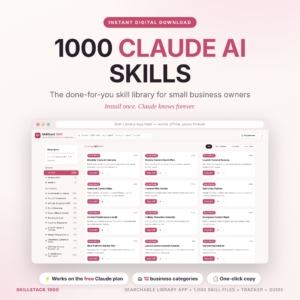
1000 Claude AI Skills for Small Business
Price: $16.99 | Best for: Small business owners using Claude
A done-for-you library of 1,000 Claude AI skills for small business. It comes with an offline search app, an Excel tracker and a guide, delivered as an instant download.
What skills save you in a typical week
Think about the jobs you repeat: answering customer emails, writing quotes, drafting a social post, turning rough notes into a checklist. Each one usually starts with you retyping the same instructions into the chat, which eats time and lets the quality drift.
A skill moves those instructions into one saved place. A customer reply skill holds your tone and your rules, such as never promising a delivery date. A quote skill asks for the size and type of job, then drafts a clear price breakdown. A notes skill turns rough text into a tidy task list with an owner for each item.
You still read every reply before it goes out, and you still adjust quotes that look off. What goes away is the blank page and the retyping. The drafts start closer to your voice, and the time you free up can go to work only a person can do, like phoning a customer.
Skills won’t run your business. They remove friction from the dull parts so you have energy for the human parts.
How to build your first skill
You can write a first skill in about twenty minutes. Here’s a plain recipe.
- Pick one task you do at least weekly and dislike a little.
- Write down, in your own words, how you do it well. What do you ask for? What do you check? What do you avoid?
- Add one or two examples of a great result. Real ones are best.
- State the format you want back: length, headings, tone.
- Test it on three real cases, then fix anything that came out wrong.
That last step matters most. The first version is never perfect. Run it, see where it slips, and add a rule. “Don’t use exclamation marks” or “always ask for the budget first.” A skill gets better with each tweak, like a good sourdough starter.
For how to add skills to Claude, check Anthropic’s current help pages, since menus and plan details change. If you’re brand new to the assistant, our guide to Claude AI for small business walks through nine practical uses that pair nicely with skills.
Skills versus prompts versus custom instructions
People mix these up, so here’s a simple way to tell them apart.
A prompt is a one time request. You type it, you get an answer, it’s gone. Custom instructions are general preferences that apply everywhere, like “I run a bakery, keep replies short.” A skill is a specific, named job with its own steps, used when the task calls for it.
You’ll probably use all three. Keep your general preferences short. Use prompts for one off questions. Build skills for the jobs you repeat. If you find yourself pasting the same paragraph of instructions twice a week, that paragraph wants to be a skill.
Done for you skill libraries: when they make sense
Writing skills is satisfying, but it takes time you might not have. A ready made library gives you a head start. You pick, tweak and go, instead of writing from scratch.
Two Taskdale products suit this. The first is a general one for owners. The second is built for a single trade.
1000 Claude AI Skills for Small Business is a done for you skill library. It comes with an offline search app, an Excel tracker and a guide, as an instant download. That’s a good fit if your business is not tied to one niche and you want a wide menu to browse.
1000 Claude Skills for Wedding Planners is aimed squarely at a wedding planning business. The title lists AI prompts and templates, plus an offline app, a printable PDF and a guide. If you plan weddings, a niche pack means the skills already speak your language: vendors, timelines, couples. We’ve also written about AI for wedding planners if you want ideas before you buy.
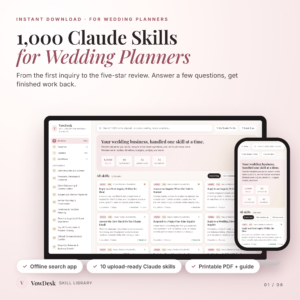
1000 Claude Skills for Wedding Planners
Price: $9.99 | Best for: Wedding planners
A set of 1,000 Claude skills, AI prompts and templates for a wedding planning business. It includes an offline app, a printable PDF and a guide.
Keeping your skills tidy as they grow
A skill library gets messy the same way a kitchen drawer does. One more little thing goes in, then another, and soon you cannot find the tape. A few habits keep it under control.
Name every skill by the job it does, such as “weekly newsletter” or “quote follow-up”, not by a clever label you will forget. Keep one skill to one job. If a skill tries to write emails and also plan your month, split it in two. And set a reminder to read each skill once a quarter. Prices change, offers end and your tone shifts a little over time, so old instructions can quietly go stale.
When a skill gives you a bad result, fix the skill instead of fixing the output by hand. Add the missing rule, run it again and check that the answer improves. That small step is what turns a one-off save into a tool you can trust every week.
Mistakes to avoid when you start with Claude skills
Owners tend to trip over the same few things. Save yourself the trouble.
Building too many at once. Start with three. A tidy small set that you actually use beats a giant pile you forget.
Being vague. “Write good copy” is not an instruction. “Write in short sentences, address the reader as ‘you,’ and mention the price once” is.
Never updating. Your business changes. Prices shift, offers change, a new service appears. Review your skills every few months and edit.
Including private data. Don’t put customer names, passwords or payment details inside a skill. Keep skills about how to do the work, not who it’s for.
Trusting without reading. Claude is a strong assistant, not a mind reader. Check the output, especially anything with prices, dates or promises. You remain the one who signs your name to it.
Compare the skill libraries
Here’s the quick look at both options.
| Product | Format | Price | Best for | Link |
|---|---|---|---|---|
| 1000 Claude AI Skills for Small Business | Skill library, offline search app, Excel tracker, guide | $16.99 | Small business owners using Claude | View |
| 1000 Claude Skills for Wedding Planners | Offline app, printable PDF & guide | $9.99 | Wedding planners | View |
Claude skills: common questions
What are Claude skills used for?
They package repeatable work, such as replying to customers, drafting posts, writing quotes or summarizing meetings, into saved instructions. Claude uses the right one when your request matches, so results stay consistent and you type less. Think of them as reusable recipe cards for your AI assistant.
Do I need to know how to code to use Claude skills?
No. A basic skill is written in plain language, much like instructions you’d give a new team member. Some skills can include extra files, but you can get real value from simple, text based ones. If you can describe how you do a task, you can create a skill.
Are Claude skills the same as prompts?
Not quite. A prompt is a single request you type. A skill is a saved, named set of instructions that Claude can use again and again. Prompts suit one off questions, while skills suit jobs you repeat every week.
Should I write my own skills or buy a library?
Both work. Writing your own gives you a perfect fit but takes time. A library gives you a big starting set to edit. Many owners buy a pack, keep the skills they like, and then write a few custom ones for their own quirks.
Is it safe to share business details with Claude?
Treat it like any online tool. Avoid putting passwords, payment details or private customer data into skills or chats. Check the privacy settings for your plan, and share only what the task needs. Review the output before sending anything to a customer.
Where to start this week
Pick one chore you repeat, write it as a skill, and test it three times. That’s the whole plan. If you’d rather start with a big set, the 1000 Claude AI Skills for Small Business library is the broad option. If you run weddings, the 1000 Claude Skills for Wedding Planners pack is the one built for you.