You have an iPad, an Apple Pencil and a vague plan to get fitter. What you do not have is a place to write it all down that does not feel like admin. A digital fitness planner changes that. It lives in the same app you already use for notes, it never runs out of pages, and you can tap a tab to jump to your workout log in half a second. This guide shows you how to set one up in GoodNotes in about an hour, and compares five digital planners from Taskdale priced between $1.09 and $4.49.
General information only, not medical advice. Talk to your doctor before starting a new exercise or eating plan.
Quick picks
| Product | Best for | Price | Link |
|---|---|---|---|
| Glow & Grow Digital Fitness Planner | A low-cost workout and wellness planner | $1.19 | View |
| Bloom & Lift Digital Fitness Planner | A hyperlinked workout, meal and weight loss tracker | $3.96 | View |
| Strive Digital Fitness Planner | A workout log, meal planner and habit tracker | $2.45 | View |
| Lighter Days Digital Weight Loss Planner | A hyperlinked fitness, meal and calorie tracker | $1.09 | View |
| Milestone Digital Weight Loss Planner | A GoodNotes weight tracker | $4.49 | View |
Why Choose a Digital Fitness Planner Over Paper?
Paper is lovely. But paper also gets left in the gym bag, smudged by a water bottle, or buried under the mail. A digital fitness planner goes where your tablet goes, and many people forget how handy it is to copy a page. Need another week of workout logs? Duplicate the page and keep going. No printing, no hole punching.
Hyperlinks are the other big win. In a hyperlinked planner, the tabs along the top or side are links. Tap one and you land on the right section instantly. That is a small thing, and it is the difference between a planner you open and a planner you avoid.
The honest downside? Screens distract. If you tend to open the iPad and end up on a video, a paper planner on the fridge might serve you better. Know yourself before you buy.
What You Need for a GoodNotes Digital Fitness Planner
The list is short.
- An iPad with GoodNotes installed. Some of these planners also mention Notability, and several say they work on Android too, so check each listing.
- A planner file, usually a PDF.
- An Apple Pencil or any stylus, though you can type with text boxes if you prefer.
- About an hour for the first setup.
That is it. No subscription is needed for the planner itself, since you buy the file once.
Set Up Your Digital Fitness Planner in One Hour
Follow these steps in order. Do not skip the last one.
- Download the file (5 minutes). Save the PDF to your iPad, in the Files app or in iCloud.
- Import it into GoodNotes (5 minutes). Open GoodNotes, tap the plus button and choose to import the file. Give the notebook a clear name, like Fitness 2026.
- Test the tabs (5 minutes). If your planner is hyperlinked, tap every tab and make sure you land where you expect. Learn where the weekly, daily and tracker pages sit.
- Fill in your starting numbers (10 minutes). Weight, measurements and one clear goal. Write them with the Pencil or in a text box.
- Plan your first week (15 minutes). Add three workouts and a few dinners.
- Make a duplicate (5 minutes). Copy the blank notebook so you always have a clean master.
- Add a shortcut (5 minutes). Put the notebook on your iPad home screen or pin it in your GoodNotes library.
The duplicate step saves headaches later. If you ever mess up a page, or want to start a fresh year, you will thank yourself.
Handwriting or typing?
Both work. Handwriting feels more personal, and for many people it helps ideas stick. Typing in text boxes is faster for long meal lists. A mix is fine: write your workouts, type your grocery list.
Five Digital Fitness Planner Options
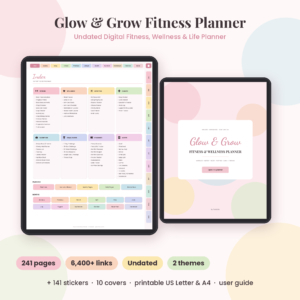
Glow & Grow Digital Fitness Planner
Price: $1.19 | Best for: a low-cost start in GoodNotes or Notability
An undated workout, wellness and weight loss planner made for GoodNotes, Notability, iPad and Android, with a printable version too. At $1.19 it is the second cheapest planner here.
Undated is the key word. Start whenever you like. If you skip two weeks over the holidays, there is no row of empty dates reminding you.
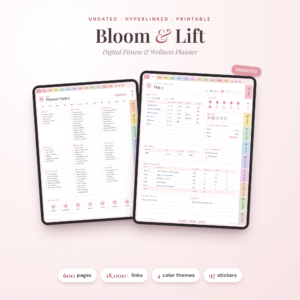
Bloom & Lift Digital Fitness Planner
Price: $3.96 | Best for: hyperlinked workout, meal and weight loss tracking
An undated, hyperlinked workout, meal and weight loss tracker for GoodNotes and Notability, plus a printable. Price: $3.96.
Hyperlinks plus an all-in-one layout make this a good pick for anyone who wants to move between workouts and meals fast. It costs more than Glow & Grow, and the links are what you are paying for.
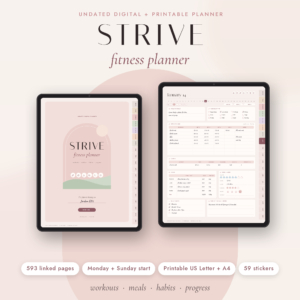
Strive Digital Fitness Planner
Price: $2.45 | Best for: a digital planner with a printable backup
An undated digital fitness planner with a workout log, meal planner, weight loss tracker and habit tracker, plus a printable. Price: $2.45.
Strive sits in the middle on price. The listing mentions a printable as well, so you have a paper option if you want one for weeks without the tablet.
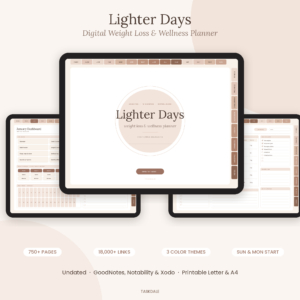
Lighter Days Digital Weight Loss Planner
Price: $1.09 | Best for: hyperlinked calorie and meal tracking on a budget
An undated, hyperlinked fitness, meal and calorie tracker for GoodNotes, Notability, iPad and Android, with a printable. At $1.09 it is the cheapest in this guide.
If your goal is weight loss and you like logging calories, this is the lowest-cost way in. Do not let the price fool you into thinking it is flimsy. Hyperlinked tabs at this price are good value.
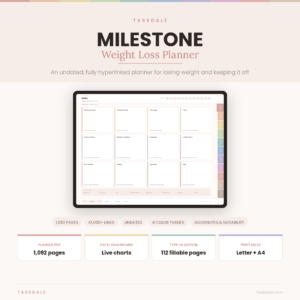
Milestone Digital Weight Loss Planner
Price: $4.49 | Best for: a GoodNotes weight tracker with weight loss focus
An undated GoodNotes planner and weight tracker for digital weight loss planning. It costs $4.49.
Milestone is the most weight-focused of the group. Pick it if tracking your weight over time is the heart of your plan.
Side-by-side comparison
| Product | Format | Price | Best for | Link |
|---|---|---|---|---|
| Glow & Grow | Undated digital, GoodNotes and Notability, plus printable | $1.19 | Budget workouts and wellness | View |
| Bloom & Lift | Undated hyperlinked, GoodNotes and Notability, plus printable | $3.96 | Fast navigation | View |
| Strive | Undated digital, plus printable | $2.45 | A balanced log with printable | View |
| Lighter Days | Undated hyperlinked, GoodNotes and Notability, plus printable | $1.09 | Calories on a budget | View |
| Milestone | Undated GoodNotes planner | $4.49 | Weight tracking | View |
Choosing the Right Digital Fitness Planner for You
Start with your main goal. If you want to lose weight and count calories, Lighter Days or Milestone put that front and centre. If you want workouts and meals in one place, Bloom & Lift and Strive cover both. If you just want the cheapest way to try a digital planner and see whether you like it, Glow & Grow at $1.19 costs about the same as a bag of crisps.
Then think about navigation. Do you hate scrolling? Choose a hyperlinked planner. Do you like a clean, simple layout and do not mind a few swipes? An unlinked one is fine, and you may never miss the tabs.
Finally, check the app. If you use GoodNotes, look for it in the title. If you prefer Notability, a few of these mention it too. Reading the product page for compatibility takes a minute and avoids a wasted evening.
A colour system that takes ten seconds to learn
Pick three colours and stick with them. Green for a workout done. Yellow for a workout shortened or moved. Red, or grey if red feels harsh, for skipped. At the end of the week you can see the pattern at a glance, and nobody else has to understand it. A planner you can read in two seconds is a planner you will keep opening.
Add a small ritual to go with it. Every Sunday, flip to the next week, duplicate the page if you need to, and fill in only the workouts. Meals can wait until Monday. Splitting the work keeps the Sunday session short, and short sessions are the ones that happen.
Make Your Digital Fitness Planner a Daily Habit
The first week is easy. Week three is where planners die. To keep yours alive, put the notebook on your home screen so it is one tap from your lock screen. Then tie it to something you already do. After your last set, before you shower, open the planner and write one line.
Also, keep your weekly page honest. If you planned four workouts and did two, write two. The point is not to look good on the page. It is to see what really happens so you can plan better.
If you have an Apple Pencil, try a little colour. Highlight completed workouts in green. Circle a skipped one in yellow, no judgement. A quick glance at the page tells you the story of your week.
One more thing about pencils and screens: a matte screen protector gives the tip a bit of grip, so your handwriting looks less like a spider fell in ink. It is optional, and plenty of people write happily on bare glass. Try it without first.
Back it up
Turn on backup or sync in GoodNotes so a lost or broken iPad does not take your history with it. It takes two minutes and it saves months of entries.
Common Mistakes With a Digital Fitness Planner
The first is buying a planner and never importing it. The file sits in Downloads for three months. Do the setup tonight while you are keen. The second is making the planner too detailed. If you track calories, workouts, water, sleep, steps and mood on day one, you will burn out by Friday. Pick two things and add more later.
A third is forgetting the printable. Several of these include a printable version. On a travel day or a tablet-free week, print a page or two so your streak survives.
Small Setup Choices That Make a Digital Fitness Planner Easier to Use
Most people quit a planner because it feels like a chore, not because the idea was bad. A few small choices early on can make the daily habit lighter.
Put the planner where you already look. If you open your tablet every morning for the news or a calendar, park the planner next to that app. If you only touch it when you remember to, you will forget it within a week.
Keep your first page simple. One workout log and one weekly overview are plenty to start. You can add habit trackers and meal pages later, once the basics stick.
Duplicate a blank week before you fill anything in, so you always have a clean copy. And pick one pen color for done, another for planned. It sounds silly, but a glance at the page then tells you where you stand.
If you miss a few days, skip the guilt. Turn the page and write today’s date. That is all a planner needs from you.
Frequently asked questions
What is a digital fitness planner?
It is a planner file you use on a tablet or phone instead of paper. Most are PDFs you import into an app like GoodNotes. Many are undated and hyperlinked, so you tap a tab to jump between workouts, meals and trackers.
Can I use these planners in GoodNotes on an iPad?
Glow & Grow, Bloom & Lift, Lighter Days and Milestone mention GoodNotes in their product titles. Strive is listed as a digital fitness planner with a printable, so check its product page for app details before buying.
What does undated and hyperlinked mean?
Undated means the pages carry no fixed dates, so you can start any day and never waste pages. Hyperlinked means the tabs are tappable links that take you straight to a section, which makes a long PDF easy to move around.
Do I need an Apple Pencil for a digital fitness planner?
No. A Pencil or stylus feels natural for handwriting, but you can also type into text boxes with your finger and keyboard. Choose whichever is quicker for you, since the best method is the one you will keep using.
Can I print a digital fitness planner?
Several of these listings include a printable version, such as Glow & Grow, Bloom & Lift, Strive and Lighter Days. That gives you a paper backup for travel or tablet-free weeks. Check each product page for the exact files.
So, the short version: pick a planner, import it tonight and fill in one week before you go to bed. For a hyperlinked start that is easy on the wallet, try Lighter Days for $1.09, or for workouts and meals together choose Bloom & Lift at $3.96.