


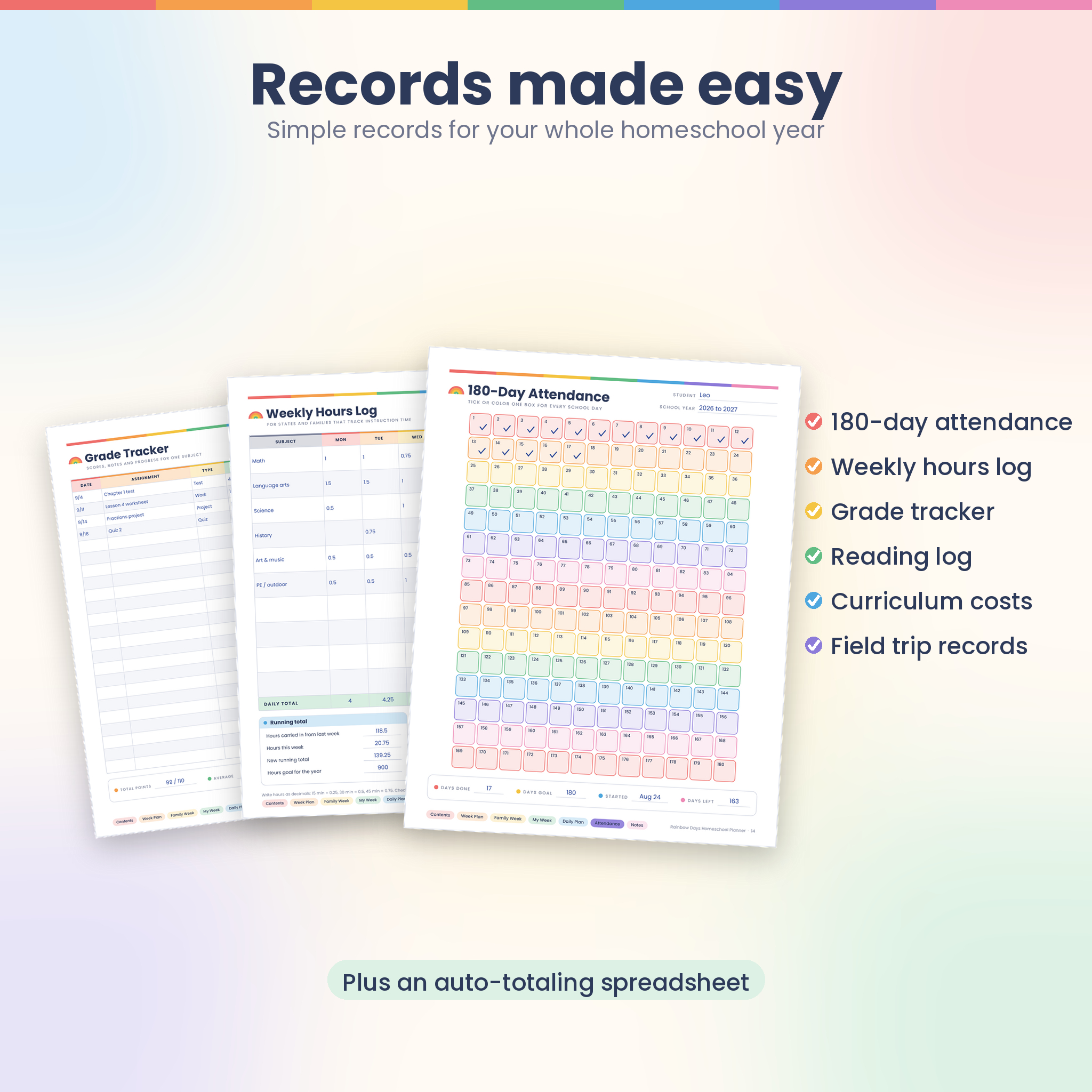
Rainbow Days is a bright, undated homeschool weekly planner that gives you a calm place to plan lessons and gives your kids pages they actually want to use. You get a 22-page fillable and printable planner in US Letter and A4, in full color and an ink saver version, plus a spreadsheet that counts attendance days, adds up hours and works out grades for you.
It keeps the cheerful rainbow look homeschool families love, then adds the records, kid pages and tracking a single weekly sheet can’t give you.
What this homeschool weekly planner does
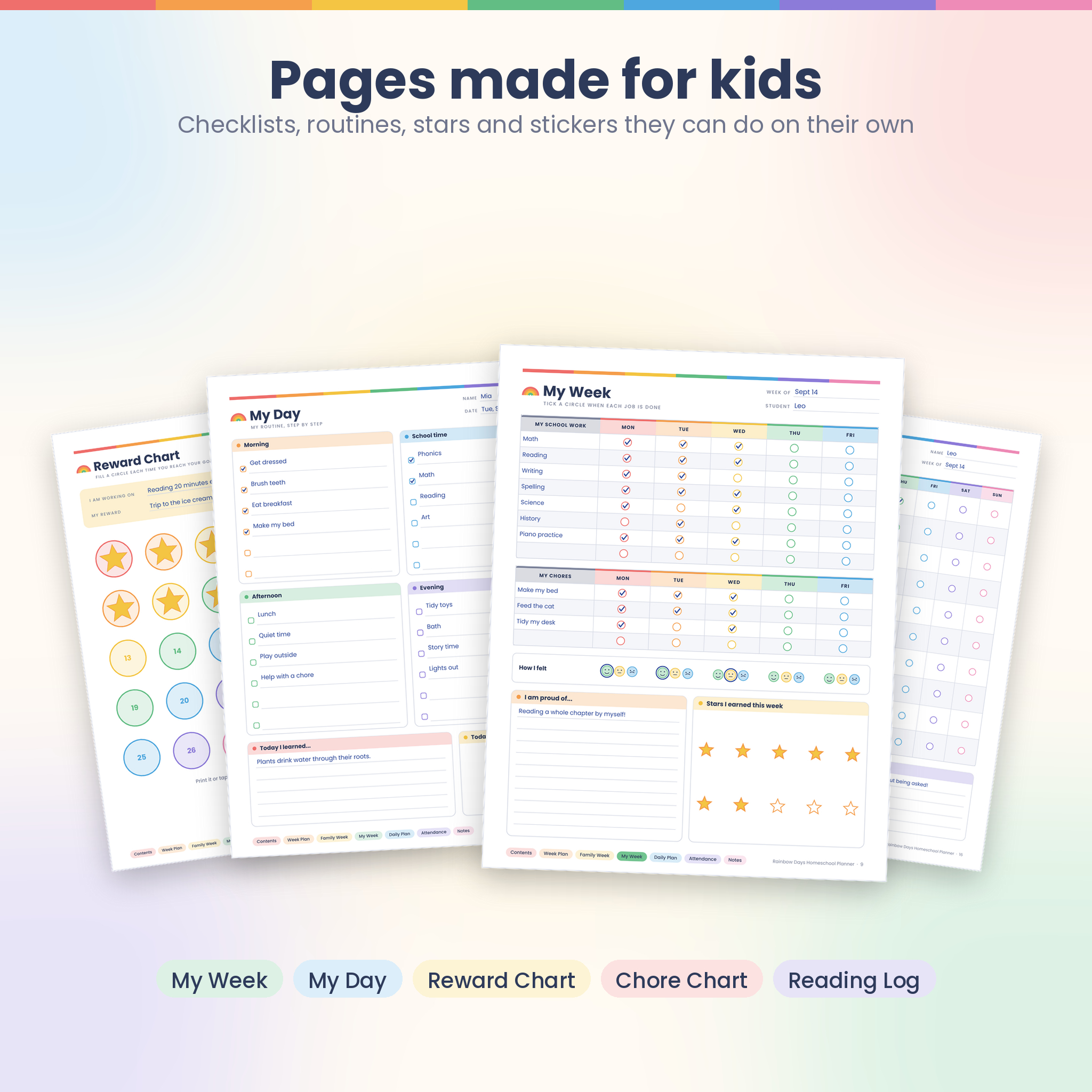
Each week you fill in one Weekly Plan per child: up to 8 subjects across Monday to Friday, with a tick box in every lesson cell. Your child copies the same subjects onto My Week and ticks off their own work, chores and mood each day. On Friday you log hours, grades and finished books, then spend five minutes on the Weekly Review.
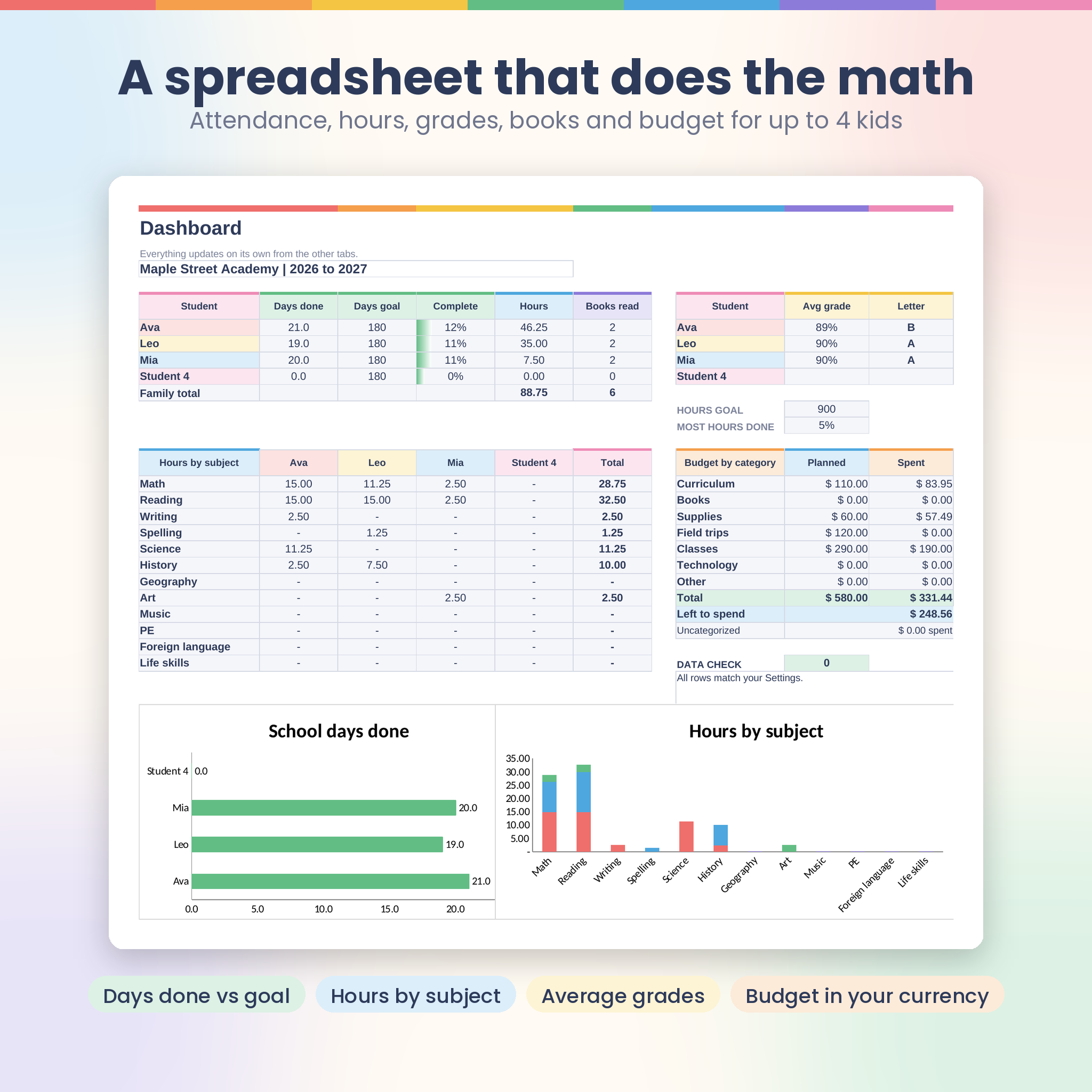
The spreadsheet does the adding up. Pick a code for each school day and it counts days done against your goal. Log a session and it totals hours by subject. Type a score and it gives you the percent and letter grade.
Who it is for
- Homeschool parents with one child or up to four
- Families who want a colorful planner their kids enjoy using
- Parents who need to keep attendance days or instruction hours
- Co-op leaders and tutors who plan a week for one group
- Any curriculum: classical, Charlotte Mason, unit studies, boxed curriculum or a mix
What’s included
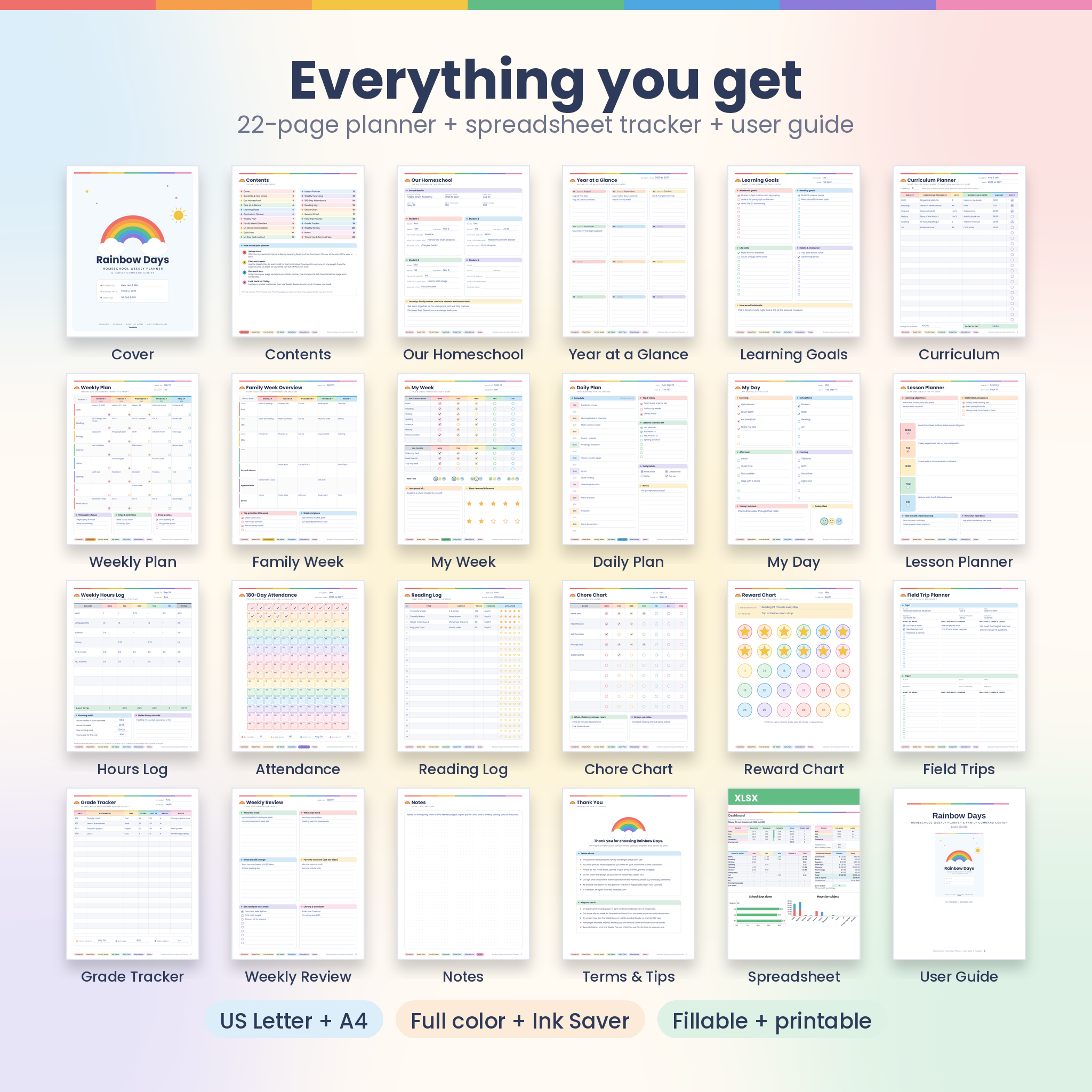
The 22-page planner (PDF)
- Cover and Contents with clickable links to every page
- Our Homeschool: school details plus profile cards for 4 students
- Year at a Glance: 12 undated month boxes
- Learning Goals: academic, reading, life skills and habits, with tick boxes
- Curriculum Planner: resources, where they came from, amount paid and a total
- Weekly Plan: 8 subjects by 5 days, plus focus, trips and prep notes
- Family Week Overview: 4 children, co-op, appointments and dinners on one page
- My Week (kid checklist) and My Day (kid routine)
- Daily Plan: half-hour schedule, top 3, lessons to check off, daily habits
- Lesson Planner, Weekly Hours Log and 180-Day Attendance
- Reading Log with tap-to-fill star ratings
- Chore Chart, Reward Chart and Field Trip Planner
- Grade Tracker, Weekly Review and a dot grid Notes page
The Command Center spreadsheet (XLSX)
- Dashboard: days done, hours, books read and average grade for each child, hours by subject, budget by category, plus two charts
- Settings: school details, one currency setting, student names, 12 subjects, grade scale and attendance values
- Weekly Plan: choose a student and week number and the dates fill in. Mark lessons done and watch progress update
- Attendance: all 260 weekdays of the year listed for 4 children, with simple codes
- Hours Log, Grades, Reading Log and Curriculum Budget
User guide (DOCX)
An 11-page guide with setup steps, a page-by-page tour, tips, troubleshooting and FAQs.
Features that make the difference
- Fillable and printable: over 1,700 form fields. Type on screen or print and write by hand
- Clickable navigation: colored buttons on every page jump to Contents, Weekly Plan, My Week, Daily Plan, Attendance and more
- Two paper sizes, two ink levels: US Letter and A4, each in full color and Ink Saver
- Undated: start in any month and reuse it every year
- Kid pages: big tick circles, mood faces, stars to earn and a 30-circle reward chart
- Automatic math: attendance totals, hours by subject, percents, letter grades and money left to spend
- Your currency: type your symbol once in Settings. All money headings and totals use it, with $ as the default
- Mistake-proof cells: formulas are locked (no password), dropdowns keep names matching, and a Data check flags any row that doesn’t match your settings
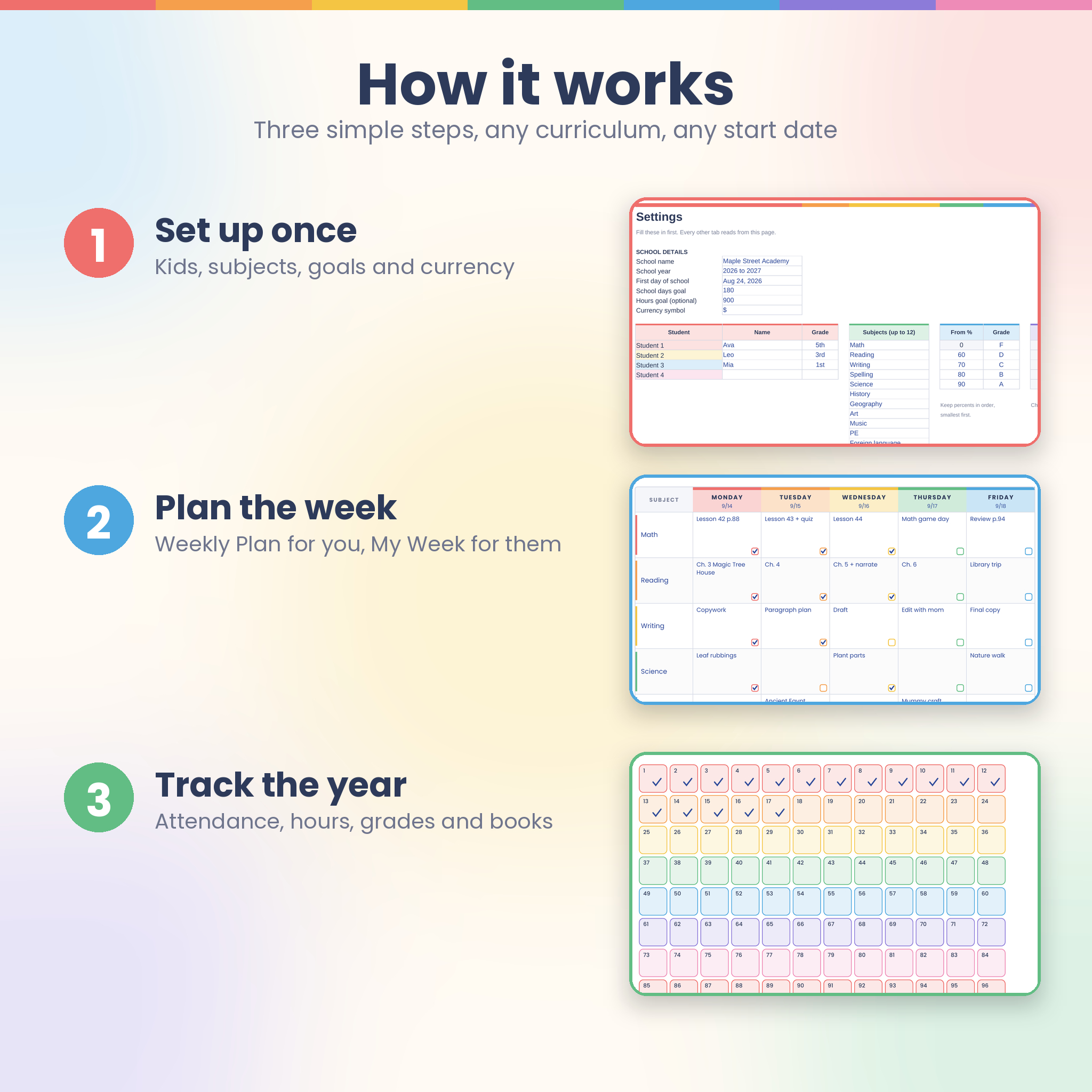
How it works
- Download the ZIP file after checkout and unzip it.
- Set up once: fill in Our Homeschool and the spreadsheet’s Settings tab with your kids, subjects, first day and currency.
- Plan each week: print or type a Weekly Plan for each child and a My Week page they can tick off.
- Track as you go: mark attendance, log hours, grades and books. The Dashboard keeps score.
File formats and software
- 4 PDF files (US Letter 8.5 x 11 in and A4, full color and Ink Saver). To type in them, use Adobe Acrobat Reader (free) or another PDF app that supports fillable forms. Any printer works for the printed version.
- 1 XLSX spreadsheet with no macros. Tested in LibreOffice Calc (free). It uses common formulas that Microsoft Excel and Google Sheets also support.
- 1 DOCX user guide.
Customizing it
Every subject and lesson line is blank, so it works with whatever you teach. In the spreadsheet you can rename subjects, change the grade scale and set how each attendance code counts if your state counts days differently. Print only the pages you need and as many copies as your family uses.
Digital download
This is a digital product. Nothing is shipped. You’ll get a download link straight after purchase. Colors may look slightly different on paper depending on your printer.
Ways families use it
- A parent of three plans everyone’s week on the Family Week Overview, then hands each child their own My Week page on Monday morning.
- A family in a state that asks for 180 days ticks the attendance page each afternoon and checks the Dashboard at the end of each term.
- A first grader uses My Day in a sheet protector with a dry-erase marker, so mornings run without reminders.
- A co-op teacher prints the Lesson Planner for each class and keeps field trip costs on the Curriculum Planner.
Homeschool weekly planner FAQ
Is this a physical planner?
No. It’s an instant digital download you print at home or use on screen.
Is it dated?
No. It’s fully undated, so you can start any time and use it again next year.
Can I use it for more than one child?
Yes. Print a Weekly Plan and My Week page for each child. The Family Week page and the spreadsheet handle up to 4 children.
Can I type in it on my iPad or computer?
Yes, in a PDF app that supports fillable forms, such as Adobe Acrobat Reader. Handwriting apps can open it too, but you’ll write on the page rather than type in the boxes.
Do I need Microsoft Excel?
No. The spreadsheet was tested in free LibreOffice Calc and uses standard formulas found in Excel and Google Sheets.
Does it work with my curriculum?
Yes. All subject and lesson lines are blank, so it fits any curriculum.
Can I print it more than once?
Yes, as often as you like for your own family or one classroom.
For personal, family and single-classroom use. Please don’t resell or share the files.
Reviews
There are no reviews yet.