Best Excel Planner: How to Choose the Right One
The best Excel planner is the one built for the job you actually have. For general life admin, Daybloom, Linden Life Organiser and Linen Life OS cover the most ground. Clearday suits a plain task list, Semester HQ and Campus Compass suit students, and the two ADHD planners suit people who rely on routines.
A spreadsheet planner can feel like a lot to take on, especially if you haven't built one before. We'll keep it simple: what to check, how these files differ, and how to pick one you'll still be using in three months.
Key facts at a glance
- An Excel planner is a spreadsheet template where you type information once and linked tabs update themselves.
- Every planner on this page works in Excel, and all but two also list Google Sheets (Thanksgiving Planner and ADHD Planner Spreadsheet for Excel are Excel only).
- Tab counts range from 9 (Clearday) to 75 (Tidewell), and more tabs means more to learn, not necessarily more value.
- Most listings include a blank file, a filled sample and a written user guide.
- Clearday, Linen Life OS and several others are described as instant downloads with no subscription.
Table of Contents
Toggle
- What should you look for in an Excel planner?
- How do the Excel planners on this page compare?
- Which Excel planner suits which person?
- How do you set up and look after an Excel planner?
- What mistakes should you avoid when choosing an Excel planner?
- What affects the price of an Excel planner?
- How to choose the best Excel planner with peace of mind
- Common questions
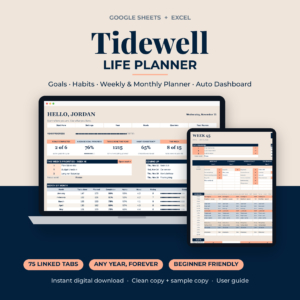 Life Planner Spreadsheet for Google Sheets & Excel | Tidewell Goal Tracker, Habit Tracker, Weekly & Monthly Digital Planner with Auto Dashboard
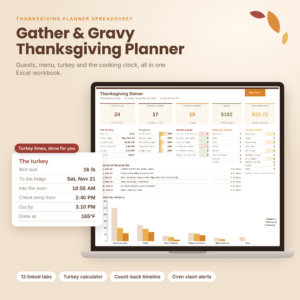 Thanksgiving Planner Spreadsheet for Excel | Gather & Gravy Dinner Planner with Turkey Calculator, Cooking Timeline, Guest List & Budget
 ADHD Planner Spreadsheet for Excel | Task, Habit & Goal Tracker with Recurring Tasks, Daily Weekly Monthly Planner & Time Blocking
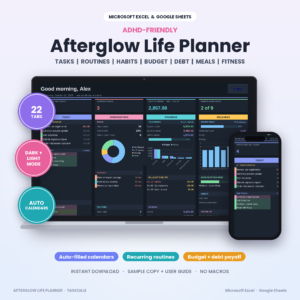 ADHD Life Planner Spreadsheet for Excel & Google Sheets | Afterglow Dark Mode Planner with Budget Tracker, Habit Tracker, Routine Tracker, Meal Planner & Debt Payoff
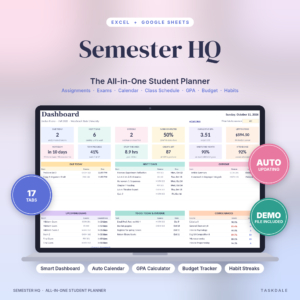 Semester HQ Student Planner Spreadsheet | Excel & Google Sheets Assignment Tracker, GPA Calculator, Class Schedule & College Budget
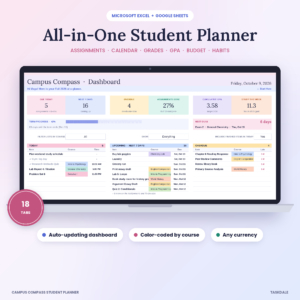 Campus Compass Student Planner Spreadsheet | Assignment Tracker, GPA Calculator, Class Schedule & Budget for Excel and Google Sheets
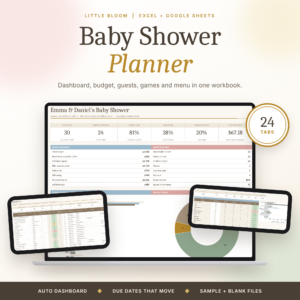 Little Bloom Baby Shower Planner | Excel & Google Sheets | Budget, Guest List, Checklist & Seating Chart
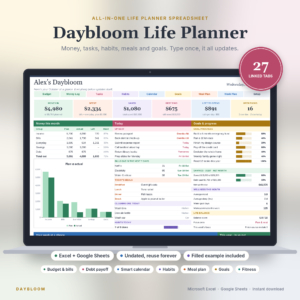 Daybloom Life Planner Spreadsheet | Excel & Google Sheets | Budget, Bills, Debt, Habit Tracker, Meal Planner, Goals & Digital Calendar
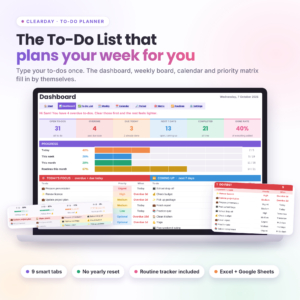 Clearday To-Do Planner | To-Do List Spreadsheet for Excel & Google Sheets with Dashboard, Weekly & Monthly Calendar and Routine Tracker
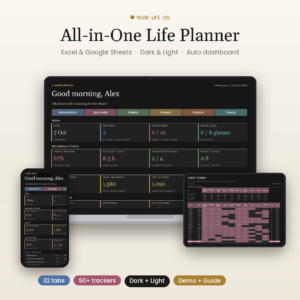 Noir Life OS | All-in-One Life Planner Spreadsheet for Excel & Google Sheets | Dashboard, Habit Tracker, Budget, Daily Weekly Monthly Planner
What should you look for in an Excel planner?
A good Excel planner has linked tabs, a size that matches your needs, confirmed compatibility with your software, a worked example, and a look you can live with. Check these five things before anything else. Browse all 12 options below with them in mind.
Linked tabs that update from one entry
A linked planner is a workbook where information typed on one tab appears on every other tab that needs it. Linden Life Organiser says a bill, task or recipe added once turns up in the budget, calendar, week ahead and dashboard. Semester HQ does the same with due dates. Without linking, you are just filling in a grid by hand.
The right number of tabs for your life
Tab count is a rough measure of scope. Clearday has 9 tabs and room for 500 to-dos, so it stays light. Daybloom has 27, Noir Life OS has 32 and Tidewell has 75. More tabs suit someone who wants budget, meals and workouts in one place. They overwhelm someone who only wants a to-do list.
Compatibility with your version of Excel
Compatibility is whether the file opens and calculates properly in the software you own. Clearday states Microsoft Excel 2010 or newer and Google Sheets. Other listings name Excel and Google Sheets without a version, so check the product page if you use an older copy.
A filled sample and a user guide
A filled sample file shows the planner working with real-looking data, so you can see what a finished version looks like before you enter your own. Most listings here include one, plus a guide. Guide lengths are stated for Clearday (17 pages), Linden Life Organiser (27 pages), Noir Life OS (23 pages) and Daybloom (35 pages).
Layout, colour and mode
Layout matters because you will open the file daily. Noir Life OS and Afterglow come in dark and light editions, and the ADHD Planner Spreadsheet for Excel has Lilac and Midnight dark editions. If bright white screens tyre your eyes, that detail matters more than it sounds.
How do the Excel planners on this page compare?
The planners differ mainly in purpose and size. Life planners cover budget, habits and calendar together, student planners track grades and deadlines, and event planners handle a single occasion. The table uses only details from the listings.
| Product | Best suited to | Size and format | Notable features |
|---|---|---|---|
| Life Planner Spreadsheet for Google Sheets & Excel | Tidewell Goal Tracker, Habit Tracker, Weekly & Monthly Digital Planner with Auto Dashboard | Goals and habits across a whole year | 75 linked tabs, Excel and Google Sheets | 12 goal cards, 7-habit tracker, hourly schedule, any year |
| Thanksgiving Planner Spreadsheet for Excel | Gather & Gravy Dinner Planner with Turkey Calculator, Cooking Timeline, Guest List & Budget | Hosting one Thanksgiving dinner | 13 linked tabs, Excel | Turkey calculator (USDA 325°F chart), cooking timeline, printable Run of Show |
| ADHD Planner Spreadsheet for Excel | Task, Habit & Goal Tracker with Recurring Tasks, Daily Weekly Monthly Planner & Time Blocking | Routines and recurring tasks | 14 tabs, Excel | Automatic time blocking, habit streaks, 8 goal cards, Lilac and Midnight editions |
| ADHD Life Planner Spreadsheet for Excel & Google Sheets | Afterglow Dark Mode Planner with Budget Tracker, Habit Tracker, Routine Tracker, Meal Planner & Debt Payoff | Tasks plus money and meals in dark mode | Excel and Google Sheets | Dashboard with overdue items and money left, light version included |
| Semester HQ Student Planner Spreadsheet | Excel & Google Sheets Assignment Tracker, GPA Calculator, Class Schedule & College Budget | University or college students | 17 tabs, Excel and Google Sheets | Live course grades, final-grade calculator, degree planner |
| Campus Compass Student Planner Spreadsheet | Assignment Tracker, GPA Calculator, Class Schedule & Budget for Excel and Google Sheets | Students who like colour-coded courses | 18 tabs, Excel and Google Sheets | Days-left countdowns, overdue alerts, final-grade calculator |
| Little Bloom Baby Shower Planner | Excel & Google Sheets | Budget, Guest List, Checklist & Seating Chart | Organising one baby shower | 24 linked tabs, Excel and Google Sheets | 60-task checklist, seating cards, menu quantities |
| Daybloom Life Planner Spreadsheet | Excel & Google Sheets | Budget, Bills, Debt, Habit Tracker, Meal Planner, Goals & Digital Calendar | Money and home life in one undated file | 27 linked tabs, Excel and Google Sheets | Debt payoff, cleaning, workouts, 35-page guide |
| Clearday To-Do Planner | To-Do List Spreadsheet for Excel & Google Sheets with Dashboard, Weekly & Monthly Calendar and Routine Tracker | A simple, focused to-do system | 9 connected tabs, Excel 2010 or newer and Google Sheets | Room for 500 to-dos, priority matrix, 12-month routine tracker |
| Noir Life OS | All-in-One Life Planner Spreadsheet for Excel & Google Sheets | Dashboard, Habit Tracker, Budget, Daily Weekly Monthly Planner | Tracking many areas of life at once | 32 tabs, Excel and Google Sheets | 10 habits with streaks, sleep and workouts, 50/30/20 budget, dark and light |
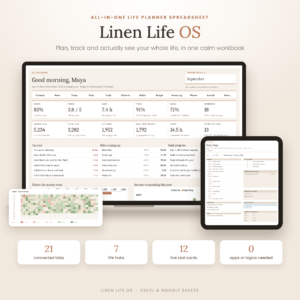 Linen Life OS: Ultimate Life Planner Spreadsheet for Excel & Google Sheets | Budget, Habit Tracker, Goals & Life Dashboard | A calm all-round life dashboard | 21 linked tabs, Excel and Google Sheets | 12 stat cards, 4 charts, mood and book tracking |
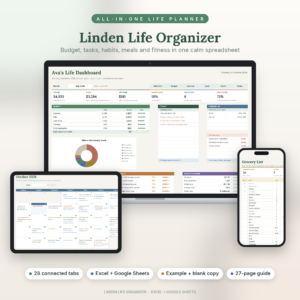
| Linden Life Organiser | Life Planner Spreadsheet for Excel and Google Sheets | Budget Tracker, Habit Tracker, Smart Calendar, Meal Planner, Workout Tracker | Household money, meals and routines | 28 connected tabs, Excel and Google Sheets | Budget by month or paycheck, automatic grocery list |
Which Excel planner suits which person?
Each planner suits a different starting point. Match yours to the closest description rather than picking the biggest file.
If you want one file for the whole household: Linden Life Organiser and Daybloom both combine budget, bills, meals, habits and a calendar. Linden adds an automatic grocery list and lets you budget by month or by paycheck. Daybloom adds debt payoff, savings and cleaning, and its 35-page guide is the longest listed.
If you want a calmer, wider view of your life: Linen Life OS has a dashboard with 12 stat cards and 4 charts. Noir Life OS goes further, with 32 tabs, sleep and workout logs, and grade tracking. It is a lot of file, so it suits people who enjoy setting things up.
If you want goals and habits first: Tidewell centres on 12 goal cards and a 7-habit tracker, with a year view and 54 weekly tabs. The structure is deep, so it suits someone who plans in long arcs.
If routines are the hard part: The ADHD Planner Spreadsheet for Excel fills your daily, weekly and monthly pages from routines you set once. Afterglow adds budget, meals and a dashboard showing what is overdue. Both have dark options.
If you just need a to-do list that behaves: Clearday is the smallest planner here, with 9 tabs and no subscription. It is the easiest place to start.
If you are studying: Semester HQ and Campus Compass both track assignments, grades and a GPA, with a "what do I need on the final?" calculator. Semester HQ adds a full degree planner. Campus Compass adds an extra tab and colour-coding by course.
If you are planning one event: The Thanksgiving Planner Spreadsheet works back from dinner time and flags oven clashes. Little Bloom has a 60-task checklist with due dates that move. These are single-purpose, so they are poor everyday planners.
How do you set up and look after an Excel planner?
Setting up an Excel planner takes about an hour if you work in order. Start with the sample file, then enter your own details into the blank one.
- Open the filled sample and click through each tab to see how the entries connect.
- Read the first pages of the user guide, which explain where to type and where not to.
- Save the blank file under a new name so the original stays untouched.
- Enter your fixed items first: routines, bills, birthdays, courses or goals.
- Add one week of real tasks and check that they appear on the dashboard.
- Back up the file monthly, ideally to a second location.
To look after it, avoid typing over formula cells, which are the ones that calculate for you. If a tab stops updating, check you haven't pasted values into a linked column. Keep one master copy and work in that, not in several duplicates.
What mistakes should you avoid when choosing an Excel planner?
The most common mistake is buying more planner than you will use. A 75-tab workbook looks impressive, but if you only want to track tasks, Clearday will serve you better.
- Ignoring compatibility. Check your Excel version, and check Google Sheets support if you share files.
- Skipping the sample file. Without it, you cannot judge whether the layout suits you.
- Choosing an event planner for daily use. The Thanksgiving and baby shower files are built for one occasion.
- Entering everything at once. Start with two or three areas, then add more once the habit sticks.
- Overwriting formulas. Type only in the input cells the guide points to.
What affects the price of an Excel planner?
The price of an Excel planner depends on how much is built in, not on the software. Larger files with many linked tabs, charts and long guides generally cost more up front than a simple task list. Extras such as dark and light editions, a filled sample and a bundled guide also play a part.
Because these are downloads, you are paying once for the file in most cases, and Clearday and Linen Life OS state there is no subscription. Compare the live prices on the cards, then weigh them against how many tabs you will actually use.
How to choose the best Excel planner with peace of mind
Choose by purpose first, size second and style last. If you want one file for money and home, pick Linden Life Organiser or Daybloom. For a lighter start, pick Clearday. For study, pick Semester HQ or Campus Compass.
If you are unsure, take the smaller option. You can always move to a larger planner once you know which tabs you reach for, and a file you open every day beats an impressive one you abandon.
Common questions
Can I use an Excel planner for any year?
It depends on the file. Tidewell is described as working for any year with a Monday or Sunday start, and Daybloom is undated. Check the listing for the others before assuming you can reuse them next January.
Will these planners work in Google Sheets as well?
Most will. Ten of these planners list both Excel and Google Sheets. The Thanksgiving Planner and the ADHD Planner Spreadsheet for Excel are listed for Excel only, so choose another if you need Sheets.
Do I need to be good with spreadsheets?
No. Each planner is built so you type in one place and the rest updates. Every listing includes a user guide or sample file, and Clearday's guide runs to 17 pages. Following the setup steps above gets most people started.
Is there a planner with a dark mode?
Yes, several. Noir Life OS has dark and light editions, Afterglow is a dark-mode workbook with a light version included, and the ADHD Planner Spreadsheet for Excel comes in Lilac and Midnight dark editions.
Can I print any of these planners?
Printing is only stated for one: the Thanksgiving Planner includes a printable Run of Show for the day itself. For the others, the listings do not say, so check the product page first.