


Barkboard is a dog training tracker spreadsheet for Microsoft Excel and Google Sheets. It turns every training session into clear progress. You log a session in about 30 seconds, and Barkboard works out the success rate, labels the session result, sets the next practice date and updates a live dashboard. Use it for one puppy or for up to six dogs.
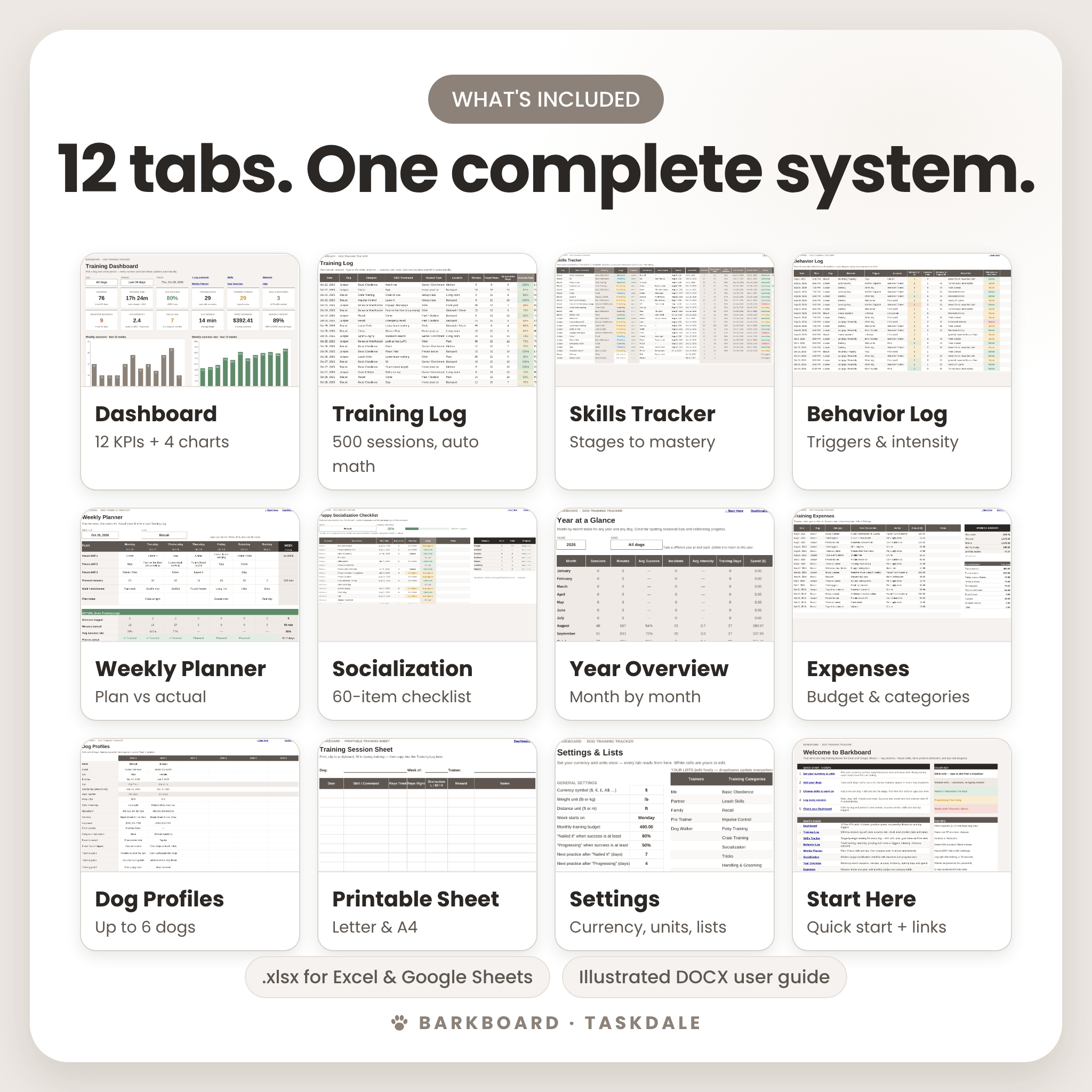
Most dog training logs are a single tab where you type notes and then guess. Barkboard is a connected system. It has a session log, a skills tracker, a behavior log, a puppy socialization checklist, a weekly planner, a year overview and an expense tracker, and the dashboard shows the results of all of them.
What This Dog Training Tracker Does
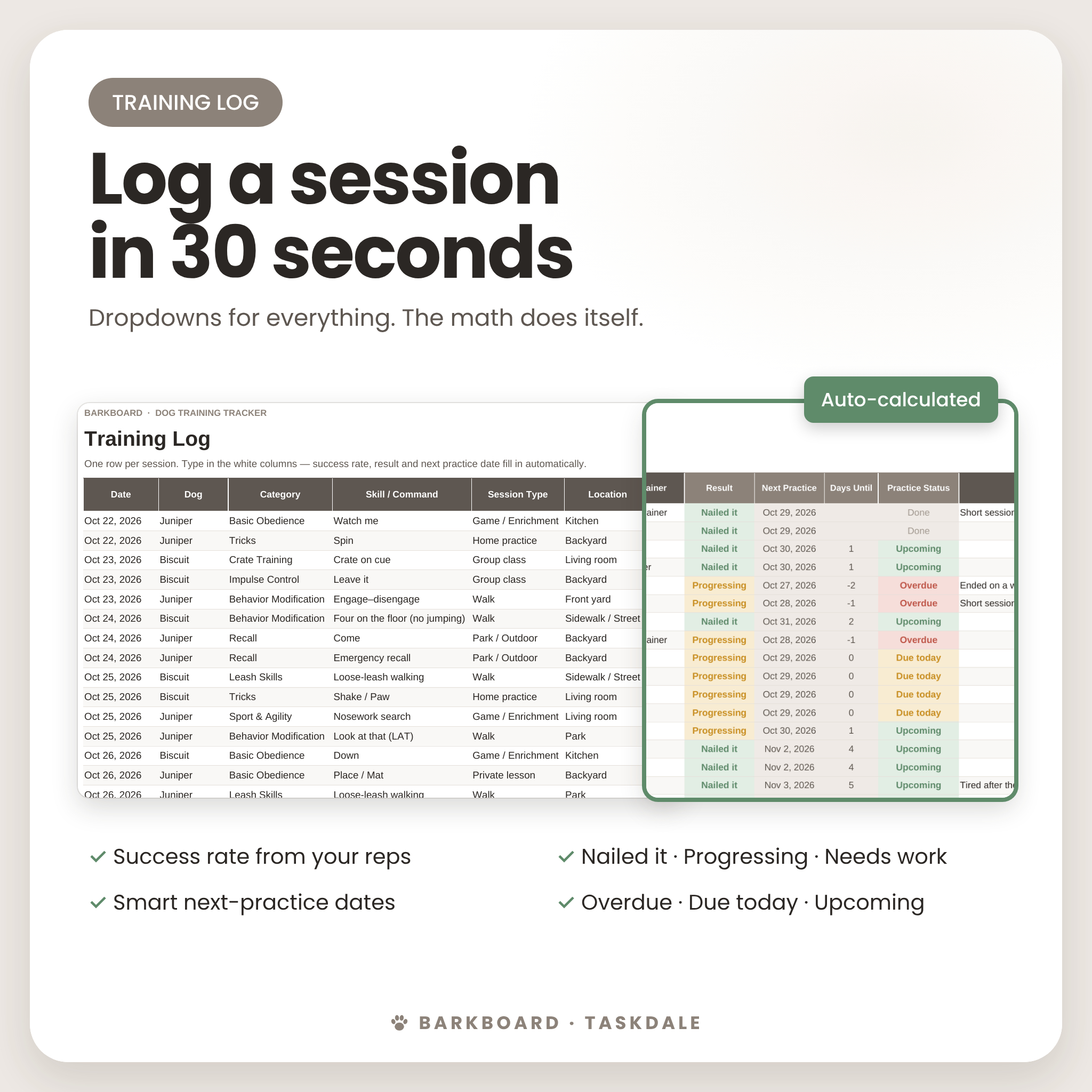
- Calculates your progress automatically: success rate, session result (Nailed it, Progressing or Needs work), the next practice date and a practice status (Overdue, Due today or Upcoming).
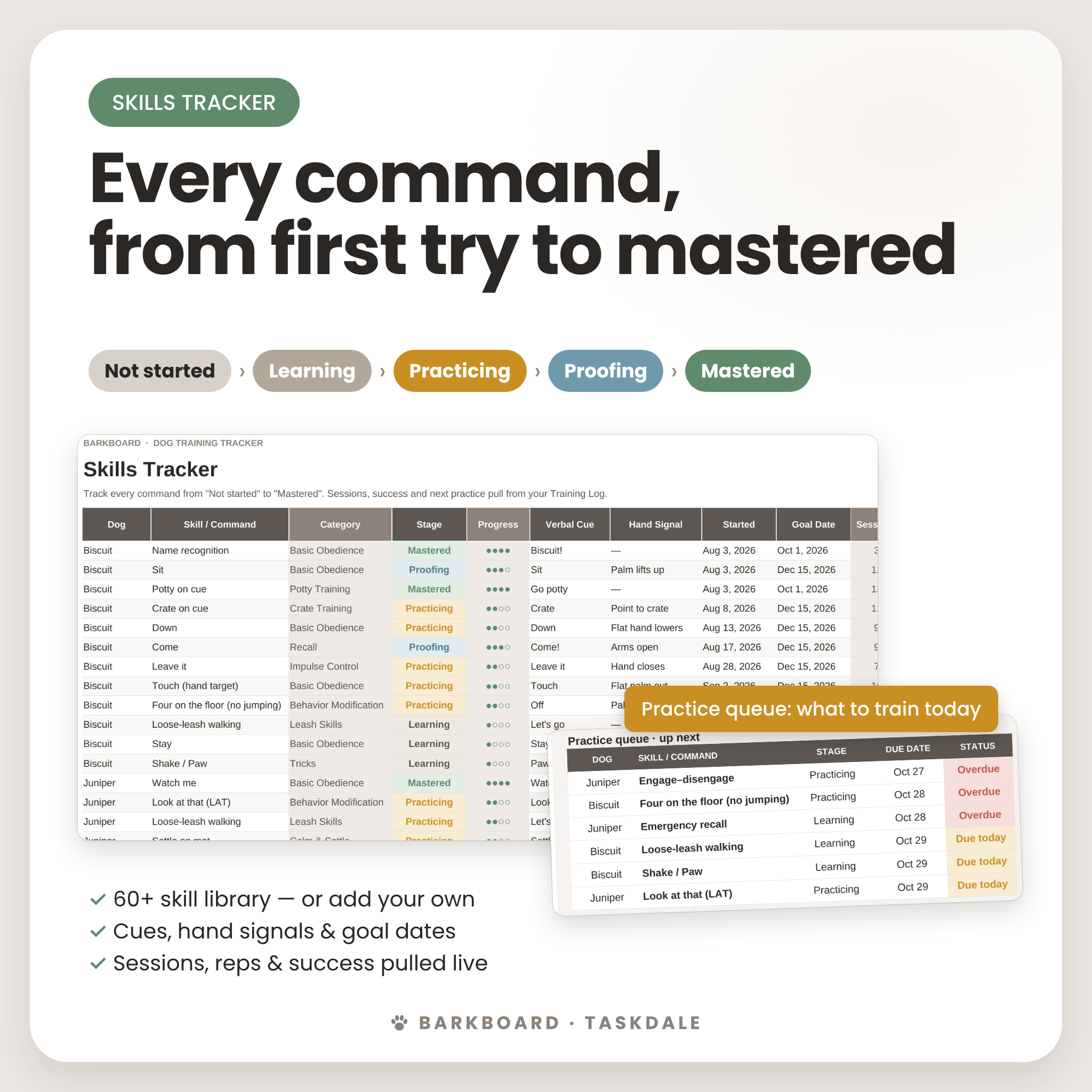
- Tells you what to train today: the Practice Queue lists the six unmastered skills that are due soonest.
- Shows when a skill is truly reliable: it compares success at low, medium and high distraction, so you know when your dog is ready for the next level.
- Finds behavior patterns: it ranks your dog’s top triggers and tracks incidents and average intensity over time.
Who It’s For
- New puppy owners working on potty, crate, socialization and basic manners
- Rescue and adult-dog owners working on leash reactivity, barking or jumping
- Students in group or private classes who want to keep homework on track
- Trick, nosework and agility fans building new skills
- Multi-dog households (up to 6 dogs in one file)
- Dog trainers who want a simple client progress log (one copy per client)
Features
Live Training Dashboard
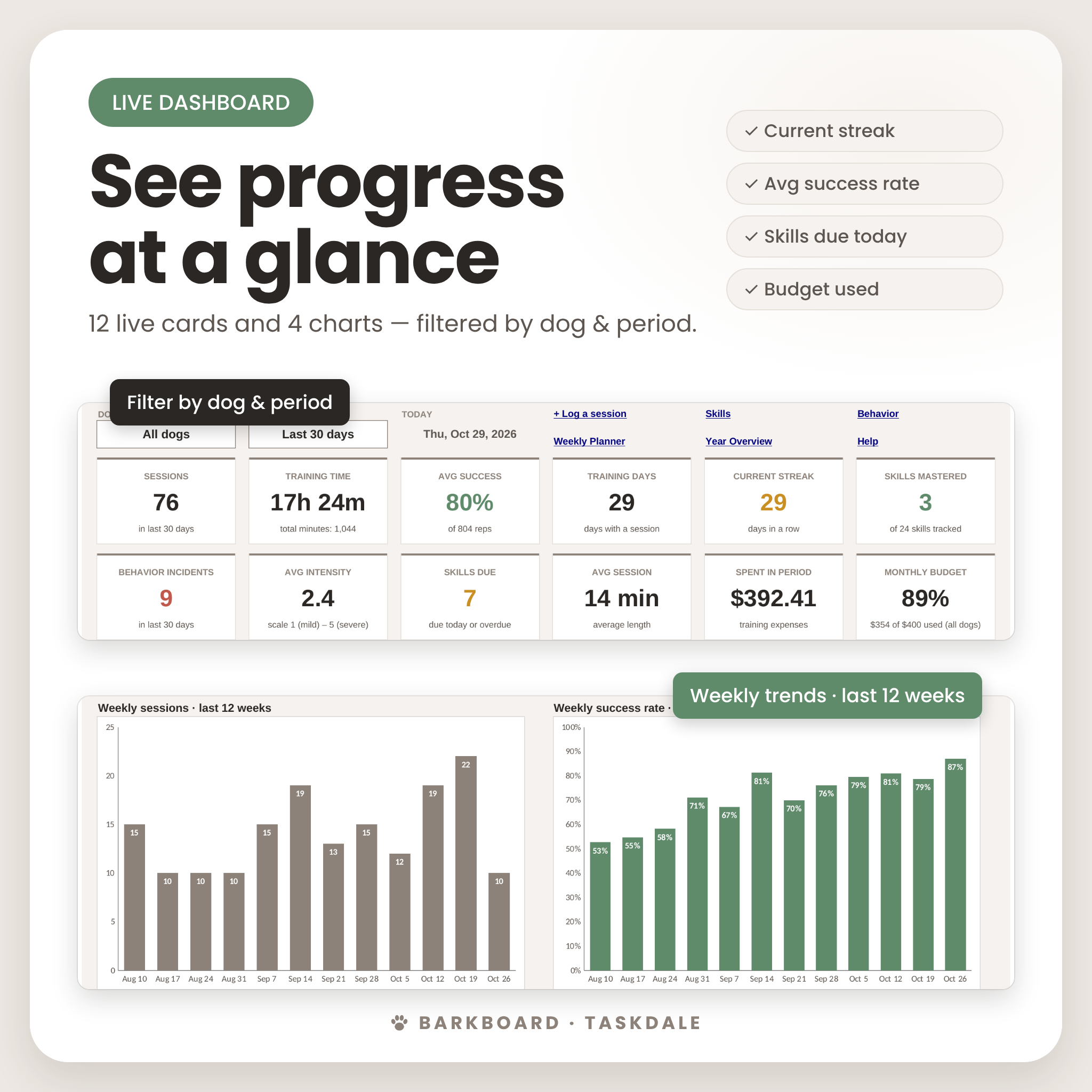
- 12 KPI cards: sessions, training time, average success, training days, current streak, skills mastered, behavior incidents, average intensity, skills due, average session length, spending in the period and monthly budget used
- 4 charts: weekly sessions, weekly success rate, training time by category and skills by stage
- Filter by dog (or all dogs) and by period: last 7, 30 or 90 days, this month, this year or all time
- Practice Queue, success by distraction level and top 5 behavior triggers
Training Log (500 sessions)
Dropdowns for dog, category, skill, session type, location, reward, distraction, distance, focus and trainer. You can still type your own entries. Validation stops impossible numbers, such as more successful reps than target reps.
Skills Tracker
Move each command through five stages: Not started, Learning, Practicing, Proofing and Mastered. Record the verbal cue, hand signal, start date and goal date. Sessions, reps, average success, last trained and next practice fill in from your log. It includes a 60+ skill library with categories.
Behavior Log
Record the behavior, trigger, location, intensity (1–5), duration, distance to the trigger, what you did and whether the outcome was better, the same or worse than last time. This is ideal for leash reactivity and other behavior work.
More Premium Tabs
- Weekly Planner: plan three focus skills a day, then compare your plan with the training you actually logged
- Puppy Socialization Checklist: 60 everyday experiences in 7 categories, with reactions, exposure counts and progress bars
- Year at a Glance: month-by-month sessions, minutes, success, incidents, training days and spend, with a chart
- Expenses: classes, treats and gear, with a monthly budget and category totals
- Dog Profiles: breed, age (calculated for you), vet, microchip number, goals and automatic stats for each dog
- Printable Sheet: a clipboard-ready session and behavior sheet that prints on US Letter or A4
- Start Here: a five-step quick start and a clickable tab directory
What’s Included
- Barkboard Dog Training Tracker (.xlsx) with 12 tabs
- Illustrated User Guide (.docx) covering setup, every feature, customization, troubleshooting and FAQs
How It Works
- Download the files right after purchase.
- Open the .xlsx in Excel. For Google Sheets, upload it to Google Drive, open it and choose File › Save as Google Sheets.
- On the Settings tab, set your currency symbol, units (lb/kg, ft/m) and the day your week starts.
- Add your dogs on the Dog Profiles tab.
- Log your sessions. The dashboard updates itself.
File Formats and Software Requirements
- Format: .xlsx spreadsheet and .docx guide
- Microsoft Excel: Microsoft 365, Excel 2019 or newer, or Excel for the web (free with a Microsoft account). Windows or Mac.
- Google Sheets: free with a Google account. Tested after converting the file with Save as Google Sheets.
- No macros, add-ins or subscriptions
- Designed for a computer or tablet screen. Mobile apps can be used for quick entries.
Customization
One currency setting controls every money value, so the tracker works in any country. Rename or add trainers, categories, session types, locations, rewards, behaviors, triggers and expense categories, and all dropdowns update. You can edit the skill library, change the success thresholds and set your own spaced-practice intervals. Formula cells are protected without a password to prevent accidents. You can still change colors and column widths, and you can unprotect a sheet whenever you want.
Use Cases
- Tracking a new puppy’s first 16 weeks of socialization and manners
- Measuring progress in a reactive dog’s “look at that” and engage–disengage work
- Bringing real data to a trainer or behavior consult
- Keeping the whole family consistent with one shared training plan
- Budgeting for classes, private lessons and training gear
Digital Download
This is an instant digital download. No physical item will be shipped. Your files are available right after checkout. For personal use only: you may not resell, share or redistribute this template.
FAQ
Does this dog training tracker work in Google Sheets?
Yes. Upload the .xlsx to Google Drive and choose File › Save as Google Sheets. All formulas, dropdowns, charts and tab links work.
Can I track more than one dog?
Yes. You can track up to six dogs, and every view can be filtered by dog.
Do I need Excel experience?
No. You type in the white cells and choose from dropdowns. Everything else is calculated for you. A Start Here tab and an illustrated guide walk you through setup.
Can I use my own currency?
Yes. Change one setting ($, €, £, A$ and so on) and every money value follows it.
Is it good for reactive dogs?
Yes. The Behavior Log records the trigger, intensity, distance and outcome, and the dashboard ranks your top triggers. It is an organizational tool and does not replace professional behavior advice.
Does it work on Mac?
Yes. It works in Excel for Mac, Excel for the web and Google Sheets.
Is there a subscription?
No. You pay once and download the files.
Reviews
There are no reviews yet.