Open your bank statement and read it slowly, line by line. Somewhere in there is a charge you do not recognize. A streaming service from a free trial last spring. An app you tried once. A cloud storage plan for a phone you no longer own. Small amounts, taken quietly, month after month. A subscription tracker is the simple fix: one list, every recurring payment, with the date it hits and the date you will decide whether to keep it.
This guide walks through a one-hour audit, how to cancel without the runaround, and how to stop the creep from coming back. It also covers two Taskdale budget spreadsheets that already have a subscription tracker built in.
Quick picks
| Product | Best for | Price | Link |
|---|---|---|---|
| Wisteria Budget Planner | Monthly, biweekly or paycheck budgets with a subscription tracker | $3.48 | View |
| Rosewater Monthly Budget Spreadsheet | A monthly budget dashboard with a subscription tracker | $3.99 | View |
Why Forgotten Subscriptions Cost More Than You Think
One charge of $9.99 hardly matters. Ten of them is $99.90 a month, and over a year that is $1,198.80. That is a holiday, or a chunk of an emergency fund, gone on things you may barely use.
The trouble is how subscriptions work. They are designed to be easy to start and boring to stop. A free trial asks for your card up front. The first charge arrives weeks later, when you have forgotten the sign-up. Prices creep up with a polite email you never read. And because each charge is small, no single one raises an alarm.
That is exactly why a subscription tracker matters. It turns a fog of small charges into one visible list. Once you see the total, most people feel a jolt. Not guilt. Just surprise.
How to Find Every Subscription You Are Paying For
Set a timer for sixty minutes. Make a coffee. You are going on a treasure hunt, and the treasure is your own money.
Step 1: Read three months of statements
Download your bank and card statements for the last three months. Highlight every charge that repeats, even if it has a different date. Look for the same amount appearing monthly, or a name you half recognize. Three months catches the monthly ones. If you can, scan back a full year to catch the annual renewals, which are the sneakiest.
Step 2: Check your email
Search your inbox for words like “receipt,” “renewal,” “your subscription” and “trial.” Old emails often reveal services that bill from a different account or card than you expect.
Step 3: Check your phone
Both Apple and Google keep a list of the subscriptions billed through your account. Open it and look. Apps you forgot about love to hide there.
Step 4: Check shared accounts
Family plans, a partner’s card, a student’s account you still pay for. Ask around. It is common to find a service nobody uses that everybody assumed somebody else cancelled.
Step 5: Write them all down
For each one, note the name, the cost, how often it bills, the next billing date, and how to cancel. That list is your subscription tracker. Everything else in this guide builds on it.
What a Good Subscription Tracker Should Show
You can keep a tracker on a scrap of paper. But a good one has a few columns that make decisions easier.
| Column | Why it matters |
|---|---|
| Name and cost | The basics. What are you paying? |
| Billing cycle | Monthly, yearly or weekly changes the real cost |
| Next billing date | Gives you time to cancel before it charges |
| Yearly cost | Multiplying by 12 shows the true price |
| Used lately? | The honest question: did you open it this month? |
| Keep or cancel | Your decision, written down |
The yearly cost column is the eye-opener. A $14.99 monthly plan feels fine. $179.88 a year feels like a decision.
A Quick Subscription Tracker Example
Here is a made-up audit, just to show how it works. Say you find five charges.
| Service | Monthly cost | Yearly cost | Used this month? | Decision |
|---|---|---|---|---|
| Video streaming | $12.00 | $144.00 | Yes | Keep |
| Music app | $10.00 | $120.00 | Yes | Keep |
| Fitness app | $15.00 | $180.00 | No | Cancel |
| Cloud storage | $3.00 | $36.00 | Sometimes | Review |
| Old magazine plan | $8.00 | $96.00 | No | Cancel |
Cancelling the two unused ones saves $23 a month, or $276 a year. The numbers are invented, but the pattern is real: there is nearly always something to cut.
How to Cancel a Subscription Without the Runaround
Cancelling can be annoying on purpose. Here is how to cut through it.
Look for the cancel option in account settings first, not on the main page. If you subscribed through an app store, cancel there instead, since the company itself cannot do it for you. If there is no button, search for the company’s name plus “cancel” and follow the steps from their help page.
When you reach a retention offer, a discount to stay, decide in advance. If you really do not use it, say no. If you would use it at half price, take the deal and put a review date in your tracker.
Always screenshot the confirmation. Then check your next statement to make sure the charge actually stopped. It is rare, but it happens, and a screenshot makes any dispute much easier.
For trials, set a reminder the day you sign up, two days before it ends. Better still, cancel right after you start, if the service lets you keep the trial period. Many do.
Common Subscription Traps to Watch For
A tracker only helps if you know what to put in it. These are the usual hiding places.
Free trials that roll into paid plans. The card goes in on day one and the charge lands on day eight, or day thirty. Write the end date in your tracker the moment you sign up.
Bundles you stopped using. A phone plan add-on, a bank account perk, a software suite that came with a laptop. These feel like part of something else, so they slip past the eye.
Annual renewals. A single yearly charge of $60 or $120 is easy to miss on a statement, then painful when it lands. Put the month in your tracker and set a sinking fund so the money is ready.
Price rises. A service you signed up for at one price may now cost more. When you do your monthly check, compare the amount charged against what your tracker says. A mismatch is your cue to reconsider.
Duplicate services. Two music apps, two cloud storage plans, two note-taking tools. Pick the one you actually open and drop the rest.
Spot one of these and write it down straight away. A thirty-second note today saves a surprise later.
Where to Keep Your Subscription Tracker
The best place is wherever you already keep your budget. A separate list tends to get forgotten. A tracker that lives next to your bills gets seen every week.
That is why a budget spreadsheet with a subscription tracker built in makes sense. Your recurring charges sit beside your bill calendar and your monthly budget, so they stay in view. When you set your budget, you can see how much of it is already spoken for by subscriptions before you buy a single thing.
Two Taskdale spreadsheets do exactly this. Both work in Excel and Google Sheets, and both list a subscription tracker in the title.
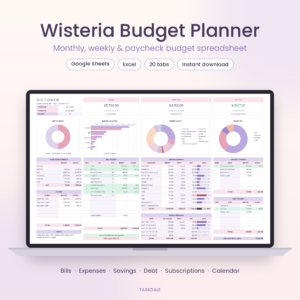
Wisteria Budget Planner
Price: $3.48 | Best for: Monthly, biweekly or paycheck budgets with a subscription tracker
A budget spreadsheet for Google Sheets and Excel with monthly, biweekly and paycheck budgeting. It includes a bill calendar, debt payoff, savings and a subscription tracker.
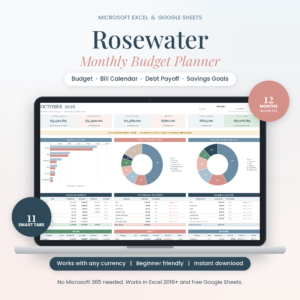
Rosewater Monthly Budget Spreadsheet
Price: $3.99 | Best for: A monthly budget dashboard with a subscription tracker
A monthly budget spreadsheet for Excel and Google Sheets with a budget planner dashboard, bill calendar, debt snowball, sinking funds and a subscription tracker.
Compare the Two Subscription Tracker Spreadsheets
| Product | Format | Price | Best for | Link |
|---|---|---|---|---|
| Wisteria Budget Planner | Budget spreadsheet for Google Sheets and Excel | $3.48 | Monthly, biweekly or paycheck budgets with a subscription tracker | View |
| Rosewater Monthly Budget Spreadsheet | Monthly budget spreadsheet for Excel and Google Sheets | $3.99 | A monthly budget dashboard with a subscription tracker | View |
How to Choose Between Wisteria and Rosewater
Both are budget spreadsheets with a subscription tracker, a bill calendar, a debt tool and savings. The difference is in how you plan your money.
Wisteria lists monthly, biweekly and paycheck budgeting. If you are paid every two weeks or your pay does not line up neatly with the calendar month, that is a clear sign it fits you. It also lists debt payoff and savings.
Rosewater is a monthly budget with a dashboard, a debt snowball and sinking funds. If you plan by the month and like a single overview screen, it is a good match. The sinking funds help with those yearly renewals we talked about, since you can set aside a little each month for the annual ones.
Neither is a bank connection. You type in what you choose to track. For a subscription list that is a plus, since you decide what goes in and you stay in control.
Keeping Subscriptions Under Control for Good
An audit works once. A habit works every year. Here is how to keep the list honest.
Review monthly. Take ten minutes on the first of the month. Look at the next billing dates. Ask the used-lately question for anything coming up.
Use a one-in, one-out rule. Before you add a new service, pick one to drop. It stops your list from growing.
Pay yearly only when you are sure. Annual plans often cost less, but they lock in your money. Only choose them for services you have used for a full year.
Rotate instead of stack. You do not need every streaming service at once. Subscribe to one, finish what you want to watch, cancel, and swap to the next. Your tracker shows you which one is active.
Give the savings a home. If you cancel $23 a month, move $23 into savings the same day. Otherwise it dissolves into everyday spending and you never feel the benefit.
Frequently Asked Questions
What is a subscription tracker?
A subscription tracker is a list of every recurring payment you make, with the cost, billing cycle and next billing date. It helps you spot forgotten charges and decide which ones to keep. It can live on paper, in a spreadsheet or inside a budget planner.
How do I find all my subscriptions?
Read three months of bank and card statements, search your email for receipts and renewals, check the subscription list in your phone’s app store account, and ask anyone who shares your accounts. Write each one down with its cost and date.
How often should I review my subscriptions?
Once a month works well. Spend ten minutes checking upcoming billing dates and asking whether you used each service lately. Do a longer audit once a year, since annual renewals are easy to miss in a short check.
Is a spreadsheet good for tracking subscriptions?
Yes, especially if it sits next to your budget and bill calendar. You can total the monthly and yearly cost automatically. Wisteria and Rosewater are two Taskdale spreadsheets that each list a subscription tracker in their titles.
What is the easiest way to cancel a subscription?
Start in the account settings of the service or in your phone’s app store subscriptions list. If you cannot find the option, search the company name plus the word cancel for its help page. Take a screenshot of the confirmation and check your next statement.
Your Next Step
So, here is the plan. Set a timer for an hour this week, pull your statements, and build the list. Then keep it somewhere you will see it. If you want it built into a budget, Wisteria at $3.48 suits uneven pay days, and Rosewater at $3.99 suits a monthly plan. The first charge you cancel will pay for either one.