Sunday night, 9 p.m. A stack of unmarked quizzes on the couch, a lesson plan you half remember writing, and a paper planner that is already out of room for next week. Sound familiar? A digital teacher planner will not mark the quizzes for you. But it can put your lessons, grades and attendance in one tapped-through place, and that alone takes real weight off your Sunday. This guide walks through what to look for, then compares five 2026-2027 options from Taskdale so you can pick one and get on with your week.
Quick picks at a glance
| Product | Best for | Price | Link |
|---|---|---|---|
| Hopscotch Planner 2026-2027 | Teachers with up to 6 classes | $7.49 | View |
| Bright Bell Planner 2026-2027 | Built-in grade book calculator | $6.99 | View |
| Chalk & Bloom Planner | Dated and undated in one purchase | $3.49 | View |
| Lesson Lane Planner | Teachers who also homeschool | $9.99 | View |
| Classroom Compass Planner | Seating charts plus gradebook | $4.99 | View |
Why a digital teacher planner beats paper for many classrooms
Paper has charm. I get it. But paper has one big flaw: you cannot move a lesson without rewriting it. Fire drill on Tuesday? Assembly on Thursday? Your neat pencil grid turns into arrows and scribbles by October.
An iPad planner lets you drag, copy and re-type without leaving a mess. Most are built as a PDF with hyperlinked tabs, so you tap a class name and land on that class page. Tap again for the week. Tap again for attendance. No flipping, no sticky tabs falling off in your bag.
Another plus is weight. If you already carry a laptop, a lunch and a crate of graded work, leaving a three-ring binder at home feels pretty good. Your whole year lives on one device.
Digital is not perfect, of course. Battery life matters, and some people simply think better with a pen on paper. If that is you, a printable option might suit you more, and a couple of the planners below include printable pages too.
What to look for in a digital teacher planner
Before you buy anything, take ten minutes and write down what you actually do each week. Not what you wish you did. What you do. That list is your shopping list.
Hyperlinked tabs
This is the feature that separates a real planner from a pile of pretty pages. Hyperlinks let you jump between months, weeks and classes in one tap. Without them, a digital planner is just a very long PDF, and scrolling through 200 pages on a Monday morning is nobody’s idea of fun.
Gradebook and attendance
Your school may have its own online gradebook, and that is the official record. Still, a personal gradebook in your planner is handy for quick checks, parent calls and your own sanity. Attendance pages work the same way. They give you a place to note who was away before the office email arrives.
How many classes it handles
Elementary teachers usually need one class page. Middle and high school teachers might have five or six. Check the product details so you do not buy a planner that stops at three.
The app you will use
Digital planners run inside a note-taking app on your tablet. Some Taskdale planners name the apps they work with, such as GoodNotes and Notability. Always check the product page for the app you own before buying. If it is not listed, do not guess.
Dated or undated
A dated planner has the calendar built in, so you start right away. An undated one lets you begin in any month and skip the weeks you do not need. Both work. Your pick comes down to a simple question: do you like structure handed to you, or would you rather set your own?
Our top picks for a digital teacher planner in 2026-2027
Here are the five planners I would look at first. Each one is a download from Taskdale, and each one is described below using only what its product listing says.
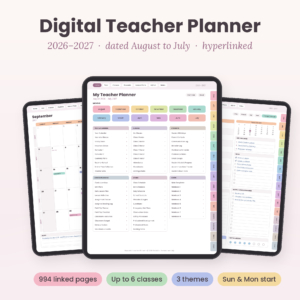
Hopscotch Digital Teacher Planner 2026-2027
Price: $7.49 | Best for: teachers juggling several classes
Hopscotch is a dated, hyperlinked lesson planner made for GoodNotes and Notability. It includes a gradebook and attendance pages, and it handles 6 classes. If your timetable looks like a puzzle, this is a strong starting point.
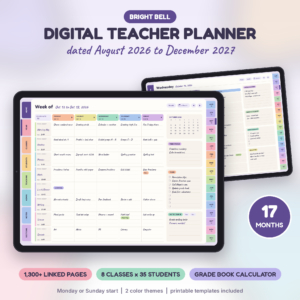
Bright Bell Digital Teacher Planner 2026-2027
Price: $6.99 | Best for: teachers who want grades calculated for them
Bright Bell is a hyperlinked lesson planner with a grade book calculator, attendance pages and student pages. The calculator is the draw. Less hand math at report card time means fewer mistakes and a calmer weekend.
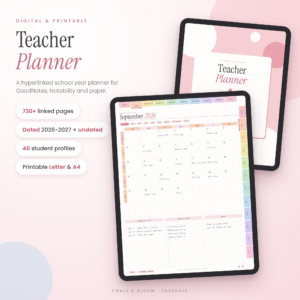
Chalk & Bloom Digital Teacher Planner
Price: $3.49 | Best for: budget-minded teachers who want options
Chalk & Bloom is a hyperlinked GoodNotes lesson planner that comes as 2026-2027 plus undated versions. It also includes printable Letter and A4 pages. That mix covers you if you switch between tablet and paper.
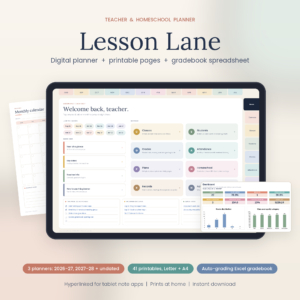
Lesson Lane Digital Teacher Planner 2026-2027 & Homeschool Planner
Price: $9.99 | Best for: classroom teachers and homeschool parents
Lesson Lane is sold as both a teacher planner and a homeschool planner for 2026-2027. If you teach at school and also teach your own kids at home, one product covers both worlds.
Classroom Compass Digital Teacher Planner
Price: $4.99 | Best for: teachers who want seating charts in the same file
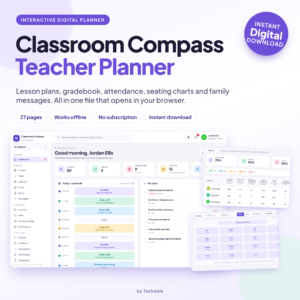
Classroom Compass covers lesson plans, a gradebook, attendance and seating charts. Seating charts sound small until you have a substitute coming in on Friday. Then they feel like gold. We also have a separate guide on which Classroom Compass teacher planner fits your classroom.
A day in the life with a digital planner
Picture a Wednesday. You walk in at 7:40, open the planner on your tablet, and tap today’s page. Period one is a reading block, period three is a quiz, and there is a note to call a parent after lunch. You glance at the seating chart, spot that two students who talk too much are side by side, and move one. Ten seconds. No eraser dust.
At 10:15 a student hands you a late slip. You tap attendance, note it, and carry on. After the last bell you enter quiz scores, and the totals are right there. By 3:45 you are done, and you did not carry a binder anywhere.
That is the whole pitch. It is not magic. It is just fewer small frictions stacked across a long school day, and teachers know better than anyone how fast small frictions add up.
One small tip: keep your stylus in the same pocket or bag slot every day. It sounds silly. But a planner that is hard to start is a planner that stays closed.
Planner comparison table
| Product | Format | Price | Best for | Link |
|---|---|---|---|---|
| Hopscotch | Dated, hyperlinked, GoodNotes and Notability | $7.49 | Up to 6 classes | View |
| Bright Bell | Hyperlinked lesson planner | $6.99 | Grade book calculator | View |
| Chalk & Bloom | Hyperlinked GoodNotes, dated and undated, printable | $3.49 | Low price, flexible | View |
| Lesson Lane | Digital teacher and homeschool planner | $9.99 | School plus home | View |
| Classroom Compass | Digital planner with seating charts | $4.99 | Seating charts and gradebook | View |
How to set up your planner in one afternoon
Buying the planner is the easy part. Setting it up well is what makes you keep using it in February, when energy runs low.
Start with the calendar. Add school holidays, testing weeks, parent evenings and staff meetings first. Those dates do not move, and seeing them early stops you from planning a big project the week before winter break.
Next, fill in your class pages. Names, periods, room numbers. If you have 28 students in one class, adding them all takes about fifteen minutes. Do it once, and every attendance and gradebook page is ready.
Then plan only the first four weeks of lessons. Not the whole term. Plenty of teachers fill an entire semester in August, then rewrite half of it by October. Four weeks is enough to feel prepared and short enough to stay flexible. When week three ends, add week seven, and keep rolling forward like that.
Last, pick a weekly check-in. Fifteen minutes on Friday afternoon or Sunday evening. Open the planner, move unfinished tasks forward, glance at next week. That small habit is what turns a nice file into a working tool.
A quick word on backups. Your planner is a file, and files can vanish if a device dies. Save a copy to cloud storage once a month, and again before report card season. It takes one minute and saves a lot of tears.
Common mistakes when choosing a digital planner
The first mistake is buying for looks. A pastel layout is lovely, but if it lacks an attendance page and you need one, you will resent it by week three.
The second is ignoring your device. Check which note-taking app the planner is built for, and check that you own it. A planner you cannot open is an expensive picture.
Third, skipping the trial run. Use the planner for one week before you load all your students into it. If tapping around feels slow, you will know early.
And the fourth: expecting it to replace your school system. Keep official grades where your school wants them. Your planner is your private notebook, which is exactly why it is useful.
Which planner should you choose?
Teach six classes in a day? Hopscotch lists support for 6 classes. Hate calculating grades by hand? Bright Bell has the grade book calculator. Watching your budget? Chalk & Bloom costs $3.49 and gives you dated and undated options.
If you also homeschool, Lesson Lane is the obvious fit. And if a seating chart is what you reach for most, Classroom Compass puts it right next to your gradebook.
Not sure if you want digital at all? Our comparison of 10 gradebooks and lesson planners includes other formats, and our weekly lesson plan template guide shows how to plan a week in 30 minutes.
Teacher planner FAQ
What is a digital teacher planner?
A digital teacher planner is a downloadable file you open in a note-taking app on a tablet or similar device. It usually has hyperlinked tabs for lesson plans, a gradebook, attendance and calendars. You type or write into it with a stylus or keyboard, and you can edit as often as you need without crossing anything out.
Can I use a teacher planner on an iPad?
Many people use digital planners on an iPad with an app such as GoodNotes. Several Taskdale planners list GoodNotes or Notability in their titles. Check the product listing for the app it names, then make sure you own or can install that app before you buy.
Is a dated or undated planner better?
Dated planners save setup time because the calendar is ready. Undated planners suit teachers who start mid-year, change schedules often, or want to reuse the same file. Chalk & Bloom includes both a 2026-2027 version and an undated version, so you do not have to choose.
Do I still need a school gradebook?
Yes, in most schools. The official gradebook is the record that counts. A planner with its own gradebook is a personal backup and a quick reference during meetings or parent calls. Treat it as your working notes, not the final word on grades.
How many classes can one planner handle?
It depends on the product. Hopscotch lists support for 6 classes in its title. For the others, open the product page and read the description before buying. If you teach many sections, confirm the planner has enough class pages first.
Your next step
Pick the one that matches your week, not your favorite color. If you are still torn, start with Hopscotch for a busy timetable or Chalk & Bloom for the lowest price. Download it tonight, set up your calendar tomorrow, and walk into Monday with one less thing on your mind.