You bought an iPad, a pencil and a pretty digital planner. Now the question: which app opens it? Every forum thread on GoodNotes vs Notability ends the same way, with a dozen people shouting for their favorite and nobody answering the actual question.
So here’s a calmer take. This guide compares GoodNotes vs Notability for one job only: digital planning. What each does well, where each gets annoying, and how to pick without losing a weekend to it.
| Product | Best for | Price | Link |
|---|---|---|---|
| Daybloom All-in-One Digital Planner | An undated 2027 and 2028 hyperlinked planner for GoodNotes, Notability and Android | $7.99 | View product |
| Hearthday Undated Digital Planner | Daily, weekly and monthly pages with a budget and habit tracker, 118 templates | $2.79 | View product |
| Willowday Undated Digital Planner | 130 templates and stickers at a small price | $2.49 | View product |
| Terra Undated Digital Planner | Habit, mood and budget trackers with boho stickers | $4.00 | View product |
| Linen Days Undated Digital Planner | A simple, low cost planner with daily, weekly and monthly pages | $1.99 | View product |
GoodNotes vs Notability: The Short Answer
If you want one line: both apps open the same kind of planner file, so either one will work. The real difference is how you like to organize and what else you do with the app.
GoodNotes feels like a shelf of notebooks. Notability feels more like a single, flexible notepad that can also record audio. For a planner, the shelf idea often wins, because you tend to keep several things side by side: a daily planner, a journal, a tracker.
That said, I’ve met plenty of people who use Notability happily for planning and never look back. So treat the next sections as a guide, not a verdict.
How Digital Planners Work in Both Apps
Most digital planners are PDF files. You import the file into the app, and from then on you write on it with your Apple Pencil or stylus. Good planners add hyperlinks, so tapping a month at the top of the page jumps you to that month. Tap a tab on the side and you land in another section.
Both apps can open PDFs, and both let you tap those links. So the planner itself is not what separates them. What matters is everything around it: how you store files, how you move between pages, how the pen feels, and what it costs.
A planner built for these apps will usually say so in the title. For example, several Taskdale planners list GoodNotes and Notability right in the product name, along with iPad and Android, so you know what you’re getting before you buy.
Where GoodNotes Wins for Planning
Organization
GoodNotes organizes work into notebooks and folders. If you keep a daily planner, a weight tracker and a gratitude journal, you can file each in its own place and find it in two taps. That structure matches how most people think about planners: one book per purpose.
Page tools
GoodNotes has a tidy toolbar for pens, highlighters, shapes and a lasso for moving things around. Stickers are a big part of planner culture, and dragging them into place feels natural. Many digital planner fans lean on that sticker workflow.
A planner culture around it
A lot of planner creators design with GoodNotes in mind, so the app has a large community and plenty of tutorials. If you get stuck, a quick search usually finds someone who solved the same problem.
Where Notability Wins
Audio with notes
Notability is well known for recording audio while you write. If your planning includes meetings, classes or calls, that feature can be handy. You jot a quick note and the recording is tied to it, so you can go back and hear what was said.
A simple, flexible feel
Some people find Notability less fussy. Fewer menus, more of a clean page. If you don’t care about shelves of notebooks and you just want a page to write on, it can feel faster.
Study and meeting use
Students often pick Notability for lectures. If your planner doubles as a place for class notes, that overlap may tip the balance.
A Planning Day in Each App
Abstract comparisons only go so far. So picture a Tuesday.
In GoodNotes, you open your shelf, tap the planner notebook and land on today’s page through a link. You write three tasks, drop a sticker beside the one that scares you, and flip to the tracker notebook to log your water. Two taps to switch books. It feels tidy.
In Notability, you open the planner from your list of notes, jump to today with a link, and write your tasks. If you’re in a meeting, you hit record and keep jotting. Later you tap a line and hear what was said. For a day full of calls, that’s a real help.
Neither day is wrong. They just suit different weeks. If your life is mostly lists and trackers, the GoodNotes day will feel smoother. If your life is mostly conversations, Notability earns its keep.
Pen Feel and Handwriting
People get weirdly emotional about this, so here’s the plain version. Both apps handle handwriting well on a modern iPad with an Apple Pencil. Both let you pick pen types, colors and thicknesses. Both have an eraser and a way to select and move what you wrote.
The difference you notice is small and personal: how quickly the toolbar lets you switch pens, how comfortable the zoom feels, and whether palm rejection behaves for your grip. The only honest test is to write a full page in each. If one makes you wince, drop it. When it comes to GoodNotes vs Notability, comfort in your own hand matters more than any feature table.
GoodNotes vs Notability on Price and Devices
On price, GoodNotes vs Notability is a moving target. Pricing and free limits for both apps have changed over the years, so check each app’s store page for what they charge today before you commit. Don’t trust a blog post from two years ago, including this one, on exact numbers.
What you can ask yourself is simple. Do you want to pay once, pay yearly, or stay on a free tier? Do you need your planner on more than one device? Are you on Apple only, or do you also use an Android tablet? Some planners mention iPad and Android in the title, which helps if you switch devices.
Whichever you pick, keep a backup of your planner file somewhere else, such as cloud storage. If a tablet dies, a fresh copy of the PDF means you only lose handwriting since your last export, not the whole planner.
A Fast Way to Choose
Answer these three questions.
- Do you plan to keep many planners and journals on the go? Lean GoodNotes.
- Do you record meetings or lectures while you write? Lean Notability.
- Do you already use one of them? Stay put. Switching costs you more time than any feature is worth.
Still stuck between GoodNotes vs Notability? Download a cheap planner and open it in both. Spend ten minutes writing a to-do list in each. Your hand will tell you faster than any review.
Digital Planners That Work in GoodNotes and Notability
Here are five Taskdale planners whose titles name these apps. They’re all undated or long lasting, so you can start any day, and each has a slightly different feel.
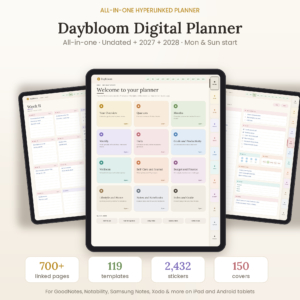
Daybloom All-in-One Digital Planner
Price: $7.99 | Best for: a planner that carries you through 2027 and 2028
Daybloom is an undated, hyperlinked all-in-one digital planner for GoodNotes, Notability and Android. The title mentions 2027 and 2028, so it suits anyone who wants one planner to last more than a year. A good first pick if you plan to stay with digital planning.
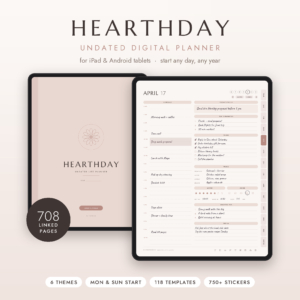
Hearthday Undated Digital Planner
Price: $2.79 | Best for: daily, weekly and monthly planning with a budget and habit tracker
Hearthday is an undated, hyperlinked planner for GoodNotes and Notability on iPad and Android. The title lists daily, weekly and monthly pages, a budget and habit tracker, 118 templates, stickers and dark mode. A lot of layout choice for the price.
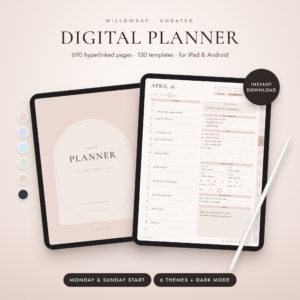
Willowday Undated Digital Planner
Price: $2.49 | Best for: trying out many layouts without spending much
Willowday is an undated, hyperlinked planner for iPad and Android, made for GoodNotes and Notability. The title lists daily, weekly and monthly pages, 130 templates and stickers. It suits anyone who likes choosing from many page types.
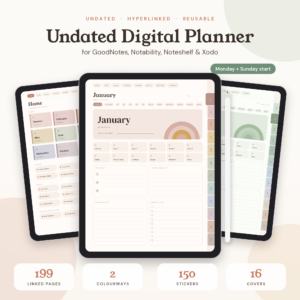
Terra Undated Digital Planner
Price: $4.00 | Best for: tracking habits, mood and budget with a boho look
Terra is an undated, hyperlinked iPad planner for GoodNotes and Notability. The title lists habit, mood and budget trackers, boho stickers, and a choice of Monday or Sunday start. A fit for anyone who wants gentle, earthy pages and a few built in trackers.
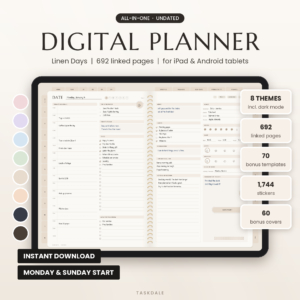
Linen Days Undated Digital Planner
Price: $1.99 | Best for: a simple undated planner at the lowest price here
Linen Days is an undated digital planner for GoodNotes and Notability on iPad and Android. The title lists daily, weekly and monthly planner pages with stickers. Choose it if you want to try digital planning without a big spend.
Tips That Work in Either App
A few habits help no matter which you choose.
Duplicate your blank planner before you start writing. Keep one clean copy untouched. When next month rolls around or you want a fresh start, you won’t have to buy it again.
Use the page thumbnails or outline to jump around. Learning the hyperlinks takes five minutes and saves hours.
Write a little bigger than you would on paper. Small handwriting on a tablet looks messy when you zoom out.
Also, check the screen at the size you’ll use it. A planner that looks lovely on a tablet may feel cramped on a phone. If you plan to check it on the go, test that first.
Compare the Planners
| Product | Format | Price | Best for | Link |
|---|---|---|---|---|
| Daybloom All-in-One Digital Planner | Undated hyperlinked planner, 2027 and 2028, for GoodNotes, Notability and Android | $7.99 | A planner that lasts beyond one year | View product |
| Hearthday Undated Digital Planner | Undated hyperlinked planner for GoodNotes and Notability, iPad and Android | $2.79 | Daily to monthly pages with budget and habit tracking | View product |
| Willowday Undated Digital Planner | Undated hyperlinked planner for GoodNotes and Notability, iPad and Android | $2.49 | Lots of templates for a small price | View product |
| Terra Undated Digital Planner | Undated hyperlinked iPad planner for GoodNotes and Notability | $4.00 | Habit, mood and budget trackers | View product |
| Linen Days Undated Digital Planner | Undated planner for GoodNotes and Notability, iPad and Android | $1.99 | A low cost starter planner | View product |
Frequently Asked Questions
Which is better for planning, GoodNotes or Notability?
In the GoodNotes vs Notability debate, neither is better for everyone. GoodNotes suits people who keep several planners and journals in organized notebooks. Notability suits people who want audio recording with their notes. Both open planner PDFs and follow hyperlinks, so try a cheap planner in each first.
Can I use the same digital planner in GoodNotes and Notability?
Often yes, because most planners are PDF files with links, and GoodNotes vs Notability matters less than the file itself. But check the product title. Some planners list both apps, while others name only one. If a title names the app you use, you can buy with confidence.
Do digital planners work on Android?
Some do, but it depends on the planner and the app you use. A few product titles list Android alongside iPad, which tells you the file was made with both in mind. Always read the title and description before you buy.
What does undated mean in a digital planner?
An undated planner has no fixed calendar year, so you fill in the dates yourself. That means you can start any day and never waste pages if you miss a week. It’s a handy choice if you’re new to digital planning.
Can I print a digital planner?
Some can. Product titles often say printable if a paper version is included. If you want both a tablet copy and a paper copy, look for that word before you buy.
So, the next step: pick the app you already have, grab one low cost planner, and use it for two weeks. A good place to start is Linen Days at $1.99, or Daybloom at $7.99 if you want a planner that lasts into 2028. If it sticks, buy a bigger one. If it doesn’t, you’ve lost less than a coffee.