Sooner or later every small business owner types “invoice template” into a search bar at 10 p.m., because a customer is waiting and the paperwork is not ready. Then comes the real question. Word, Excel, or PDF? Each one works. Each one also has a way of annoying you when you least expect it. This guide compares the three formats in plain terms, shows what a good invoice template must include, and points you to three Taskdale products that cover different needs, from a one-off freelancer to a seller with a stack of unpaid bills.
Quick picks
| Product | Best for | Price | Link |
|---|---|---|---|
| Ledgerline Invoice, Quote & Receipt Template Kit | A simple invoice template in Excel, Word and PDF | $1.50 | View |
| Client Billing Hub Invoice Tracker Spreadsheet | Tracking who has paid and who has not | $6.49 | View |
| Maker’s Business Forms Kit | Craft sellers who need order forms and invoices | $3.00 | View |
What Every Invoice Template Needs
Before we compare formats, let’s agree on what the page must say. A pretty layout means nothing if the basics are missing. Customers cannot pay a bill they cannot read, and accountants cannot file one that lacks key details.
Every solid invoice template should have these items:
- Your business name, address and contact details
- The customer’s name and address
- A unique invoice number, so you can find it later
- The issue date and the due date
- A clear list of what you sold, with quantity and price for each line
- Subtotal, any tax, and the final total
- How to pay you, plus your payment terms
That is the whole list. Everything else, like logos and colors, is dressing. Nice dressing, sure, but dressing.
One small tip from people who chase late payments for a living: put the due date in plain sight, near the total. Hiding it in a footer is how invoices sit in a drawer for three weeks.
Invoice Template in Word: Easy to Edit, Easy to Break
Word is where most people start. You open a file, type over the sample text, and save. No learning curve. If you can write a letter, you can fill one in.
The upside is flexibility. You can change the wording, add a note, move a box. A photographer can add a line about usage rights. A tutor can add a note about missed sessions. Word handles words well.
The downside is math. Unless the file has built-in formulas, you add up totals by hand or with a calculator. And one slip, like a missed zero, lands on a real customer’s invoice. Picture billing $1,200 as $120 and not spotting it for three weeks. Nobody is happy about that.
Word also makes it easy to overwrite last month’s invoice by mistake. You change the customer name, forget to change the number, and now you have two invoices with the same number. Small trouble, but it adds up.
Pick Word when you send a few invoices a month, each one is a bit different, and the math is simple.
Invoice Template in Excel: Built for Numbers
Excel suits anyone who prefers numbers to words. A good Excel version adds up lines, applies tax, and shows the total without you touching a calculator. Change the quantity and everything updates on its own.
That auto-calculation is the main reason many sellers prefer it. You type, the sheet does the sums. Fewer errors, faster work.
Excel also gives you a chance to keep a list of invoices in one file. You can add rows, sort by customer, and see at a glance what has been billed. For anyone who sells small items many times a week, that beats a folder full of separate documents.
The trade-off is layout. Excel is not a word processor, so long notes and fancy formatting can look clumsy. And if you send the sheet itself as an attachment, the customer can edit it, which is not what you want. Most people print to PDF before sending. We’ll get to that next.
Use Excel when you send invoices often, bill by item or hour, and want the math handled for you.
PDF: The Format You Send, Not the One You Build
Here is something that trips up newcomers. PDF is usually the final step, not the starting point. You build the invoice in Word or Excel, then save or print it as a PDF to send.
Why? Because a PDF looks the same on every phone and computer. Fonts do not shift, columns do not jump, and nobody can change your total by accident or on purpose. It feels official.
Some invoice templates come as fillable PDFs, where you type into set boxes. These are handy for simple, one-off jobs. They tend to be weaker on auto-math, though, so check before you rely on one for tax lines or long item lists.
Use PDF to send and to store. Keep the editable version in Word or Excel so you can create the next one quickly.
Word vs Excel vs PDF at a Glance
| Format | Best strength | Main weakness | Good for |
|---|---|---|---|
| Word | Easy wording changes | Math is often manual | A few custom invoices a month |
| Excel | Auto totals and tax | Layout can feel stiff | Frequent invoicing by item or hour |
| Looks the same everywhere | Hard to edit, weak math | Sending and storing finished invoices |
The best setup uses all three. Build in Excel, tweak wording in Word when needed, and send a PDF. A kit that gives you every format saves you from picking sides.
Picking the Right Invoice Template for Your Business
Different businesses need different things from their paperwork. Let me sketch three simple cases.
The solo freelancer. You send maybe five invoices a month. You want something clean, quick, and cheap. A kit with a ready invoice in a few formats does the job.
The busy seller. You send invoices weekly, and some customers pay late. Here the invoice is only half the story. You also need a way to see who owes what, and for how long.
The craft maker. You take custom orders. Customers ask for names, colors and sizes, and you need to write it all down before you bill. An invoice alone is not enough. You need the order form that comes before it.
The products below match those three cases. This section sticks to what each listing says, so please read the full product page before you buy.
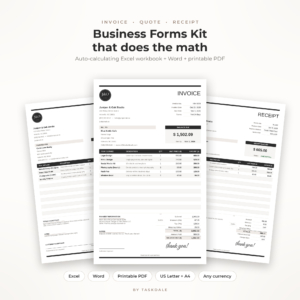
Ledgerline Invoice, Quote & Receipt Template Kit
Price: $1.50 | Best for: freelancers and small shops that want a simple invoice template
The listing describes an auto-calculating Excel invoice template, editable Word forms and a printable PDF, made for small business. That gives you the three formats we just compared in one download. At $1.50 it is a low-risk way to get started.
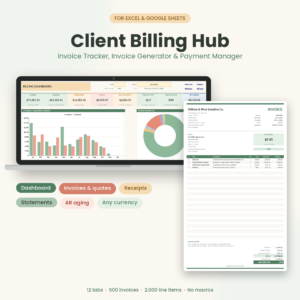
Client Billing Hub Invoice Tracker Spreadsheet
Price: $6.49 | Best for: businesses that need to track payments and chase late ones
This is an invoice tracker spreadsheet for Excel and Google Sheets. The title lists an invoice generator, payment tracker, receipts, client statements and an AR aging dashboard. If your problem is not making invoices but keeping tabs on them, this one speaks to it directly.
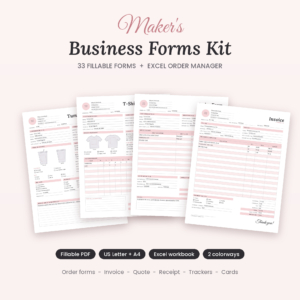
Maker’s Business Forms Kit
Price: $3.00 | Best for: craft sellers who take custom orders and bill for them
The kit lists 33 fillable craft order forms, plus invoice, price quote and receipt templates and an Excel order tracker. It comes in US Letter and A4. For makers, the order form and the invoice sit side by side, which keeps the details from getting lost.
Comparing the Three Invoice Template Options
| Product | Format | Price | Best for | Link |
|---|---|---|---|---|
| Ledgerline Invoice, Quote & Receipt Template Kit | Excel, Word, printable PDF | $1.50 | Simple invoicing for small business | View |
| Client Billing Hub Invoice Tracker Spreadsheet | Excel, Google Sheets | $6.49 | Payment tracking and client statements | View |
| Maker’s Business Forms Kit | Fillable forms, Excel tracker, US Letter and A4 | $3.00 | Craft order forms plus invoices | View |
Mistakes People Make With Invoices
Even a great template cannot save you from sloppy habits. These are the slips that happen most.
Reusing an old file without checking it. You open last month’s invoice, swap the customer name, and hit send. Then the customer sees the wrong date or an old price. Slow down for ten seconds and read the page top to bottom before it goes out.
Skipping the description. “Services: $450” makes people ask questions, and questions delay payment. Write what you did, in a line or two. “Logo design, three rounds of changes” tells the customer exactly what they paid for.
Forgetting deposits. If you took money up front, show it on the invoice and subtract it from the total. Otherwise the customer wonders if you remember, and you end up sending a correction.
Mixing business and personal payment details. Use one clear way to pay and make sure it goes to the right account. A wrong bank detail on a template gets copied onto every invoice you send afterward.
Not saving the paid copy. When money arrives, mark the invoice paid and file it. A paid stamp costs nothing and ends arguments.
Habits That Get You Paid Faster
A good template helps. Good habits help more. Here are the ones worth building early.
Send the invoice the same day you finish the work. The longer you wait, the less urgent it feels to the customer, and to you. A bill sent on Friday afternoon while the job is fresh gets paid sooner than one sent three weeks later.
Use clear payment terms. “Due in 14 days” beats “due soon.” If you charge a late fee, say so on the page before the problem starts, not after. Check your local rules on late fees, because they differ by place.
Number your invoices in order. INV-001, INV-002, and so on. It sounds boring, but when a customer says “I never got invoice 14,” you can find it in seconds.
Follow up. A gentle reminder a few days after the due date solves most late payments. People forget. They are not always ignoring you.
And keep copies. Save a PDF of every invoice you send. Tax time is much calmer when the paperwork lives in one folder.
Frequently Asked Questions
Which is best for an invoice template, Word or Excel?
Excel is better if you send many invoices and want automatic totals and tax. Word is better if each invoice needs custom wording. Many small businesses use a kit with both, then send the finished invoice as a PDF so it looks the same everywhere.
Can I send an invoice as a PDF?
Yes, and most people do. Build the invoice in Word or Excel, then save it as a PDF. That locks the layout and stops accidental edits. Keep the editable file too, so you can reuse it for the next customer.
What should an invoice include?
At minimum: your details, the customer’s details, a unique invoice number, the issue and due dates, a list of items with prices, the total, and how to pay. Tax lines may be needed too. This is general information, so check local requirements for your area.
Do I need a tracker as well as an invoice template?
Not at the start. If you send a handful of invoices a month, a folder and a simple list may be enough. Once you have many open invoices, a tracker helps you see who owes you and who is overdue.
Is a free invoice template good enough?
It can be. Free ones often lack auto-math, tracking or matching forms. A low-cost kit saves time if it fits your needs, but compare what is included before you pay for anything.
Your Next Step
So, here is the short version: pick the invoice template that matches how you really work, not how you wish you worked. If you just need to get paid this week, start with the Ledgerline Invoice, Quote & Receipt Template Kit for $1.50. If late payments are the pain, add the Client Billing Hub later. Either way, send your next invoice today.