You have probably started a budget at least twice. Once with a notebook, once with an app, maybe once with a spreadsheet your cousin swore by. And somewhere around week three, each one fell off. So here is a better question than “what is the best tool?” Ask which one you will still open in month four. A budget planner printable, a spreadsheet and a budget app all work. They just suit different kinds of people.
Below is an honest comparison, a quick quiz to find your type, and four Taskdale options, one for each style.
Quick picks
| Product | Best for | Price | Link |
|---|---|---|---|
| Fern & Penny Budget Planner Printable | Paper fans who want personal-size inserts | $1.99 | View |
| Sandstone Budget Planner | A monthly paper budget with a debt snowball | $6.99 | View |
| Northstar Budget Planner Spreadsheet | People who want formulas to do the sums | $12.99 | View |
| Peony Budget Planner App | An ADHD-friendly offline budget with no subscription | $14.99 | View |
The Real Test: Which Budget Tool Will You Open in Month Four?
Most budget advice treats the tool as the answer. It is not. A perfect system you never open is worse than a messy one you check on Sunday evenings. So the goal here is simple. Match the tool to your habits, not to your good intentions.
Think about where you already are when money worries hit you. At the kitchen table with the post? On your phone in the shop queue? At a laptop, with a cup of tea and a lot of tabs open? That is your clue. The best tool lives where you already are.
One more thing before we compare. Whichever you pick, the work is the same. List what comes in, list what goes out, give the leftover a job, and check back often. The tool just holds the numbers.
Budget Planner Printable: Pros, Cons and Who It Suits
A budget planner printable is a set of pages you print and fill in by hand. Monthly budget, bill tracker, debt page, savings page. You keep them in a folder or a ring binder.
What paper does well
Writing a number by hand slows you down. That sounds like a flaw, but it is the point. When you physically write “$62, electricity” you notice it. Paper also never needs charging, never updates itself without asking, and never shows you ads. There is no login, and nothing to cancel.
It is also great for households. Pin the page on the fridge and everyone sees the plan.
Where paper falls short
You do the maths yourself. If you are slow with sums, mistakes creep in. Paper also does not remind you about a bill, and it is easy to leave the folder in a drawer and forget it. And if you spill tea on the page, that is that.
A budget planner printable suits people who like to see things on a page, who enjoy a pen, and who budget at a desk or table. It is a poor match if you only ever manage money on the move.
Budget Spreadsheets: Pros, Cons and Who They Suit
A spreadsheet is a file in Excel or Google Sheets. The best ones are templates, which means the formulas are built in. You type your numbers and the totals update on their own.
What spreadsheets do well
They do the sums for you. They show monthly and yearly totals at a glance, and you can usually change categories to fit your life. You can also see the whole year at once, which paper rarely manages. Google Sheets works on a phone too, so you can update it in the shop queue.
Where spreadsheets fall short
A blank spreadsheet is a trap. Building one yourself takes hours, and a single broken formula can quietly throw off every figure. Templates fix that, but you still have to learn where things go. And if you are not comfortable with a computer, the whole thing feels like homework.
A spreadsheet suits people who like numbers, enjoy seeing totals, and already live in a laptop. It is a poor match if looking at a grid makes you want to close the lid.
Budget Apps: Pros, Cons and Who They Suit
An app lives on your phone. Many connect to your bank and sort transactions automatically. Others, like some offline ones, simply give you a tidy place to type.
What apps do well
They are always with you. You can log a coffee the second you buy it. Reminders pop up before a bill is due. If an app pulls in your transactions, you skip the typing completely.
Where apps fall short
Many charge a monthly fee. Some need your bank details, which not everyone is happy sharing. Notifications can become noise you swipe away. And when the company changes its prices or shuts down, your system goes with it. That is why some people prefer offline apps with no subscription.
An app suits you if your phone is your main device and you want nudges. It is a poor match if you distrust connecting accounts, or if pings make you tune out.
Budget Planner Printable vs Spreadsheet vs App: Side by Side
| Question | Printable | Spreadsheet | App |
|---|---|---|---|
| Who does the maths? | You | The formulas | The app |
| Works without power or signal? | Yes | Offline in Excel | Only if offline |
| Easy to update on the go? | No | Sometimes | Yes |
| Ongoing cost? | None | None | Often a subscription |
| Best at | Building awareness | Seeing the full year | Quick daily logging |
A Quick Quiz to Find Your Budget Style
Answer these in your head. No scoring needed.
Do you think better with a pen in your hand? Go printable. Do you like seeing totals and charts update by themselves? Go spreadsheet. Do you want a reminder before every bill? Try an app, preferably an offline one if you dislike subscriptions.
Do you get overwhelmed by too many options on one screen? Paper or a simple, focused tool. Do you share the budget with a partner who hates technology? Paper again. Do you work on a laptop all day? A spreadsheet will feel natural.
And if you answered a bit of everything, that is fine. Plenty of people print a monthly page for awareness and keep a spreadsheet for the yearly view.
Setting Up Each Tool in Thirty Minutes
Whichever you choose, the first half hour matters most. Here is a fast start for each.
Paper
Print the monthly page, the bill tracker and the debt page. Write your income at the top. Then copy your bills from your last statement, with due dates. Put the pages in a folder you can see from your usual chair. Done.
Spreadsheet
Open the template and save a copy before you touch anything. Fill in income, then bills, then savings goals. Do not rename the sheets or move columns yet, since the formulas may rely on them. Change the look later, once the numbers work.
App
Create your first month, enter your pay day, and add each bill with its date. Turn on reminders for the bills you have missed before. Leave the rest alone for a week and see what you actually use.
Then do the same thing every tool needs: a weekly check. Ten minutes. Tick bills, update balances, glance at what is left. The tool is only as good as the habit around it.
Which Budget Planner Printable Style Is Best?
If you do go with paper, pick the size first. Personal-size inserts, like those in the Fern & Penny planner, fit small binders you can carry around. Letter and A4 give you room to write bigger. Both Fern & Penny and Sandstone are undated, so you can begin in any month and skip nothing.
That is worth saying twice. An undated budget planner printable is much more forgiving than a dated one. Miss a month and there is no empty gap staring back at you. You just pick up the next page.
Our Picks for Each Budgeting Style
These four are real Taskdale products. Details come from the listings. I have ordered them by price.
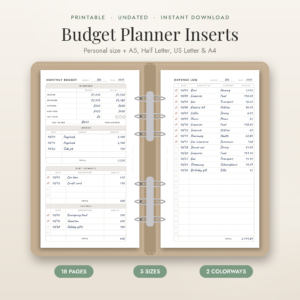
Fern & Penny Budget Planner Printable
Price: $1.99 | Best for: Paper fans who want personal-size inserts
A printable budget planner with personal size inserts in A5, Half Letter, Letter and A4. It is undated and covers a monthly budget, bill tracker, expense log, savings and debt payoff.
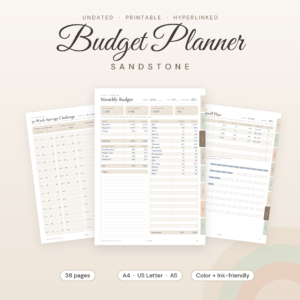
Sandstone Budget Planner
Price: $6.99 | Best for: A monthly paper budget with a debt snowball
An undated printable monthly budget and finance planner PDF with a bill tracker, debt snowball and savings challenges. It comes in US Letter, A4 and A5.
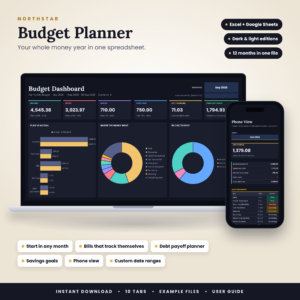
Northstar Budget Planner Spreadsheet
Price: $12.99 | Best for: People who want formulas to do the sums
A budget template for Excel and Google Sheets with monthly and annual views, a bill tracker, debt snowball and savings goals. It comes in dark and light versions.
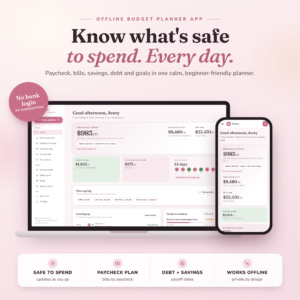
Peony Budget Planner App
Price: $14.99 | Best for: An ADHD-friendly offline budget with no subscription
An ADHD-friendly budget planner app with a paycheck budget, bill calendar, debt payoff and savings tracker. It works offline and has no subscription.
Compare the Four Budgeting Tools
| Product | Format | Price | Best for | Link |
|---|---|---|---|---|
| Fern & Penny Budget Planner Printable | Printable inserts in A5, Half Letter, Letter and A4 | $1.99 | Paper fans who want personal-size inserts | View |
| Sandstone Budget Planner | Undated printable PDF, US Letter, A4, A5 | $6.99 | A monthly paper budget with a debt snowball | View |
| Northstar Budget Planner Spreadsheet | Excel and Google Sheets template, dark and light | $12.99 | People who want formulas to do the sums | View |
| Peony Budget Planner App | Offline budget planner app | $14.99 | An ADHD-friendly offline budget with no subscription | View |
How to Switch Tools Without Losing Your Progress
Changing methods is normal. It does not mean you failed. But do it smartly, so you do not lose the thread.
First, write down your current fixed bills and balances on one page. That list travels with you to any new tool. Second, run both systems side by side for a month. It is a little extra work, but it stops gaps. Third, only retire the old tool once the new one has survived a full pay cycle.
Also, keep the categories the same at first. If you change your tool and your categories at once, you cannot tell whether your spending changed or just your labels did. One change at a time.
Frequently Asked Questions
Is a budget planner printable better than a budget app?
Neither is better for everyone. A budget planner printable builds awareness because you write each figure by hand, and it has no subscription. An app is better for quick logging and reminders. Choose the one that matches where and how you usually think about money.
Is a spreadsheet or a printable budget planner easier for beginners?
A printable is usually simpler to start, since there is nothing to learn beyond filling in boxes. A ready-made spreadsheet template is also beginner friendly because the formulas are done. Building a spreadsheet from scratch is the harder route.
Can I use a budget planner printable and a spreadsheet together?
Yes. Many people use paper for the monthly plan and a spreadsheet for the yearly view. Just keep one list of fixed bills as your master so the two never disagree about what you owe.
Are there budget apps with no subscription?
Yes. The Peony Budget Planner App is listed as offline with no subscription. Always check any app you consider for whether it charges monthly, needs bank access, or works without a connection.
How often should I update my budget?
Give it a few minutes each week and a longer check at the start of each month or pay period. Small regular updates beat one long session every quarter, because errors and forgotten bills get caught while they are still easy to fix.
Your Next Step
Here is the short version. Pick the tool that fits where you already are, not the one that sounds most impressive. If paper feels right, the Fern & Penny Budget Planner Printable is $1.99 and easy to try. If you want the formulas handled, look at Northstar. Whichever you choose, set your first Sunday check-in today.