A customer messages you: “Can you make a mug set for my niece? She likes blue.” Three days of texts later you know the color is actually teal, the name is spelled with a double L, the mugs are for a June 14 birthday, and nobody has said how much it costs. You are tired, and the job hasn’t even started. A simple craft order form ends that dance. It asks every question once, in one place, so the details are right before you pick up a brush, a needle or a hot glue gun. This guide shows what to put on one, how to use it, and which Taskdale kit saves you from building it from scratch.
Quick picks
| Product | Best for | Price | Link |
|---|---|---|---|
| Maker’s Business Forms Kit | A craft order form set with invoice, quote, receipt and tracker | $3.00 | View |
| Ledgerline Invoice, Quote & Receipt Template Kit | Simple invoices and quotes for small sellers | $1.50 | View |
| Client Billing Hub Invoice Tracker Spreadsheet | Keeping track of who has paid | $6.49 | View |
Why Every Custom Seller Needs a Craft Order Form
Custom work is wonderful and exhausting. Every order is different, so every order needs details. Colors, sizes, names, dates, delivery. When those details live in scattered messages, something always slips. A wrong spelling on a name is not a small mistake when the item is personalized. You cannot unprint it or unstitch it without losing money.
A craft order form gathers everything up front. The customer fills it in, you read it once, and both of you agree on what is being made. If something is unclear, you ask before you cut the fabric, not after.
It also protects your time. Without a form, a single order can eat an hour of back-and-forth. Multiply that by twenty orders in a busy season, and you have lost most of a week. A form turns that mess into five minutes of reading.
And it makes you look serious. Customers trust a seller who has a clear process. A tidy form says, “There is a process here, and your order will be right.”
What to Put on Your Craft Order Form
Keep it short enough that people will finish it, and complete enough that you never need to ask a follow-up. Here is what most makers need.
Contact and delivery details
Name, email, phone and a delivery address if you ship. Add a line for the customer’s preferred way to be contacted. Some people hate phone calls. Some ignore email. Ask once and save yourself the guessing.
The order itself
This is the heart of the page. List the item, the quantity, the size, the color, the material, and any wording or names to be added. Leave space for a sketch or a link to a photo if the customer has a reference in mind. Where possible, use checkboxes or short choices instead of blank lines. People answer faster when they only have to tick a box.
Dates that matter
Ask for the date the customer needs the item, and what the occasion is. A wedding gift and a casual treat have different deadlines. Also state your own lead time on the form, so people know a custom piece does not appear overnight.
Price and payment
Show the price or note that a quote will follow. Say if you take a deposit, how much it is, and when the balance is due. Make the payment method clear. A form that skips money invites awkward emails later.
Terms in plain words
Spell out your rules for changes, cancellations, returns on personalized items, and approval of any proofs. Keep it short and friendly. “Personalized items can’t be returned, but I’ll happily fix any mistake on my end” is clear and kind.
A confirmation line
End with a place for the customer to confirm that the details are correct. That one line settles most disputes before they begin.
How to Use an Order Form Day to Day
Here is how this might look in real life, using a small candle maker as an example.
A message arrives asking for twelve wedding favor candles with a custom label. The maker sends the customer a link to her craft order form instead of firing off twenty questions. The customer fills it in that evening: scent, label wording, jar size, wedding date, pickup or delivery.
Next morning, she reads it once. She spots that the wedding is in five weeks and her lead time is four. That is tight but possible, so she replies with a quote and a note about the deposit. The customer agrees. She saves the form, adds the order to her tracker, and starts pouring.
No texts at midnight. No guessing about the scent. And when the customer later says, “I thought it was lavender,” she has the form that says vanilla.
That last part is the real value. The form is not red tape. It is your memory.
Where the Quote, Invoice and Receipt Fit
An order form starts the process, but it is not the only document you need. Think of the paperwork as a small chain.
First, the order form records what the customer wants. Next, a quote or price confirmation says what it will cost. If the customer agrees and pays a deposit, a receipt confirms it. When the item is ready, an invoice asks for the balance. Finally, a receipt closes the loop.
If you want the details on how a quote differs from a rough estimate, we have a separate guide on that. For craft sellers, the main thing is to keep every step on the same page style, so nothing looks thrown together.
Pricing the work well is its own skill. Our guide on how to price handmade products walks through the formula, and it pairs nicely with a good order form.
Choosing a Craft Order Form Template
You could design your own in a document or a form builder. Plenty of makers do. But it takes hours to get the layout right, and it is easy to forget a field until the order goes wrong.
A ready-made craft order form kit gives you a head start. Look for forms that suit your type of work, a printable version for craft fairs, and matching documents for quotes and invoices so everything looks consistent. A tracker for open orders is a bonus.
The Taskdale kits below fit different needs. The descriptions stick to what each listing says, so please read the full product page before you buy.
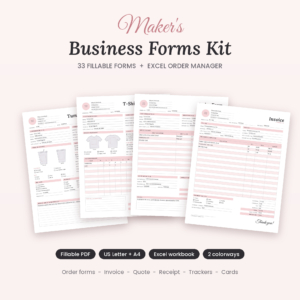
Maker’s Business Forms Kit
Price: $3.00 | Best for: makers who take custom orders and want the whole paperwork set
The listing describes 33 fillable craft order forms, plus invoice, price quote and receipt templates and an Excel order tracker, in US Letter and A4. That covers the order form, the price, the payment and the tracking in one download. For a craft seller, it is the closest fit on this list.
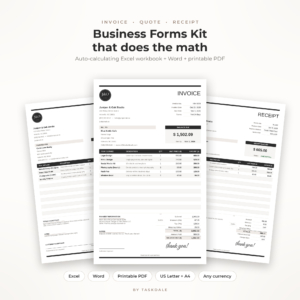
Ledgerline Invoice, Quote & Receipt Template Kit
Price: $1.50 | Best for: a small seller who mainly needs invoices, quotes and receipts
This kit lists an auto-calculating Excel invoice template, editable Word forms and a printable PDF for small business. It does not mention craft order forms, so think of it as a budget option for the money side of your paperwork.
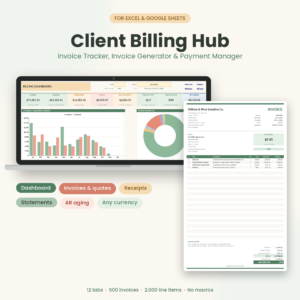
Client Billing Hub Invoice Tracker Spreadsheet
Price: $6.49 | Best for: makers with many open invoices who need to see who still owes money
This is an invoice tracker spreadsheet for Excel and Google Sheets. The title lists an invoice generator, payment tracker, receipts, client statements and an AR aging dashboard. It suits a growing shop where payments are starting to pile up.
Comparing the Options
| Product | Format | Price | Best for | Link |
|---|---|---|---|---|
| Maker’s Business Forms Kit | Fillable forms, Excel order tracker, US Letter and A4 | $3.00 | Craft order forms plus invoice, quote and receipt | View |
| Ledgerline Invoice, Quote & Receipt Template Kit | Excel, Word, printable PDF | $1.50 | Invoices, quotes and receipts | View |
| Client Billing Hub Invoice Tracker Spreadsheet | Excel, Google Sheets | $6.49 | Payment tracking and client statements | View |
Tips to Get Better Answers From Your Craft Order Form
A form is only as good as the answers it gets. A few small tweaks make customers fill it in properly.
Use plain questions. “What name should appear on the item?” works better than “Personalization details.” People should never have to wonder what you mean.
Offer examples. Under a wording box, add a short sample such as “Example: Emma & James, June 14.” It cuts down on messy replies.
Mark required fields. If you must have a date and a size, say so. Missing details are the main reason for delays.
Ask for a proof approval. For anything with printed or stitched words, tell the customer you will send a photo or mock-up first, and that they must approve it before you finish. It takes a day. It saves a remake.
Print a copy for markets. If you sell at craft fairs, keep a few printed forms and a pen on the table. A customer who wants a custom piece can fill it in on the spot, and you walk away with everything in hand.
Review it every few months. When you notice the same question coming up again and again, add it to the form. Your form should grow with your business.
Mistakes That Cost Makers Money
Talented makers lose money on orders they loved, and it is almost never the craft that goes wrong. It is the paperwork around it.
Starting before the deposit lands. Materials cost real money. If you buy fabric or resin for an order that then vanishes, you carry the loss. Wait for the deposit.
Promising a date you cannot meet. A rush order feels flattering. Then a jar cracks or a shipment runs late, and you are stuck. Quote a date with a little breathing room and beat it.
Forgetting extras. Gift boxes, shipping, special packaging and rush fees all take time or cash. Put them on the form as options with prices, so you are never working for free.
Keeping orders in five places. Notes on your phone, messages in three apps, a sticky note on the desk. Pick one tracker and put every order in it the day it arrives.
Frequently Asked Questions
What is a craft order form?
A craft order form is a page where a customer lists exactly what they want you to make. It covers item details, colors, sizes, names, dates, delivery and payment terms. Using one means fewer messages, fewer mistakes and a written record you can check later.
Should I take a deposit on custom orders?
Many makers do, because custom items cannot easily be resold. The amount and timing are your choice. Put it clearly on the form and the quote so there are no surprises. This is general information, not financial or legal advice.
Do I need a separate invoice if I have an order form?
Usually yes. The order form records what is wanted, while the invoice asks for payment. Some makers send a quote after the form and an invoice when the item is ready. A kit with matching documents makes this simple.
Can customers fill in the form on a phone?
That depends on the file type. Fillable forms work best on a computer. If many customers use phones, consider sending the form as a document they can complete, or fill it in yourself while chatting with them.
How many forms do I need?
One for each type of product is a good start. A candle order needs different questions than a knitted blanket. A kit with many forms lets you pick the one that fits and adjust it to your style.
Your Next Step
So, the short version: stop collecting order details in scattered messages. Pick a craft order form, use it for your next three orders, and see how much calmer your week feels. If you want one download that covers the form, quote, invoice, receipt and tracker, start with the Maker’s Business Forms Kit for $3.00.