It is the last week of May. You have a vague feeling that you taught plenty this year, but when the umbrella school or the local office asks for your days and hours, you stare at the wall. A good homeschool attendance tracker fixes that, and it costs you about thirty seconds a day. This guide shows you what to log, how to count hours without losing your mind, and which Taskdale planners keep the numbers in one place so the end of the year is a five minute job instead of a weekend of guessing.
Quick picks
| Product | Best for | Price | Link |
|---|---|---|---|
| Brightwood Homeschool Planner 2026-2027 | Fillable PDF planning with attendance and GPA in one kit | $9.99 | View |
| Hearthside Homeschool Command Center | Excel users who want attendance, grades and a transcript | $8.99 | View |
| Homeschool Planner App for Multiple Kids | Digital planning for several kids on iPad, phone or computer | $4.49 | View |
Why a homeschool attendance tracker matters more than you think
Most of us start the year sure we will remember. We will not. By November, Tuesday and Thursday blur together, and the day you spent at the science museum feels like it happened in another life. Memory is a terrible record keeper.
Rules differ a lot from place to place. Some states and countries want a set number of days, some ask for hours, and some ask for nothing at all. Check your own local requirements first, and keep this article as a general guide, not legal advice. Even if you are in a no-reporting area, a clean attendance log helps. It backs up a transcript, answers a relative who asks “but how much do they actually do?”, and gives you something solid if you ever move or enroll a child in a school.
There is a quieter benefit too. When you can see forty days logged in a row, you feel like you are doing the thing. That small win matters on the weeks when the kids are grumpy and the dishes are loud.
What to log in a homeschool attendance record
Keep it boring. The best records have only a few fields, because anything longer gets abandoned by week three. At minimum, you want the date, whether it was a school day, and a rough hours number. If you teach more than one child, give each child their own row or sheet.
- Date and day of the week
- Present, absent, or field trip/outside learning
- Approximate hours, rounded to the nearest quarter hour
- One short note, like “fractions, library trip, piano”
That note is the secret ingredient. A single phrase takes five seconds and later becomes your proof of what was covered. When a reviewer asks what you did in March, you can read it straight off the page.
Do not log perfection. A day that started at ten and wandered into a nature walk still counts. Write down what happened, not what the schedule said should happen.
How to count days and hours without going mad
Here is where people overthink. Pick one rule at the start of the year and stick to it. A simple rule that works: a day counts if real learning took place, even if it was short. Then, for hours, count the time spent on lessons, reading aloud, projects, practice, and structured outside classes. Skip meals, free play and chores unless they were part of a lesson.
A small example. Say your daughter does math for 45 minutes, reads for 30, writes for 20 and spends an hour on a co-op class. That is roughly two hours and thirty-five minutes. Round it to 2.5 and move on. You are building a fair estimate, not a timesheet for a law firm.
Days versus hours
If your area asks for days, tick days and keep hours loosely as backup. If it asks for hours, tally weekly and add up monthly. In both cases, keep a running total at the top of the sheet. Seeing “112 days, 380 hours” at the end of February is oddly motivating, and it saves you from a nasty surprise in June.
Paper, PDF or spreadsheet: choosing your attendance format
There is no right answer, only the one you will actually open. A paper log lives on the kitchen counter and is hard to ignore. A fillable PDF is neat, searchable and easy to back up. A spreadsheet does the adding for you, which is a gift in April.
Think about when you will fill it in. If it is at the table right after lessons, anything works. If it is late at night on the couch, a phone-friendly file beats a binder in the other room. And if you keep forgetting, tie the habit to something you already do, like closing the laptop or making tea.
Whatever you choose, keep one master copy. Two half-finished logs are worse than none, because you will never trust either.
One more thing about the homeschool attendance tracker you pick: test it for a week before you commit. Fill in five days and see how it feels. If you dread opening it, the layout is wrong for you, no matter how pretty it looks. A tracker that takes more than a minute a day will get skipped, and a skipped tracker is just clutter. Choose the one that feels light.
Younger kids can even help. A seven year old loves to tick the box that says “we did school today”. It gives them a little ownership, and it turns the log from a chore into a family ritual.
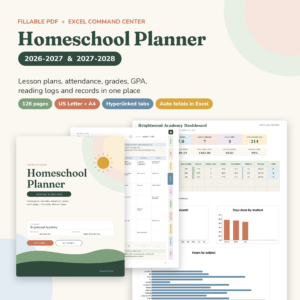
Brightwood Homeschool Planner 2026-2027
Price: $9.99 | Best for: families who like a fillable PDF with Excel backup
Brightwood is a 2026-2027 homeschool planner built as a fillable PDF lesson planner, with an attendance tracker and a grade and GPA tracker. It also comes with an Excel command center, and it is sized for US Letter and A4. If you want your lessons, attendance and grades to live in the same kit, this is a tidy way to do it.
Mistakes that wreck attendance records
The same five problems show up over and over. None of them are dramatic. They just pile up.
First, waiting a week to fill it in. By Friday, Monday is gone. Second, changing the rules mid-year, like counting field trips in October but not in January. Third, logging only the “real” school days and forgetting that reading in the car counts. Fourth, keeping notes so vague they say nothing, such as “school stuff”. And fifth, storing the log somewhere you cannot find it, then rebuilding it from the family calendar in a panic.
The fix for almost all of these is the same: make the record small, put it where you will see it, and fill it in the same day. A few seconds beats a long catch-up session every single time.
A simple weekly routine that keeps you honest
Daily logging is ideal, but life is life. If a day slips, use a Friday reset. Take ten minutes, open the log, and fill the week while it is still fresh. Check the notes against your lesson plans. Add the weekly hours. Look at the running total.
Once a month, do a slightly longer check. Count days so far, compare with your target, and spot gaps. If you are behind, you will know in February instead of in June. If you are ahead, you may be able to take that extra week off in spring without guilt.
It also helps to log the odd days: sick days, travel days, family emergencies. Write them as absences or partial days and move on. Honest records are more useful than perfect ones.
Attendance next to grades, lessons and a transcript
Attendance does not sit alone. Once you have it, you will want your lesson plans and grades nearby, and for older kids, a transcript. High school credits are often tied to hours, so a good record from ninth grade on can save you a lot of reconstruction later.
That is why many parents choose a planner that holds everything together instead of five separate files. When the dates, subjects and scores sit in one workbook, you are not copying numbers from sheet to sheet at midnight.
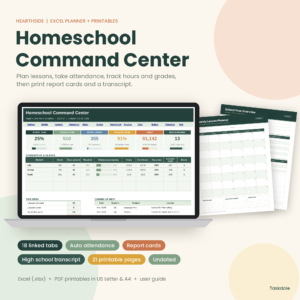
Hearthside Homeschool Command Center
Price: $8.99 | Best for: Excel fans who want attendance, report cards and a transcript
Hearthside Homeschool Command Center is an Excel homeschool planner with a lesson planner, attendance, a gradebook, report cards and a transcript, plus 21 printable pages. It comes in US Letter and A4. It suits parents who like a spreadsheet to do the heavy lifting and want everything for the year in one file.
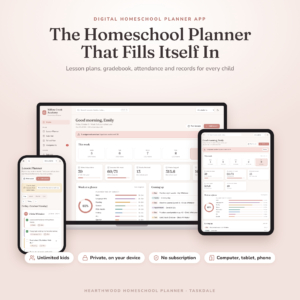
Homeschool Planner App for Multiple Kids
Price: $4.49 | Best for: parents who want planning, grades and records on iPad, phone and computer
Homeschool Planner App for Multiple Kids is a digital lesson planner with a gradebook, attendance tracker, report cards and transcripts. It works on iPad, phone and computer, and it is made for families with more than one child. If you like to update records from wherever you happen to be, this is the one to look at.
Which homeschool attendance tracker should you pick?
Here is the blunt version. If you love paper and fillable PDFs, start with Brightwood. If you want the widest set of records in a spreadsheet, including report cards and a transcript, Hearthside is the one. If you want to log days from your phone or tablet, with attendance, grades and report cards built in, the Homeschool Planner App is the one.
All three are digital products, so you download and use them right away. Print the pages you like, fill the rest on screen, and ignore any section you do not need. A planner is a tool, not a test.
Side by side
| Product | Format | Price | Best for | Link |
|---|---|---|---|---|
| Brightwood Homeschool Planner 2026-2027 | Fillable PDF + Excel command center | $9.99 | Planning with attendance and GPA tracking | View |
| Hearthside Homeschool Command Center | Excel + 21 printable pages | $8.99 | Attendance, gradebook, report cards and transcript | View |
| Homeschool Planner App for Multiple Kids | Digital app (iPad, phone, computer) | $4.49 | Logging attendance on the go | View |
Frequently asked questions
How many days should a homeschool attendance tracker show?
That depends on where you live. Some places ask for a set number of days, others for hours, and some have no rule. Check your local requirements first, then set your target at the start of the year and track toward it each week.
Do field trips and co-op classes count as attendance?
In most setups they can, as long as real learning happened and you wrote it down. Mark them as outside learning, add the hours, and put a short note. Whichever rule you choose, apply it all year so your totals stay consistent.
How long should I keep homeschool attendance records?
Keep them at least until your child finishes high school, and many parents keep them longer. They support transcripts, college applications and any move between schools. Store one digital copy somewhere safe, like cloud storage, and back it up once a term.
Can I fill in the attendance record weekly instead of daily?
Yes. A Friday reset works fine for many families. Set a reminder, review your lesson notes, and log the whole week in about ten minutes. Daily is more accurate, but a steady weekly habit beats a daily plan you abandon.
Is a spreadsheet better than a paper homeschool attendance tracker?
Neither wins every time. A spreadsheet adds your days and hours for you, which helps at report time. Paper is easy to grab and hard to forget. Pick the one you will really use, and keep a single master copy.
Your next step
So, the short version: start your homeschool attendance tracker today, even if it is mid-year. Back-fill what you remember, then keep it daily from here. If you want one place for lessons, attendance and grades, the best all-round fit on the shelf is Brightwood Homeschool Planner 2026-2027, and if you are an Excel person, Hearthside Homeschool Command Center is a close second. Future you, staring at a quiet June, will be glad you did.