Nobody warns you about the first time you grade your own kid. You sit there with a pen over a homeschool report card, your son watching from the sofa, and wonder if a B-plus is fair or just kind. Good news: a report card is simpler than it feels. It is a short, honest summary of what was learned and how well. This guide covers what to grade, which scale to use, how to write comments that help, and which Taskdale tools keep the whole thing neat from September to June.
Quick picks
| Product | Best for | Price | Link |
|---|---|---|---|
| Hearthside Homeschool Command Center | Excel users who want gradebook and report cards together | $8.99 | View |
| Brightwood Homeschool Planner 2026-2027 | Fillable PDF planning with grade and GPA tracking | $9.99 | View |
| Homeschool Planner App for Multiple Kids | A digital planner with report cards and transcripts on any device | $4.49 | View |
Why a homeschool report card is worth the effort
You already know how your child is doing. So why write it down? Three reasons. A report card makes you stop and look at the whole term instead of the last bad Tuesday. It gives your child a clear picture of progress, which beats vague praise. And it builds a paper trail that makes high school transcripts far easier later.
It also changes the mood at home. A calm sit-down once a term, with tea and a printed page, turns grading into a conversation. Kids stand a little taller when they see a real document with their name at the top.
Rules about record keeping vary by place, and this is general information, not legal advice. If your area asks for specific reports, check those first and then shape your report card to match.
What to put on a homeschool report card
Keep the layout plain. One page per child, per term. The top holds the child name, grade level, term dates and the teacher name (that is you). The middle is a table of subjects with a grade or rating and a short comment. The bottom holds attendance, a note on strengths, one goal for next term, and a signature line.
- Core subjects: math, language arts, science, social studies
- Extras: art, music, physical education, foreign language, Bible or character study if you use it
- Skills: reading level, handwriting, independent work, effort
Do not stuff the page. Six to nine subjects is plenty. If your child did fifteen things, group them. “Fine arts” can cover drawing, piano and a recorder club.
What to grade and how to grade it
Here is the part that trips people up. In a school, a teacher grades from tests and homework. At home, you have more to choose from. Use a mix: quizzes, written work, projects, oral answers, and plain old daily effort. The trick is to decide the mix in advance and tell your child.
A simple example for fourth grade math. Weekly quizzes count for 40 percent, daily practice pages for 30, and a monthly project or game for 30. At the end of the term you average the parts and get one number. No mystery.
Letter grades, percentages or rubrics
Younger children often do better with a rubric, such as Exceeds, Meets, Developing, Not Yet. Letter grades start making sense around middle school, and percentages fit when you are building toward a transcript. You can use one style for early grades and switch later. Just keep one style within a single year, so the numbers mean the same thing in October and in May.
Grading mastery instead of speed
One of the lovely things about home education is that your child can retry. If he missed half the fractions quiz, you reteach and test again. When you grade that subject, grade what he knows at the end, not what he knew on the first try. That is the point of learning at home.
Writing comments that actually help
A comment is the most useful line on the page, and also the one most parents skip. Skip nothing. One or two sentences are enough, as long as they are specific.
Weak: “Good job in science.” Better: “Explains experiments clearly and asked great questions about plant growth. Next term, work on writing up results in full sentences.” See the difference? The second one tells the child what went well and what to try next. It also doubles as a record of what you covered.
A simple formula: one strength, one thing to grow, one next step. Keep the tone kind but true. Kids can tell when praise is padding.
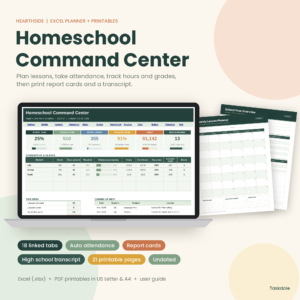
Hearthside Homeschool Command Center
Price: $8.99 | Best for: parents who want a gradebook, report cards and attendance in one Excel file
Hearthside Homeschool Command Center is an Excel homeschool planner with a lesson planner, attendance, a gradebook, report cards and a transcript, plus 21 printable pages. It comes in US Letter and A4. It fits families who want term grades and report cards to live in the same workbook as everything else.
How often should you issue a homeschool report card?
Most families pick every quarter, every semester, or once at year end. Quarterly gives you four checkpoints, which is great for catching problems early. Semester reports are lighter and fit well with a transcript. Annual reports are the minimum, and they work only if you keep notes during the year.
Whatever you choose, schedule it. Put the dates in your planner the way you would put in a dentist visit. Then give yourself a one week window before each date to gather scores, tidy comments and print. It keeps the job small.
If you have more than one child, do them on different days. Four report cards in one evening is how people end up writing “good effort” on everything.
Report cards by age: what changes from K to 12
A five year old and a sixteen year old need very different pages. For kindergarten and first grade, skip grades altogether. Use a short checklist of skills, like “recognizes letters” or “counts to 100”, and tick Not Yet, Getting There or Got It. Add a line about what your child loved this term. That is the part grandparents want to read anyway.
For grades two to five, add a rubric or simple letters and a sentence per subject. For middle school, letters begin to carry weight, so keep the gradebook tidy. In high school, the report card feeds the transcript, so credits, hours and weighting start to matter. The structure stays the same all the way up, which is nice. Only the detail changes.
One small tip that saves arguments: show your child the grading plan before the term starts. When they know quizzes count for forty percent, they stop being surprised by the result. Surprise is where most report card tears come from, more often than not.
Common mistakes with a homeschool report card
The big one is grading on feelings. If you are tired and the day was rough, you might pass a lower mark. The fix is to grade from the gradebook, not from the mood. Another is grade inflation, where everything is an A because it feels bad to give anything else. A report card that is always perfect stops being useful, and older kids notice.
Then there is the opposite trap: harshness. If your child worked hard on a weak subject and improved, that shows up in comments and a progress note, even if the letter stays a C. And there is plain forgetting, where the end of the term arrives and no scores were saved. Keep a simple gradebook all year and this problem goes away.
Printing, filing and sharing report cards
Print a copy for your records and a copy for your child. Some families frame the first one, which sounds silly until you see the grin. File the rest in a binder or a folder on your computer, one per child, by year. You will be glad of this when a co-op asks for a record, or when you start a high school transcript.
If you use a spreadsheet, export to PDF before you file, so the layout does not shift. If you use printable pages, a three-hole punch and a thin binder per child is all you need.
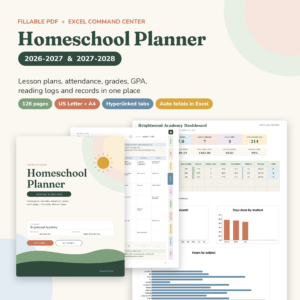
Brightwood Homeschool Planner 2026-2027
Price: $9.99 | Best for: planners who like fillable PDF pages with a GPA tracker
Brightwood Homeschool Planner 2026-2027 is a fillable PDF lesson planner with an attendance tracker and a grade and GPA tracker. It also comes with an Excel command center, and it is made for US Letter and A4. It is a good match if you plan lessons by hand or on screen and want grades tracked right next to them.
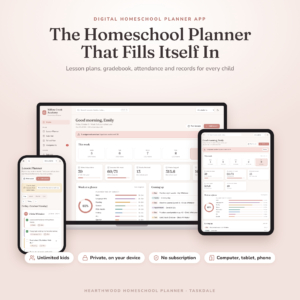
Homeschool Planner App for Multiple Kids
Price: $4.49 | Best for: parents who want planning, grades and records on iPad, phone and computer
Homeschool Planner App for Multiple Kids is a digital lesson planner with a gradebook, attendance tracker, report cards and transcripts. It works on iPad, phone and computer, and it is made for families with more than one child. If you like to update records from wherever you happen to be, this is the one to look at.
Choosing the right tool for your homeschool report card
Think about two things: where you like to work, and how much you want automated. If you love a spreadsheet and want grades, report cards and a transcript in one file, Hearthside is the closest match in the shop. If you like fillable PDF pages and a GPA tracker, choose Brightwood. If you want report cards and transcripts on your phone or tablet, and you teach several kids, the Homeschool Planner App is the budget friendly way in at $4.49.
You can always start light and move up. The habit matters more than the tool.
| Product | Format | Price | Best for | Link |
|---|---|---|---|---|
| Hearthside Homeschool Command Center | Excel + 21 printable pages | $8.99 | Gradebook, report cards and transcript | View |
| Brightwood Homeschool Planner 2026-2027 | Fillable PDF + Excel command center | $9.99 | Planning with grade and GPA tracking | View |
| Homeschool Planner App for Multiple Kids | Digital app (iPad, phone, computer) | $4.49 | Several kids, grades on any device | View |
Frequently asked questions
What should a homeschool report card include?
Include the child name, grade level, term dates, subjects with grades or ratings, short comments, attendance, a note on strengths, one goal for next term, and a parent signature. Keep it to one page. Six to nine subjects is plenty for most families.
Do I have to give letter grades on a homeschool report card?
No. Younger children often do well with a rubric like Meets, Developing or Not Yet. Letter grades start to make sense around middle school, and they matter more when you build a transcript. Pick one style and keep it steady through the year.
How often should I do a homeschool report card?
Many families use quarterly or semester reports. Quarterly catches problems sooner, and semester reports are lighter and fit a transcript. Choose a rhythm you will really keep, and put the dates in your planner so they do not slip.
How do I grade subjects like art or PE?
Use a simple rubric based on effort, progress and participation. You can also list what was covered and add a short comment. These subjects rarely need percentages. A clear note about skills practiced is more useful than a number.
Can I use a homeschool report card for high school transcripts?
Yes, if you keep consistent grading and credit rules. Term report cards give you the grades, and a gradebook gives you the detail. At the end of the year, you transfer final grades and credits to the transcript. Always check what your target school wants.
Your next step
So, the short version: choose your grading style this week, set the next report card date, and start a simple gradebook. If you want everything in one place, start with Hearthside Homeschool Command Center and print your first report card at the end of the term. Your child will remember that moment, and so will you.