Should you put your face on your resume? Ask five recruiters and you may get five answers. In Germany or Brazil, a photo can be normal. In the United States, many employers would rather not see one at all. A resume with photo can make you memorable, or it can quietly cost you the interview. The trick is knowing which situation you are in before you hit send.
This guide gives you a simple way to decide, covers photo rules that actually matter, and shows five Taskdale templates that include a photo option.
Quick picks
| Product | Best for | Price | Link |
|---|---|---|---|
| Hollis Resume Template | Photo resume plus a job search planner | $8.99 | View |
| Ellery Resume Template | Resume with photo for Word, plus ATS version | $4.79 | View |
| Alder Resume Template with Photo | Minimalist look with a job tracker | $4.79 | View |
| Sloane Resume Template | A modern resume with a photo, low price | $4.49 | View |
| Calla Photo Resume Template | Photo resume with thank-you letter | $4.49 | View |
Where a resume with photo is normal, and where it is not
Start with geography, because it settles most cases fast. In many parts of continental Europe, Latin America, the Middle East and Asia, a photo has long been a standard part of a CV. Employers there may even find a resume without one a little bare.
In the US, the UK and Canada, the habit runs the other way. Many employers and recruiters prefer to leave photos out of the hiring file. Some companies go further and ask candidates not to include them, partly to keep decisions based on skills. So if your job post comes from one of those markets and does not ask for a photo, leave it off.
Not sure? Look at the posting. If it mentions “CV with photo” or asks for a headshot, add one. If it says nothing, read a few staff profiles on the company site. Do they show faces? That tells you something about the culture, though not the rules.
And if the job is in a country where photos are common but you are applying through an online portal, you may still be asked to upload a plain file. In that case, keep a version without the picture ready.
Reasons a resume with photo can help
Where it fits the norm, a photo does a few useful things.
- It makes you easier to remember after a day of reading dozens of files.
- It signals that you know local hiring habits.
- It can suit client facing jobs where people meet you before they hire you.
Think of a hotel front desk role or a sales job. A friendly, well lit portrait on the page supports the picture of someone approachable. For a back office accounting job in the same city, it makes little difference either way.
Reasons to leave it off
A photo takes space. On a one page resume, a square headshot can push your content down by an inch or more. That inch might be the bullet that proves your best result.
It can also work against you in a few ways. Online hiring software may skip images altogether, and some portals scramble the layout. A poor photo does more harm than none, and many people only have a cropped holiday picture.
There is also a fairness point. Many employers want to judge on skills, and some recruiters feel uneasy seeing a photo for that reason. If you are applying somewhere that avoids them, you gain nothing by adding one.
How to pick a good photo for a resume with photo
If you decide to go ahead, the picture has to be right. A bad one costs you more than a missing one. Here is a plain checklist.
Light and background
Stand facing a window so soft light falls on your face. Use a plain wall behind you. Busy backgrounds pull attention away from you.
Clothing
Wear what you would wear to the interview. A shirt or blouse in a solid color usually works. Skip patterns that look loud at small size.
Framing
Head and shoulders only. Your face should fill about half the frame. Look at the camera with a relaxed, real expression, not a forced grin.
Quality
Use a sharp, recent picture. A phone camera is fine if you hold it steady or lean it on a shelf. Do not use filters. Do not crop someone else out of a group shot.
Size on the page
Keep it small. Think passport sized, not poster sized. The photo should support your content, not shout over it.
Five templates that include a photo
Every template below is made for Word, and all but Ellery also list Google Docs. They all include a cover letter and references alongside the resume, which means your documents match.
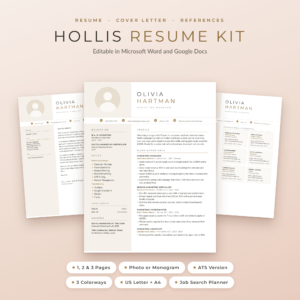
Hollis Resume Template for Word & Google Docs
Price: $8.99 | Best for: a photo resume with a planner for the whole search
Hollis is a resume with photo, a cover letter and references. It includes 1, 2 and 3 page CV versions, an ATS resume and a job search planner. It comes in US Letter and A4.
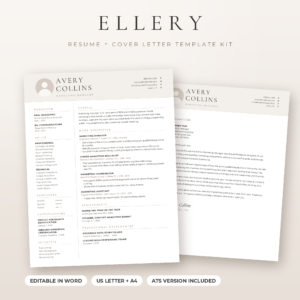
Ellery Resume Template for Word
Price: $4.79 | Best for: a Word user who wants both a photo and an ATS version
Ellery is a resume with photo for Word, with a cover letter and references. It has an ATS resume and 1, 2 and 3 page versions, in US Letter and A4.
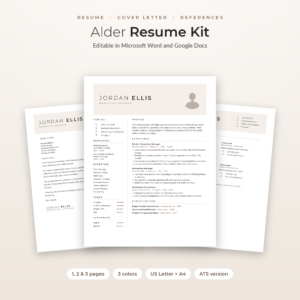
Alder Resume Template with Photo
Price: $4.79 | Best for: a minimalist layout with a way to track applications
Alder is a minimalist resume with photo for Word and Google Docs. It adds a cover letter, references, an ATS resume and a job tracker, with 1, 2 and 3 page CV versions.
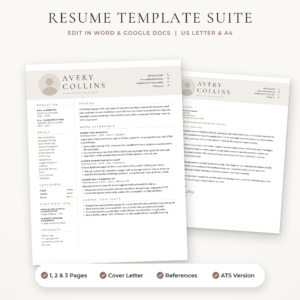
Sloane Resume Template for Word & Google Docs
Price: $4.49 | Best for: a modern photo resume at the lowest price tier
Sloane is a modern resume with photo, a cover letter and references. It includes an ATS resume and 1, 2 and 3 page CV versions, in US Letter and A4.
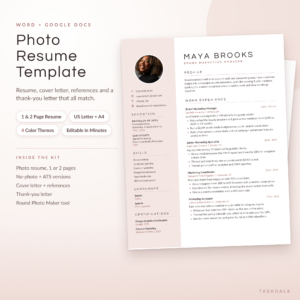
Calla Photo Resume Template
Price: $4.49 | Best for: a photo resume with every follow-up letter
Calla is a photo resume kit for Word and Google Docs with a cover letter, references and a thank-you letter. It has 1 and 2 page CV versions and an ATS version, in US Letter and A4.
Comparing the photo resume templates
| Product | Format | Price | Best for | Link |
|---|---|---|---|---|
| Hollis | Word and Google Docs, 1 to 3 pages, ATS version | $8.99 | Photo resume and job search planner | View |
| Ellery | Word, 1 to 3 pages, ATS version | $4.79 | Word users who need both versions | View |
| Alder | Word and Google Docs, 1 to 3 pages, ATS version | $4.79 | Minimalist look with job tracker | View |
| Sloane | Word and Google Docs, 1 to 3 pages, ATS version | $4.49 | Modern look, low price | View |
| Calla | Word and Google Docs, 1 and 2 pages, ATS version | $4.49 | Thank-you letter included | View |
The safest way to use a resume with photo
You do not have to pick a side forever. A smart habit is to keep two files that share the same content. One is your resume with photo, used where it fits the norm or where a person will read it first. The other is the ATS version with no picture, used for online portals.
All five templates above ship with an ATS version next to the styled one, so you are not paying twice. Name the files clearly, like “Sam-Lee-Resume-Photo” and “Sam-Lee-Resume-ATS”, so you never send the wrong one in a rush. That mistake is easy to make at eleven at night with a deadline at midnight.
It also saves stress. When a recruiter replies asking for your file in a hurry, you open the right folder and attach the right version in seconds.
Here is a short rule of thumb. If the application asks you to upload through a form, use the plain version. If you are emailing a named person, or applying in a market where photos are standard, use the photo version. When in doubt, go plain.
Does your industry care?
Field matters too. In acting, modeling and some hospitality work, a photo is part of the application and nobody blinks. In law, finance, engineering and most tech jobs, the content carries the whole weight, and a picture can feel out of place.
Teaching and healthcare sit in the middle. Practice varies by country, school and hospital, so it pays to check how colleagues in that setting present themselves. A quick look at a few public staff pages, or a question to someone who works there, takes five minutes and beats guessing.
One small test helps. Ask yourself, “Would a photo change how the reader judges my ability to do this work?” If the honest answer is no, and the market does not expect one, leave it out and use the space for another result.
Mistakes people make with a resume with photo
A few errors turn up again and again.
The first is the cropped selfie. You can spot it: a tilted angle, a bit of someone’s shoulder, a kitchen in the background. Take thirty seconds to make a proper picture instead.
The second is oversized images. A big photo crowds the page and pushes your experience off the first screen. Third, people forget to update it. A picture from ten years ago can make a first meeting awkward. Use something from the last year or two.
Last, some people add the photo and then neglect the words. The picture gets attention for two seconds. After that, only your bullet points matter. Put your real effort into those, with numbers and results where you have them.
Whatever you choose, read the whole page out loud once before sending it. Your ear catches clumsy lines your eye skips, and a page that sounds like you is far more convincing than one that only looks good.
One more point on fairness to yourself. If you feel uneasy about sending a photo, trust that. Nobody is owed your face before an interview. Plenty of people land good jobs with a text only resume, and you can always bring your photo to the interview in person, which is where it counts most.
Frequently asked questions
Should I put a photo on my resume?
It depends on where you apply. In many European, Asian, Latin American and Middle Eastern markets a photo is common. In the US, UK and Canada most employers prefer none. Follow the job post. If it does not mention a photo, leave it off.
Does a resume with photo work with ATS software?
Often not well. Tracking software reads text, and images can disturb the layout or get dropped. That is why it helps to keep an ATS version without a photo. The templates in this guide each include one alongside the styled version.
What size should a resume photo be?
Keep it small, about passport size, showing head and shoulders. It should sit in a corner or top section without crowding your text. Most templates here place the picture for you, so you only swap the image.
Can I edit a photo resume in Google Docs?
Hollis, Alder, Sloane and Calla are listed for Word and Google Docs. Ellery is listed for Word. In Google Docs, click the placeholder image and use Replace image to add your own. Check each product page for file details before you buy.
Is it rude to leave off the photo?
No, not in markets where photos are optional. If a job post specifically asks for one, include it. Otherwise a clean resume without a photo is perfectly acceptable and often preferred.
Your next step
So, here is the plan. Check the job post, decide on photo or no photo, and pick a template that gives you both. If you want a planner for the search as well, Hollis is the one. If you want a low cost start, Sloane or Calla cost $4.49. Take a clear picture near a window tonight and build your first draft.