Final grades post at midnight. You refresh the portal, see a letter, and then the real question hits: what does that do to my GPA? Most students guess. Some do the math on a napkin. A gpa calculator spreadsheet does it properly, and it lets you ask a better question before the semester ends: what do I need on the final to land where I want? This guide shows you how GPA works, how to track it each semester, and which student planner spreadsheets from Taskdale can do the heavy lifting.
Quick picks: GPA calculator spreadsheets for students
| Product | Best for | Price | Link |
|---|---|---|---|
| Semester HQ Student Planner Spreadsheet | College students who also want a budget tab | $5.99 | View |
| Campus Compass Student Planner Spreadsheet | Students who want everything in one file | $5.99 | View |
| Bloom Habit Tracker Spreadsheet | Building study habits | $1.17 | View |
How GPA actually works
GPA stands for grade point average. Each letter grade is worth points. On the common 4.0 scale, an A is 4, a B is 3, a C is 2, a D is 1 and an F is 0. Your school might use pluses and minuses or a different scale, so check your handbook. The idea stays the same.
Here is the part people miss. Courses are not equal. A four-credit lab counts more than a one-credit seminar. So the calculation is a weighted average, not a plain one.
Let me show you with a real example. Say you take three courses. Biology is 4 credits and you earn an A. English is 3 credits and you earn a B. Statistics is 3 credits and you earn a C.
Multiply each grade’s points by its credits. Biology: 4 times 4 is 16. English: 3 times 3 is 9. Statistics: 3 times 2 is 6. Add them up and you get 31 grade points. Divide by the 10 total credits and your semester GPA is 3.1.
See how Biology pulled the number up? That is why one big course can rescue a rough semester, and why one bad grade in a big course hurts more than you expect.
Why use a gpa calculator spreadsheet instead of an online tool
Free online GPA calculators exist, and they are fine for a quick check. But they forget everything the moment you close the tab. A spreadsheet remembers.
With a gpa calculator spreadsheet, you enter each semester once. Your cumulative GPA builds up across years, so you can see the whole picture, not just this term. That matters if you are aiming for honors, a scholarship renewal or a graduate program with a minimum GPA.
It also lets you play what-if games. Change a pending grade from a B to an A and watch the total move. This is the most useful trick of all, and a plain online box rarely lets you do it across several semesters.
And there is a calm that comes with seeing it written down. Vague worry about your grades is heavier than a number you can look at. Sometimes the number is better than you feared.
What to look for in a student planner spreadsheet
A GPA tab alone is a start. But grades come from assignments, and assignments come from a schedule. The best spreadsheets tie these together.
An assignment tracker
List every assignment with a due date and a status. Sort by date and you have your week. It is far better than trusting your memory at 1 a.m.
A class schedule
Times, rooms, instructors. It sounds basic, yet having it in the same file as your grades means one place to check instead of three.
A budget section
Many students are watching money as closely as grades. A college budget tab helps you track what comes in and what goes out, so textbook season does not catch you off guard.
Formulas that already work
You should not need to write a formula to get a GPA. Look for a spreadsheet that does the credit-weighting for you. Type in the credits and the grade, and let the file handle the rest.
Works where you work
Check the format. Both spreadsheets below name Excel and Google Sheets, so you can use whichever you prefer or switch between them.
Our picks for a gpa calculator spreadsheet
Both options below are student planner spreadsheets with a built-in GPA calculator. The descriptions use only what each product title says.

Semester HQ Student Planner Spreadsheet
Price: $5.99 | Best for: college students who want grades and money in one place
Semester HQ is an Excel and Google Sheets file with an assignment tracker, GPA calculator, class schedule and college budget. Four tools, one download. If you juggle classes, deadlines and a tight budget, this keeps them side by side.

Campus Compass Student Planner Spreadsheet
Price: $5.99 | Best for: students who want a simple all-in-one planner
Campus Compass pairs an assignment tracker with a GPA calculator, class schedule and budget, for Excel and Google Sheets. It suits students who want a single file to open each morning and see what is due, where to be and how the semester is going.
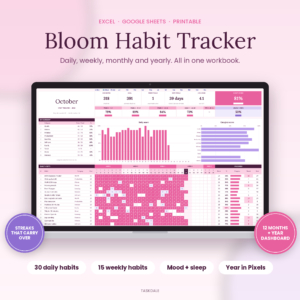
Bloom Habit Tracker Spreadsheet for Excel & Google Sheets
Price: $1.17 | Best for: students building a study routine
Bloom is a 12-month habit tracker with daily, weekly and monthly views, streaks, a mood and sleep tracker, and a year in pixels dashboard. Printables are included. Good grades often follow steady habits, and this gives you a place to track them.
Comparison: GPA and student planner spreadsheets
| Product | Format | Price | Best for | Link |
|---|---|---|---|---|
| Semester HQ | Excel and Google Sheets | $5.99 | GPA, assignments, schedule and college budget | View |
| Campus Compass | Excel and Google Sheets | $5.99 | GPA, assignments, schedule and budget | View |
| Bloom Habit Tracker | Excel and Google Sheets, plus printables | $1.17 | Study and daily habits | View |
How to track your college GPA every semester
Here is a simple routine that works. Nothing fancy.
At the start of the semester, enter each course, its credits and its name. Leave the grade blank. This takes five minutes and sets up the whole term.
Midway through, enter your current grades as estimates. Most syllabi tell you how each part of the grade is weighted, so you can work out where you stand. Now your GPA tab shows a projected number. It is not final, but it is honest.
Before finals, run the what-if test. What happens if you score a B on the final? An A? A C? Knowing the range tells you where your study hours matter most. If one class can swing your GPA by a full tenth and another can only move it by a hundredth, you know where to spend Saturday.
When grades post, replace the estimates with the real letters. Your semester GPA and cumulative GPA update together. Save a copy of the file under a new name for that term, so you have a record.
One extra tip for transfer students
If you transfer, ask your new school how it counts old credits. Some schools carry over credits but not grades. Your spreadsheet should match your school’s rules, not the other way around.
A what-if example you can copy
Let’s go back to the 3.1 semester. Say Statistics is still open and you are sitting on a C going into the final. You enter a B in that row instead. Statistics now gives 3 times 3, which is 9 points, not 6. The total climbs to 34 points over 10 credits, and your GPA becomes 3.4.
Three tenths of a point from one exam. That is the sort of thing a gpa calculator spreadsheet shows you in two seconds, and it can be the nudge that gets you into the library instead of onto the couch.
Now flip it. What if you slip from an A to a B in Biology? That row drops from 16 points to 12, and the GPA falls to 2.7. One heavy course, a big swing. So your finals plan should start with the credits, not with the class you like best.
Try this once each term. It takes five minutes, and it turns a vague hope into a plan with numbers on it.
Using your planner during finals week
Finals week is when a student planner spreadsheet earns its price. Open the assignment tracker and filter by due date. Everything that lands in the next seven days sits at the top, and anything missing a grade stands out.
Then check the class schedule tab for exam times. Write them in once, double check the room, and set a phone alarm for each. It sounds basic. But every campus has a story about the student who walked into the wrong hall.
If your file has a budget tab, glance at it too. Late nights bring takeout, and takeout adds up. A quick look at the numbers on Wednesday beats a surprise on Friday.
Common GPA mistakes students make
The first is ignoring credits. Averaging letter grades without credits is the most common error. It gives you a number that looks right and is not.
The second is forgetting repeat rules. Some schools replace an old grade when you retake a course, and some average both. Know which yours does before you plan a retake.
Third, treating pass/fail like a letter grade. Many schools leave pass/fail courses out of GPA entirely. Enter them as zero credits in your calculator, or skip them, depending on your school’s policy.
Fourth, waiting until the end. A student who checks their GPA every few weeks has time to act. A student who checks once a year only gets to react.
Finally, don’t let the number be the whole story. A GPA is a tool for planning, not a verdict on you. A bad semester is data, and data helps you change the next one.
Which student planner spreadsheet should you choose?
Honestly, Semester HQ and Campus Compass are close cousins, and both cost $5.99. Both list an assignment tracker, GPA calculator, class schedule and a budget. Open both product pages, look at the preview images, and pick the layout that feels easier on your eyes. You will use it for months, so that gut feeling counts.
If your real problem is consistency, not math, add the Bloom habit tracker for $1.17. A GPA calculator tells you where you are. A habit tracker helps change where you are headed.
GPA calculator spreadsheet FAQ
How do I calculate GPA in a spreadsheet?
Multiply each course’s grade points by its credits, add those results, then divide by total credits. A good spreadsheet does this when you enter credits and letter grades. The example above gives a 3.1 for 4, 3 and 3 credit courses graded A, B and C.
Can I use a GPA spreadsheet for more than one semester?
Yes, and that is the main advantage over a one-off online calculator. Keep each term in the file, or save one copy per term, and your cumulative GPA shows the full picture. Check the planner you choose for how it handles multiple semesters.
Does the spreadsheet work in Excel and Google Sheets?
Semester HQ and Campus Compass both name Excel and Google Sheets in their titles. That means you can open them in either program. Always confirm on the product page before buying, and make your own copy before you start typing.
Is a weighted GPA the same as a credit-weighted GPA?
No. Credit weighting means bigger courses count more. A weighted GPA in high school usually gives extra points for honors or advanced classes. Different schools use different rules, so follow your own school’s definition when you set up the calculator.
What GPA do I need for honors or a scholarship?
It varies by school and award. Check your school’s handbook or the scholarship terms for the exact number. Then use your spreadsheet’s what-if feature to see which grades you need this semester to reach it.
Your next step
Pick one file tonight. If you want the budget tab and a clean semester view, start with Semester HQ. Enter this term’s courses and credits, leave the grades blank, and you will have a working GPA tracker in ten minutes.