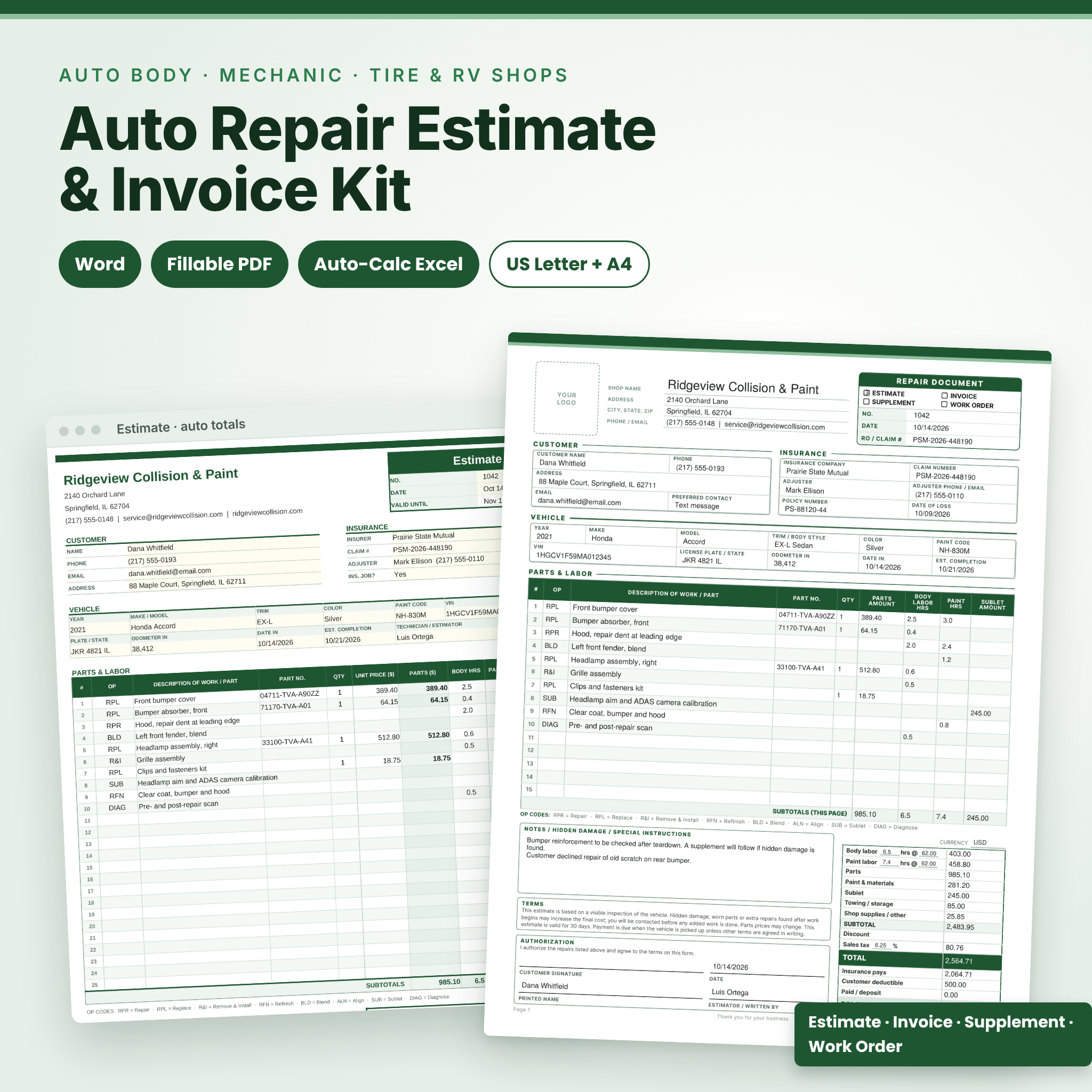



This auto repair estimate template gives your shop one clean form for every stage of a job. Write the estimate, send the insurance supplement, open the work order, then bill the customer on the same design. You get it three ways: editable Word files, fillable PDFs, and an Excel workbook that adds up the totals for you.
It’s built around how body shops and mechanics actually quote. There are columns for operation codes, part numbers, body labor hours, paint hours and sublet work. There’s space for the insurer, the claim number and the adjuster. And the totals box shows what insurance pays and what the customer owes after the deductible.
What the auto repair estimate template does
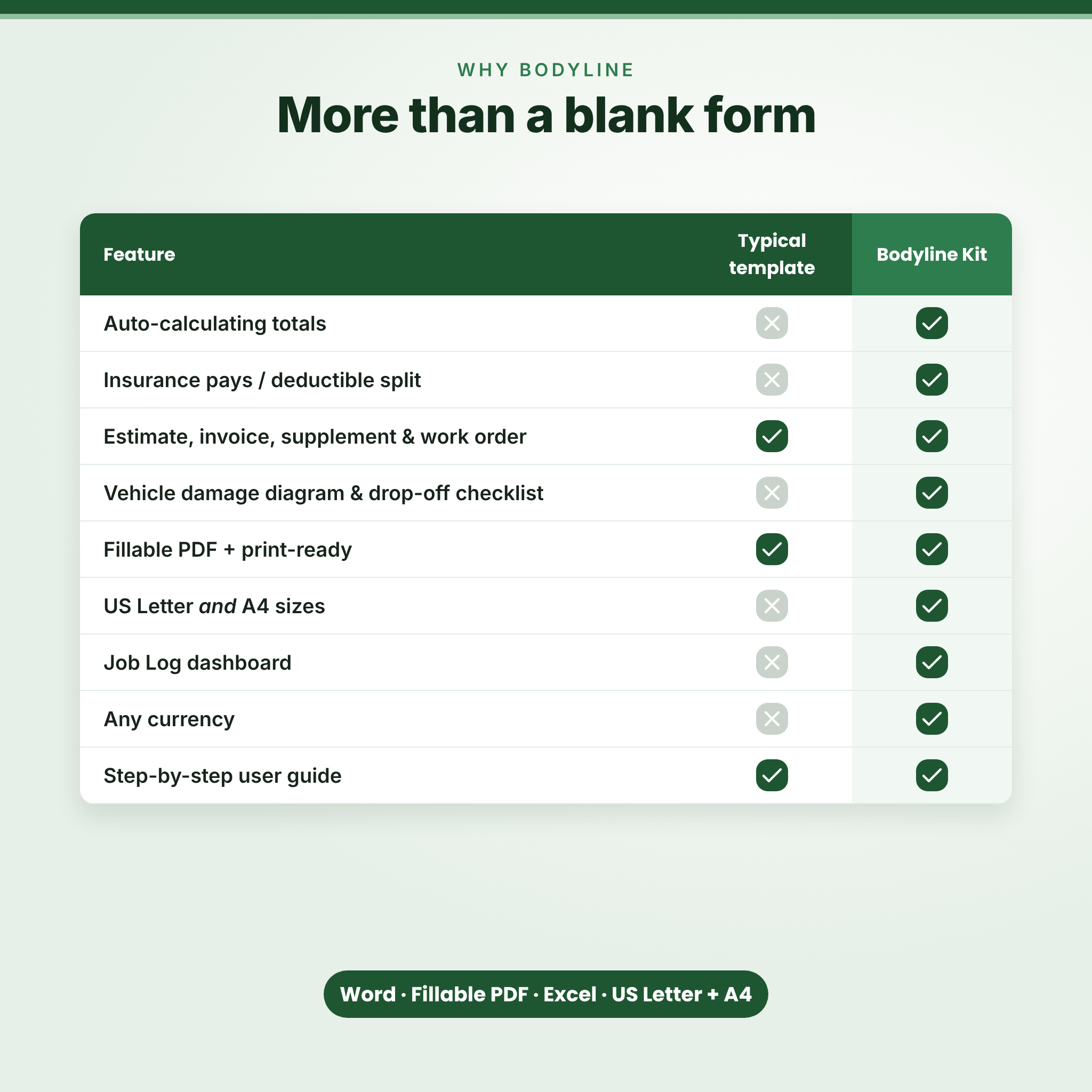
Most estimate forms are a header and a blank table. Fine for a quick quote. Not much help when an adjuster wants hours split by body and refinish, or when a customer asks why the bill went up.
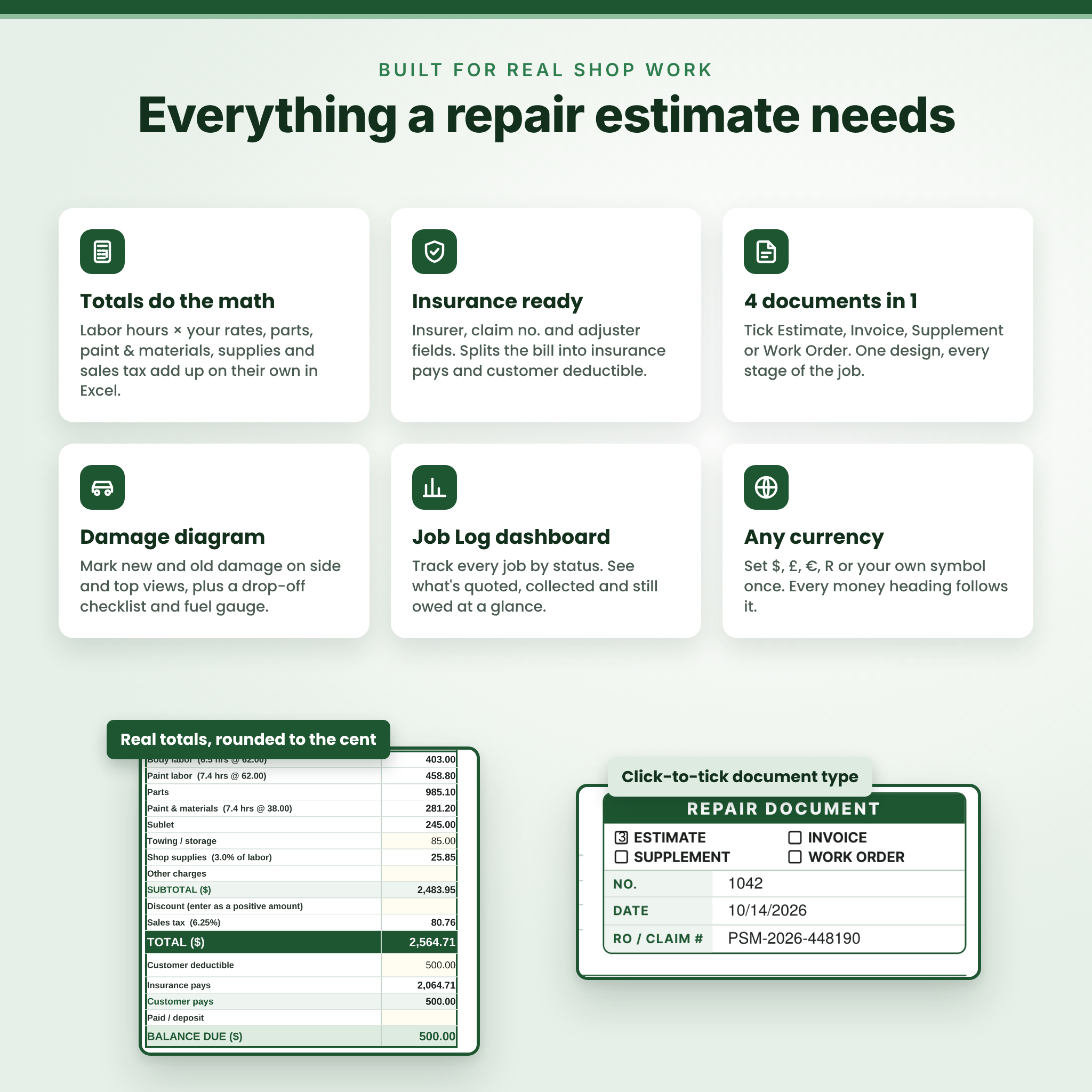
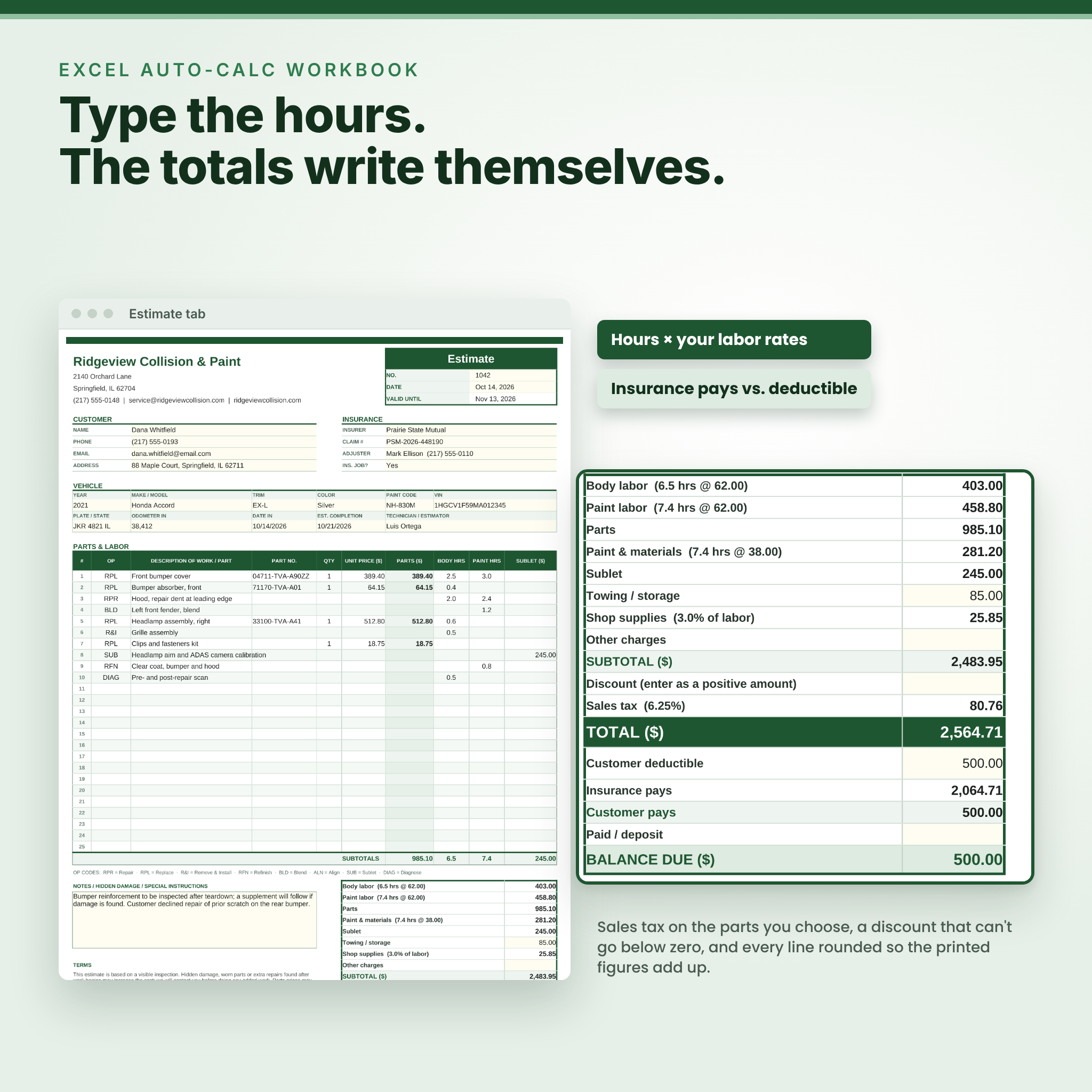
This kit fixes that. Tick Estimate, Invoice, Supplement or Work Order at the top of the form. List each part or operation on its own line. In the Excel version, type the hours and prices once and the workbook works out labor, parts, paint and materials, shop supplies, sales tax, the insurance share and the balance due. Every line is rounded to the cent before it’s added, so the printed figures always match the total.
Who it’s for
- Collision and auto body shops writing insurance estimates and supplements
- General mechanics, tire shops and service stations
- Truck, RV, motorcycle and fleet repair
- Mobile mechanics and dent repair techs who quote at the car
- New shops that want a professional form without paying for estimating software
Main features
Body shop estimate form
- Document type check boxes: Estimate, Invoice, Supplement, Work Order
- Customer, insurance and vehicle sections (year, make, model, trim, color, paint code, VIN, plate, odometer, date in, promised date)
- Parts and labor table with OP code, description, part number, quantity, parts amount, body labor hours, paint hours and sublet amount
- OP code key printed on the form: Repair, Replace, Remove & Install, Refinish, Blend, Align, Sublet, Diagnose
- Totals box with labor at your hourly rate, parts, paint and materials, sublet, towing and storage, supplies, discount, sales tax, insurance pays, deductible, deposit and balance due
- Notes for hidden damage, editable terms and a customer authorization signature block
Page 2: damage report and continuation sheet
- Vehicle damage diagram with left side, right side and top views
- Marking key for new damage, old damage, scratches, dents and cracks
- Drop-off condition checklist, fuel level boxes and keys received
- 17 to 21 extra numbered lines for bigger jobs
Excel auto-calc workbook
- Settings tab: shop details, currency symbol, body and paint labor rates, materials rate, shop supplies percentage and sales tax
- Choose what gets taxed: parts and materials, labor, or sublet and towing
- Document type dropdown changes the title and switches Valid Until to Due Date for invoices
- Insurance job switch splits the total into insurance pays and customer pays
- 25 line items with dropdowns and input checks that block typing errors
- Formulas are locked with no password, so nothing breaks by accident
- Job Log for up to 300 jobs with color-coded statuses, filters, summary cards and a jobs-by-status chart
- Prints on one page
What’s included
- 4 Word templates (.docx): 1-page and 2-page, in US Letter and A4
- 4 fillable PDF forms: 1-page and 2-page, in US Letter and A4
- 1 Excel workbook (.xlsx) with Settings, Estimate and Job Log tabs
- 1 user guide (.docx) with screenshots, troubleshooting and FAQs
- Everything also comes together in one ZIP file
How it works
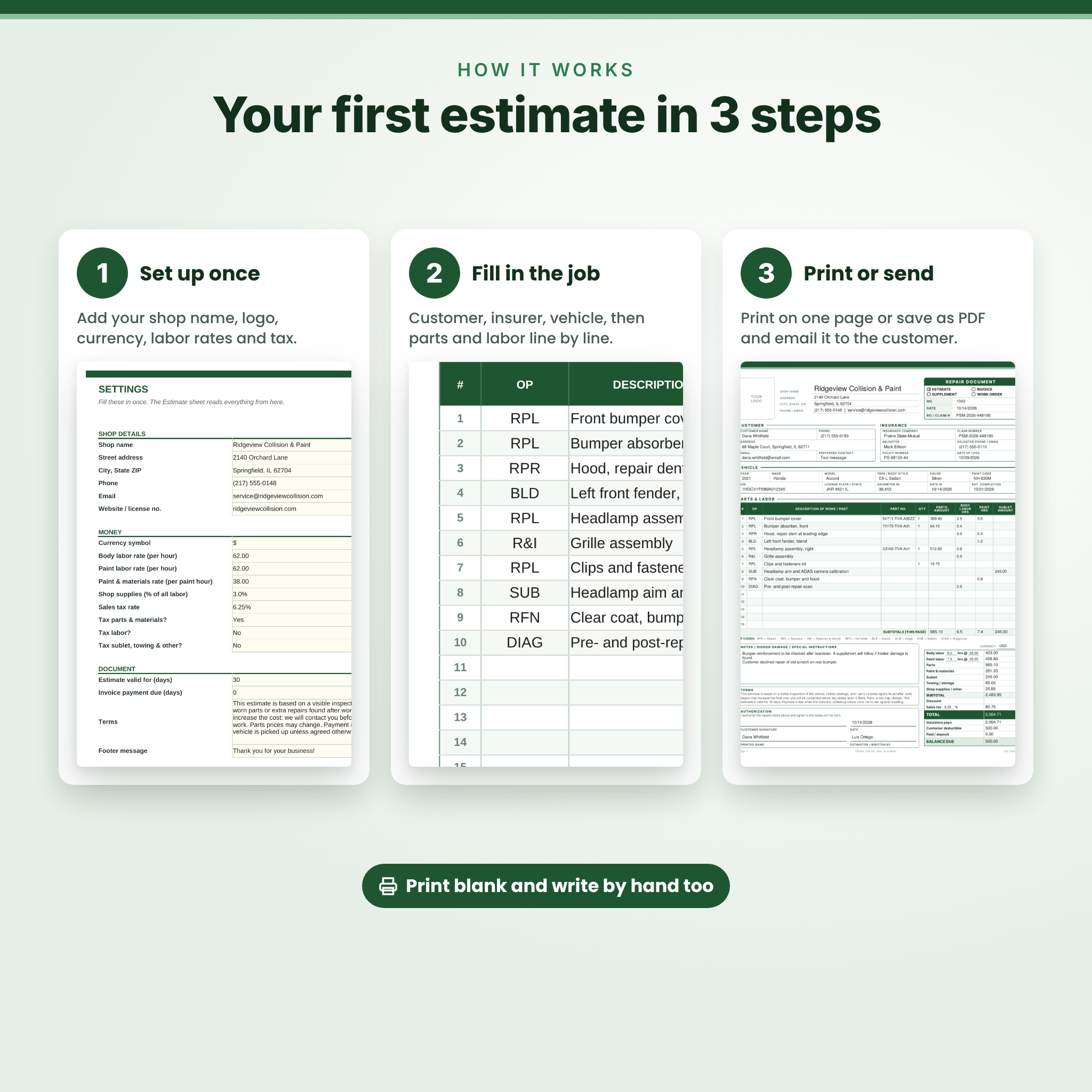
- Set up once. Add your logo and shop details to the Word file, or fill in the Settings tab in Excel.
- Fill in the job. Customer, insurer, vehicle, then parts and labor line by line.
- Print or send. Print it, or save it as a PDF and email it to the customer or adjuster.
Prefer pen and paper? Print the PDF blank and write your estimates by hand at the car.
File formats and software
- Word templates: .docx for Microsoft Word 2010 or newer (Windows or Mac). Also opens in LibreOffice Writer.
- Fillable PDFs: type into them with Adobe Acrobat Reader (free) or another PDF app that supports form fields
- Excel workbook: .xlsx for Microsoft Excel 2010 or newer. Also tested in LibreOffice Calc.
- Paper sizes: US Letter (8.5 x 11 in) and A4
Make it your own
Drop your logo into the Word or Excel file and change the terms to match your warranty and payment rules. Pick your own currency: set the symbol once in Excel and every money heading follows it, or write your currency in the box on the Word and PDF forms. The section titles in Word use a built-in style, so changing one restyles them all.
Real situations where it helps
- A customer drops off a car after a fender bender. You walk around it, mark the damage on page 2 and get a signature before work starts.
- The adjuster asks for a breakdown. You send the estimate with body hours, paint hours and parts on separate lines.
- Teardown shows a cracked bracket. You tick Supplement and list only the added work.
- The job is done. Switch to Invoice, enter the deposit and print the balance due.
- Month end. Open the Job Log and see what’s been collected and what’s still owed.
Digital download
This is an instant digital download. Nothing is mailed to you. After checkout you’ll get a download link for the ZIP and each file on its own. Print as many copies as your business needs.
FAQ
Can I use this auto body estimate template as an invoice?
Yes. Each version switches between Estimate, Invoice, Supplement and Work Order.
Does the Excel version calculate sales tax?
Yes. Enter your rate on the Settings tab and choose which parts of the bill are taxed.
Can I add my own logo?
Yes, in the Word and Excel files. The PDF has a logo space you can stamp or fill by hand.
Will it work outside the US?
Yes. A4 versions are included and you can set any currency.
Can I fill it in on an iPad?
Yes, with a PDF app that supports form fields, such as the free Adobe Acrobat Reader app.
Does it work in Google Docs or Google Sheets?
You can upload the files to Google Drive, but the kit was built and tested for Word, Excel, LibreOffice and PDF readers. Some spacing may shift in Google’s apps.
Can I resell the template?
No. It’s licensed for use by your own business. Please don’t share or resell the files.
Reviews
There are no reviews yet.